Overview
Compare
Accessories
Specs
Protection

Reviews about this item

Review Summary

2018-09-07T04:07:37

Rated 5 out of 5

Great!

The drive has been working perfectly. No dropped connections to my MacPro as I had experience with prior models from Lacie! Worth a try, especially keeping in mind the excellent return policy Adorama has should you not like the drive.

JOHN B.

2018-08-08T16:06:52

Rated 3 out of 5

Slick but not very reliable

Works ok most of the time. But time and again, I would get a message Eject the drive before unplugging it. Wrong. It turned itself off on its own. Why? I have no idea.

DMITRY A.

2018-07-22T12:13:33

Rated 5 out of 5

Great Product, Easy To Set Up, Fast

I've been using LaCie drives for over 20 years as a graphics professional and professor. I just bought this 4 TB LaCie with a faster 7200 RPM to replace my other external LaCie Drive that had been working non-stop connected to my computer for over ten years. Easy to set up, and the 7200 RPM drive you'll notice quite a difference in file management with large graphic files. Great well designed product, great company.

ALLAN W.

2018-05-10T09:03:24

Rated 5 out of 5

Easy to setup as a backup harddruve

Easy setup. This is my second Lacie that I use with my Mac.

FRANCES S.

2018-04-20T06:02:47

Rated 5 out of 5

good product/service

good product/service I'm happy with the transaction.

John D.

2018-01-23T14:31:13

Rated 4 out of 5

Everything seems to be OK

Everything seems to be OK. I am positive at this time that I could have gotten a newer item (Larger and more modern) at a substantially lower price. This item is no longer manufactured and should have been discounted. It also took almost 2 weeks to get it via USPS. 30 miles. They also charged me sales tax from NY when I'm from NJ. (NOT COOL)! Because I have a PO Box I believe that Adorama decided to make me wait. Everything else is OK!

LOUIS M.

2018-01-10T16:45:49

Rated 5 out of 5

Get the job done!

I have two of these, first Gen and 2nd Gen. I choose to drag and drop to do back ups that way I don't leave HDD running all the time, and extending the life of the drive. !st Gen is about 4 years old. Thunderbolt is the ONLY way to go if your running an older MAC with Thunderbolt 2 ports.

Paul D.

2018-01-05T08:42:08

Rated 5 out of 5

Very Fast External Hard Drive

The Lacie d2 USB 3.0 (4 TB) is very fast and quiet. The read speeds can reach up to about 220 MB/sec, and the write speeds reach about 210 MB/sec. These speeds are faster than my older style d2 Quattro (2 TB). The only negative is that the unit often goes into a "sleep" mode which requires a few second delay when first plugging it in, or when accessing it, after a period of non-use. I think this can be corrected with the supplied software, which I haven't studied yet. C. Petroski .

Christopher P.

2017-12-06T09:10:01

Rated 4 out of 5

Fast enough to edit on

I've been filling up LaCie Thunderbolt drives for years now. Each time one gets full, I buy a new one and delegate the previous drive to archive. I back each drive up on a cheap USB drive. What I love about these drives is that they are fast enough to edit on. Whenever I need to pull up an archive project to make some revisions for a client, I just plug in the drive I need and go! I've never had one fail. I recently upgraded to a 4K camera, so have purchased the LaCie 6 Tb Thunderbolt RAID, and it's performing perfectly. I'll continue to buy LaCie drives as long as they keep making them!

Evan D.

2017-10-12T10:05:49

Rated 5 out of 5

Great drive!

Great drive! Awesome speed and easy to use.

PETER V.

2017-10-08T10:18:17

Rated 5 out of 5

Lacie d2 8TB thunderbolt 2

Great drive no issues!

Douglas G.

2017-10-02T00:25:05

Rated 5 out of 5

fantastic external hard drive!

plug and play set up, and completely silent, very nice design and build quality

luc m.

2017-05-02T04:44:13

Rated 5 out of 5

Excellent, Fast Dependable

A perfect Thunderbolt companion to my iMac

RICHARD E.

2017-03-05T11:05:35

Rated 5 out of 5

Does what it's suppose to.

Purchased this as a secondary back up, was easy to partition and set up, after a few weeks working fine and is quite. j

James A.

2017-01-18T14:03:09

Rated 5 out of 5

Perfect Addtion

As a photographer, this is a perfect addition as the repository for this year's photos. There was literally no setup time with my mac.

DAVID T.

2017-01-03T12:59:45

Rated 5 out of 5

LaCie d2 6TB Thunderbolt 2 Professional

Works great as a back up to my RAID drive.

Scott W.

2016-12-13T14:43:38

Rated 4 out of 5

Awesome disk

This disk is just awesome: latest plugs for an Apple computer, large storage and great buffer, quiet too. I actually partitioned it so I can run a separate OS with just editing softwares. Go for it!

GILLES A.

2016-12-13T11:42:53

Rated 5 out of 5

Perfect External Drive for Mac users

Sleek design. Works as advertised. Highly recommend. I have an older Mac so the fact that it is Thunderbolt 2 and not 3, did not impact my decision. No complaints with the transfer speeds.

Kevin B.

2016-12-12T07:31:45

Rated 5 out of 5

Best drive yet

My first Thunderbolt drive, it is fast and quiet. Never had a problem with Lacie drives. Easy to format software included for Mac.

CHARLES G.

2016-12-11T11:39:23

Rated 5 out of 5

LaCie d2 great buy

Happy and satisfied with this purchase .

EDWIN D.

2016-12-10T18:07:17

Rated 5 out of 5

Great speed and storage.

Perfect speed and performance for video editing. Works as promised. Reliable brand I trust.

Justin O.

2016-12-07T11:43:30

Rated 5 out of 5

Very Nice External Drive

Easy to install, very quiet, seems to perform well, haven't run a speed test yet though.

Albert A.

2016-11-09T09:15:34

Rated 5 out of 5

Quality product

Drive is as advertised. High quality construction. Very quiet and fast. Have not benchmarked it, yet, but it seems much faster than my previous drives. Setup was easy. No complaints so far. I've only been using it a couple of weeks so insufficient data to comment on reliability. My only negative is that giant, bright blue light. I really wish that they would have gone with a normal, tiny indicator light. I've covered it with a piece of aluminum tape for now.

MICHAEL T.

2016-09-08T09:33:38

Rated 3 out of 5

Nice build but overpriced.

There's no doubt Lacie has great industrial design, so the drive housing is sturdy, well built and beautiful. However, I bought this drive for the Thunderbolt 2 interface expecting to get twice the speed of my existing Thunderbolt 1 drive. I quickly discovered that's not how it works–you would have to have an SSD to take advantage of the Thunderbolt 2 speeds. The 7200rpm drive that this comes with is nearly exactly the same speed as my Thunderbolt 1, and only nominally faster than USB 3. So if I had to do it over again I would NOT buy this drive–I would buy either a Thunderbolt 1 or USB 3–same performance at half the cost.

STEVE S.

2016-08-16T11:46:32

Rated 5 out of 5

Great Desktop Back Up Unit

Completely as advertised. An easy to setup and go. Fast and the Intego Back Up Assistant works perfectly. Also using it with TimeMachine. Super Good Drive. There are cheaper ones but do you want to trust your precious photographs to an Econo drive. Not Me.

MICHAEL D.

2016-06-30T11:01:56

Rated 5 out of 5

Thunderbolt speed and extra storage

I was reaching the end of my storage space while editing a forty minute TV show, so I needed to extend the 4TB that I already had onboard. I really liked the two thunderbolt ports that allowed me to daisy chain my other Thunderbolt drive, thus leaving my iMac's second port available for importing video. I also appreciated the low price, all in all, I think this was a great purchase.

DSLRCinematographer.com D.

2016-05-16T09:54:22

Rated 5 out of 5

external drives

much easier to partition than western digital products

HENRY H.

Select a plan in the Add Protection section above and purchase with this product by clicking “Add to Cart”.

image-protection

TRUSTED PROTECTION PLANS, EXCEPTIONAL SERVICE.

Invest In Your Gear and Peace Of Mind!

Accidents happen where life happens. Protect your favorite Adorama products and purchase a protection plan to stay covered from accidental damage, mechanical or electrical failure, and more.

Repair or Replacement

Repair or Replacement

If we can’t fix it, we’ll replace it at no additional cost.

Accidental Damage

Accidental Damage

Protect your product from drops, spills, and more.

Peace of Mind

Peace of Mind

Enjoy your gear without fear. We have you covered!

Malfunction Protection

Malfunction Protection

When regular use of your product over time results in mechanical or electrical failure.

Zero Deductible

Zero Deductible

We will never charge you a deductible after the purchase of a plan.

Customer-Focused Support

Customer-Focused Support

Our claims process is simple & easy and our customer service team is happy to help.

Adorama Protect powered by Extend is available for purchase to customers in the United States. Not available for purchase Internationally or in U.S. Territories.

LaCie d2 Specifications

  • Capacity

    4TB

  • Internal Storage Media

    1 x 7200 RPM/64MB cache (or greater) hard disk

  • Interface

    2 x Thunderbolt 2 ports
    1 x USB 3.0 port (UAS and USB 2.0 compatible)

  • Interface Transfer Rate

    Thunderbolt 2: 20 Gb/s
    USB 3.0: 5 Gb/s

  • Performance Benchmark

    Up to 180 MB/s reads
    With LaCie d2 SSD Upgrade: 1150 MB/s reads

  • Thunderbolt 2 Technology

    Bidirectional 20 Gb/s permits a high-resolution display and RAW 4K video playback

  • Power-Saving Mode

    Reduce power consumption by spinning down disks without disrupting daisy chain transfers (short press on front button initiates power-saving mode; long press turns product off completely)

  • Security

    AES 256-bit software encryption
    Kensington lock compatible
    Cable management

  • Cooling

    Fan-free design with all-aluminum unibody enclosure for low vibration and near-silent operation

  • External Hybrid Storage

    Compatible with LaCie d2 SSD Upgrade (sold separately):
    Adds hard disk + SSD versatility in a single-disk enclosure
    Boosts speeds up to 1150 MB/s
    Two independent drives mount - one for hard disk, one for SSD (JBOD)

  • Software

    Intego Backup Assistant for Mac
    LaCie Genie Timeline for PC
    LaCie Private-Public (protect data with AES 256-bit encryption)

  • Power Supply

    100-240V, 50/60Hz; 48W

  • Acoustic

    Typical noise level: 28 dB

  • System Requirements

    Computer with a Thunderbolt 2, USB 3.0, Thunderbolt or USB 2.0 port
    Thunderbolt 2: Mac OS X 10.8.5 or later
    USB 3.0: Windows 7, Windows 8 or Mac OS X 10.6 or later
    Minimum free disk space: 600MB recommended

  • Dimensions

    60 x 217 x 130mm / 2.36 x 8.54 x 5.11"

  • Weight

    3.1lbs / 1.40kg

  • UPC Code

    763649121450

1 Accessories for LaCie d2 4TB Thunderbolt 2 Professional External Hard Drive, 7200 RPM

  • All Accessories (1)
  • Hubs (1)

About LaCie d2

FEATURED REVIEWS

Great!

By JOHN B.

The drive has been working perfectly. No dropped connections to my MacPro as I had experience with prior models from Lacie! Worth a try, especially keeping in mind the excellent return policy Adorama has should you not like the drive.

Great Product, Easy To Set Up, Fast

By ALLAN W.

I've been using LaCie drives for over 20 years as a graphics professional and professor. I just bought this 4 TB LaCie with a faster 7200 RPM to replace my other external LaCie Drive that had been working non-stop connected to my computer for over ten years. Easy to set up, and the 7200 RPM drive you'll notice quite a difference in file management with large graphic files. Great well designed product, great company.

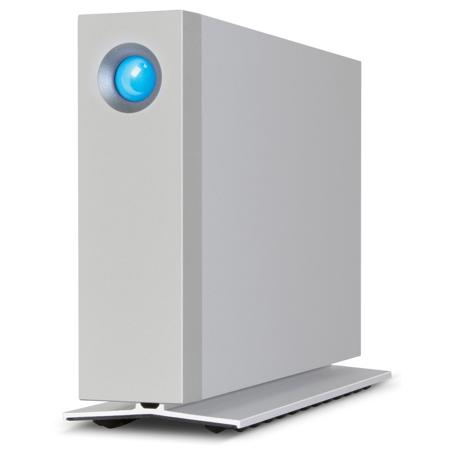
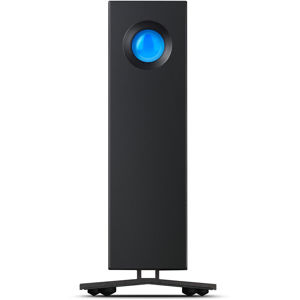
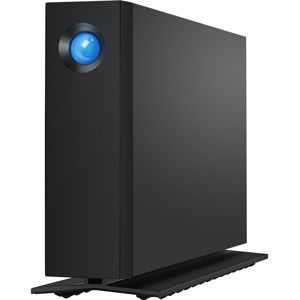
Get the job done faster - on any computer - with the LaCie d2 4TB Thunderbolt 2 Professional External Desktop Hard Drive. Thanks to its innovative, all-aluminum unibody design, you'll notice incredibly low vibration and operating noise. It's even possible to push speeds to up to five times faster by installing the LaCie d2 SSD Upgrade (sold separately). With best-in-class speed, versatility and durability, the new LaCie d2 sets a new standard for desktop storage.

Versatility for Professional Environments
The new LaCie d2 combines Thunderbolt 2 and USB 3.0 interfaces to deliver the best possible speeds when connected to any late-model PC or Mac computer. Dual Thunderbolt 2 ports let you daisy chain up to six devices to a single Thunderbolt port on a computer. This means that you could connect up to five LaCie d2 plus a 4K display to an iMac computer's Thunderbolt 2 port, bringing remarkable scalability and convenience to 4K or other workflows. And since USB 3.0 and Thunderbolt 2 are backward compatible, you always get the absolute fastest speeds your computer allows.

No-Compromise Speed for Leaner Workflows
With this speed, it's possible to store and browse a massive RAW Adobe Lightroom library with zero lag. High speeds plus industry-best capacity makes the LaCie d2 the perfect solution for storing large files and archiving projects.

Innovative Design, Breakthrough Durability
When recreating the industrial design of the d2, LaCie focused relentlessly on reliability and usability for professionals.

Unibody Enclosure
The casing is forged from a single sheet of aluminum, providing uncommon rigidity for long-term durability and premium quality.

Power-Saving Mode
For Thunderbolt connections, save energy by pressing the power button to spin down disks without interrupting daisy chain transfers. For USB connections, disk spins down automatically when the host operating system goes to sleep.

Fan-Free Cooling
The seamless, all-aluminum unibody enclosure draws heat away from the hard disk. The integrated base extends the enclosure's surface area, providing even more space for heat dissipation. The results are a long lifespan for components and ultra-quiet operation.

Integrated Cable Management
Prevent accidentally disconnected interface or power cables without compromising the look and design of the product.

Anti-Vibration Features
A cushioning base and vibration-absorbing hard disk mounts combine to dramatically reduce vibration.

Packed with Value for Pros
The LaCie d2 includes everything professionals need for secure backup: a backup software suite and compatibility with Time Machine and Windows Backup. It also includes LaCie Private-Public software, which lets you password-protect volumes with AES 256-bit encryption.

Upgradable to External Hybrid Storage
Install the optional LaCie d2 SSD Upgrade (sold separately) to multiply speeds by a factor of five, with zero compromise in capacity. At up to 1150 MB/s, the LaCie d2 with the d2 SSD Upgrade delivers speeds that exceed the performance of even the internal SSD on your late-model PC or Mac computer - in a single-disk enclosure. Simply remove the rear panel on the LaCie d2 to install the upgrade and instantly you have an additional 128 GB of SSD storage. Two separate drives mount on the computer: one for the SSD and one for the hard disk. Use the SSD for bandwidth-intensive tasks such as fast file transfers, audio mixing, video editing or OS booting and use the hard disk for file archiving. No other solution offers this level of performance and capacity in such a compact footprint.

What's in the box:

  • LaCie d2 4TB Thunderbolt 2 Professional External Desktop Hard Drive
  • Thunderbolt Cable
  • USB 3.0 Cable (USB 2.0 Compatible)
  • External Power Supply
  • Quick Install Guide
  • LaCie 3 Year Limited Warranty