About Matrox MXO2
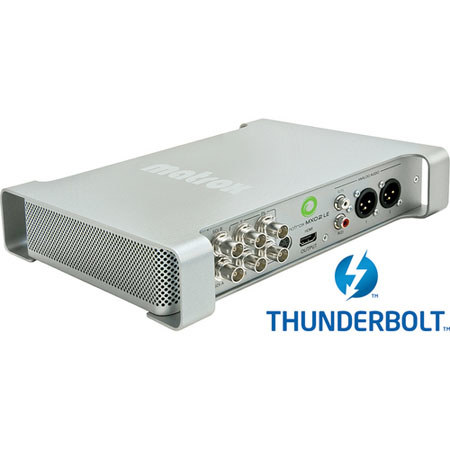
The MXO2 LE with MAX (Thunderbolt) from Matrox is a device designed to provide all the features of an I/O card in a sturdy, portable breakout box. It's got connections for both professional audio and video, including an input and output each for HD HDMI, component video, composite video and Y/C (S-Video); for audio, there's dual XLR ins and outs as well as stereo analog audio I/O. In addition, you've got an HD/SD-SDI input and two such outputs. Your options for high-quality monitoring couldn't be more versatile.
And of course, this MXO2 LE box includes a Thunderbolt adapter, which supplies the blazing-fast connection to a computer for a data transfer rate of up to 10 Gb/s. Designed for Mac laptop and desktop systems with a Thunderbolt port, this model features Matrox MAX, a technology that implements faster than real-time H.264 encoding for resolutions ranging from iPod to HD. It uses a dedicated hardware processor to accelerate the creation of H.264 files for Blu-ray, the web and mobile devices.
By using specialized hardware acceleration, jobs are finished more quickly and system resources are freed up for other tasks. This technology allows direct export to higher-quality H.264 Blu-ray compliant files from Compressor. Along with broadcast-quality audio & HD video input and output, the MXO2 LE provides calibration controls that include blue-only. You also benefit from a wide variety of HD and SD workflows with Adobe Premiere Pro and Final Cut Pro thanks to Matrox MXO2 LE's 10-bit hardware up/down/cross-conversion scaling engine and support for a wide variety of file-based formats and industry-standard codecs.
Matrox MXO2 Features
Portable: Matrox MXO2 LE is a portable I/O device for the Mac. It fits into a travel bag and connects directly to standard field batteries or the included AC power adapter
HD and SD Inputs & Outputs: Matrox MXO2 LE features professional inputs and outputs. RS-422 machine control is provided for frame-accurate capture and print-to tape with Final Cut Pro and Adobe Premiere Pro. A 4-pin XLR power connection is provided for AC or field battery operation
Genlock: Matrox MXO2 LE provides SD analog black burst (bi-level) or HD tri-level sync genlock. It can genlock to any type of video input or to house sync
Capture to a Variety of Codecs: Matrox MXO2 LE lets you capture to HD and SD codecs supported by Final Cut Pro and Adobe Premiere Pro. On a Quad-Core Mac Pro, you can capture HD to ProRes 422 HQ, DVCPRO HD, DV, DVCPRO and DVCPRO50
File-Based Formats: Matrox MXO2 LE lets you work with file-based formats such as XDCAM, XDCAM HD, XDCAM EX, P2 and P2HD. You can play out these formats directly from Adobe Premiere Pro or Final Cut Pro
RED Workflow: RED users can benefit from Matrox MXO2 LE to capture, monitor and play back on set. Back in the post suite, they can use Matrox MXO2 LE to work with 1K and 2K RED timelines and output to SD, 720, or 1080 via MXO2 LE's real-time 10-bit hardware scaling feature
HD-SDI Closed-Captioning Support: You will no longer need to spend time and money recreating HD captioning data that is typically lost when editing projects in Final Cut Pro. Matrox MXO2 LE offers a unique workflow to capture, play back and preserve closed-captioning data while editing
HD & SD Video Monitoring: Matrox MXO2 LE turns your HDMI monitor into a true-color video display you can trust, even for color grading
HDMI Monitoring with 10-bit 4:2:2 Color Precision: Matrox MXO2 LE lets you adjust and control your HDMI monitor exactly like you would a broadcast HD/SD monitor. Controls for hue, chroma, contrast, brightness and blue-only are provided
Pixel-to-Pixel Mapping on HDMI Displays: Matrox MXO2 LE provides 1:1 pixel mapping on HDMI monitors that support this feature
Real-Time Conversion, Capture & Output: Matrox MXO2 LE lets you deliver in any format your clients demand. The 10-bit hardware scaling provides high-quality mastering
Hardware Acceleration: Matrox MXO2 LE offers hardware acceleration of Final Cut Pro Dynamic RT segments, HDV and DVCPRO HD
HD to SD Downscaling: Matrox MXO2 LE provides real-time HD to SD downscaling with proper conversion of the HD color space to the SD color space and proper aspect ratio conversion to anamorphic, letterbox and center cut. You can monitor or record an SD master of your HD project in real time
SD to HD Upscaling: Matrox MXO2 LE provides real-time SD to HD upscaling with proper conversion of the SD color space to the HD color space. MXO2 LE will "pillarbox" 4:3 footage and scale 16:9 SD footage to full screen
Cross-Conversion: Matrox MXO2 LE offers real-time cross-conversion from 720 to 1080 and 1080 to 720 lines. Real-time frame rate conversion is also supported with 2:3:2:3 and 2:3:3:2 cadences
H.264 & .MOV Playback Application: The Matrox Vetura standalone application conveniently plays back your H.264 and .mov files