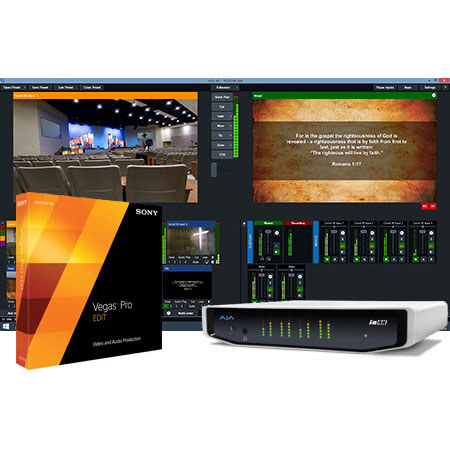
vMix Thunder 4K Live Production Software Kit, Includes Sony Vegas Pro Edit 13 Post, and AJA Io 4K Thunderbolt I/O Device
SKU: VMSCSITHNDR
This item is no longer available.
Share:
Overview
Compare
Specs
Protection
About vMix Thunder
The vMix Thunder 4K Live Production Software Kit includes Sony Vegas Pro Edit 13 Post, AJA Io 4K Thunderbolt I/O Device, XLR 12V Power for Battery/AC Use.
Vegas Pro 13 Edit Video and audio production
Vegas Pro 13 Edit delivers pure Vegas Pro core technology in a cost-effective package. New features include advanced archival tools, new audio metering options and full synchronization with the Vegas Pro Connect mobile iPad companion app. Vegas Pro 13 Edit offers more formats, more workflows and more creative control than ever before.
Innovative tools
Edit SD, HD, 2K and 4K material with drag-and-drop functionality or traditional 3-point and 4-point editing modes. The Vegas Pro 13 interface provides an impressive array of innovative tools and thoughtful touches with a fully customizable workspace for accomplishing a wide range of production tasks. Nest Vegas Pro projects within the timeline, customize and save keyboard commands and use application scripting to automate repetitive tasks.
Vegas Pro Connect Vegas Pro 13 collaboration enhancement app for iPad
To meet the collaboration challenge on video productions, Vegas Pro Connect replaces tedious written spreadsheets and notes with efficient online and offline review workflows. The app provides a comprehensive review system within a gesture-driven control surface and represents a genuine breakthrough in project collaboration and control. Easy to set up and use, Vegas Pro Connect provides the kind of collaborative edge that will make your clients feel like they have well-channeled editorial control as well as a more direct and meaningful involvement in the creative process.
Online mode
Online collaboration mode enables reviewers and editors to jointly control and comment on projects-simultaneously and in real time-in Vegas Pro 13. Multiple reviewers, each with their own iPad, can seek, start, stop and pause playback. They can also drop frame-accurate markers and notes directly onto the Vegas Pro timeline. Editors can use this direct feedback to shape and finish projects.
Offline mode
Offline collaboration mode enables reviewers to download project proxies onto their iPads and then review them anywhere and anytime, even when they don't have access to the full Vegas Pro project. Just as with online collaboration, reviewers use frame-accurate markers and notes to document their feedback. Later, reviewers sync the proxies on their iPads with Vegas Pro 13 and transfer feedback directly to the master project for direct editor access.
Gesture controls
Perfect for the editing suite, the Vegas Pro Connect gesture-driven control surface does away with small touch targets, allowing editors to keep their eyes on the prize and stay focused in the creative zone at all times.
Superior editing and collaboration
Vegas Pro is known for being a rapid editing environment. The latest version expands on this with the introduction of a multi-tool paradigm which organizes frequently used tools in a convenient pop-up menu directly below the timeline to provide fast access for a more efficient editing workflow.
Loudness meters
Open the new Loudness Meters and tweak your mixes to maximize audio dynamic range while you maintain consistent -23 LUFS Integrated levels and create EBU R-128/CALM Act compliant renders that will pass unattenuated through every stage of any contemporary broadcaster's signal path. The result: perfection, with your audio delivered to viewers in a state as dynamic and pristine as when it was rendered-exactly as you intended-regardless of playback system.
Project Archiving
Organize and archive your completed production along with its associated media with the flexible Archive feature. Archive all media associated with a project or only the media used on the timeline, including nested projects. Automatically clear the Project Media window of unused material just prior to archiving in order to maximize storage space. Smart renaming prepares your projects for export to other applications.
Surround sound mixing and encoding
Vegas Pro 13 features extensive tools for the creation of 5.1 surround mixes. Apply keyframes to the surround panning of tracks and buses to mix the most demanding DVD and Blu-ray Disc soundtracks, while never leaving the Vegas Pro environment. Apply 5.1-channel audio effects to the master bus for enhanced control over surround mixes. Export projects as discrete tracks for post encoding or encode directly to Dolby Digital surround with the Dolby Digital-certified AC-3 Pro encoder. In addition, the DVD Architect Pro software imports AC-3 files for multichannel 5.1 DVD and Blu-ray Disc creation.
All in the family
All of the products in the Vegas Pro family make it easy to import and edit movies, images and music so you can jump right in and start creating your next video or audio masterpiece. Whether you're a beginner, an experienced filmmaker or a professional broadcast producer, there is a Vegas Pro solution to meet your needs.
Io 4K 4K and HD I/O for Thunderbolt 2
Professional connectivity
Io 4K has the connectivity required for today's variety of productions. With full-sized BNC connectors for 4K input and output as well as HDMI in and out, Io 4K can handle professional 4 x SDI 4K signals as well as capturing and outputting 4K over HDMI for use with more affordable 4K equipment.
Futureproof
With more affordable high-resolution cameras available, many productions are opting to shoot at a higher resolution even if final delivery is still in SD or HD. This offers the flexibility to re-master at higher resolutions in the future. Io 4K can support your current SD and HD workflows and provides a path to move to higher resolution productions and also higher frame rate support whenever the need arises. The realtime down converter also means you can work at higher resolutions and easily create lower resolution deliverables without the need to recapture or re-edit. All at a size that's small enough to easily take on-set or in the field.
Monitor 4K in HD
When working at 4K resolutions, Io 4K outputs a high-quality HD-SDI down-converted signal on a dedicated BNC connector. This HD signal can be used to output 4K projects directly to HD recorders for broadcast and for easy viewing of 4K images on HD monitors during post-production.
Powerful
Thunderbolt 2 technology provides an incredible amount of bandwidth on a single Thunderbolt cable. Io 4K capitalizes on this increased capacity to allow up to 4K signals at frame rates up to 50p/60p to be captured and output. With dual Thunderbolt 2 ports, Io 4K can daisy chain additional devices together such as high-resolution displays and high-capacity storage for a complete, portable solution that's powerful enough to meet the demands of professional production.
Integrated Audio
Embedded 16-channel SDI and 8-channel HDMI audio are supported as well as analog audio outputs via a standard DB-25 connection. Stereo monitoring is also possible with 2 x RCA outputs and a front panel mini-TRS headphone jack.
Sync up
Io 4K can be locked to an external reference for integration into larger productions or feed LTC in and out to ensure footage captured with Io 4K has the proper timecode.
Machine control
An RS-422 port allows control of tape decks for frame-accurate captures and layoffs.
Extensive software support
AJA hardware is supported by an extensive list of professional software for editing, visual effects, graphics and more allowing the same AJA device to be used by many different applications on the same system. In addition, AJA provides several free applications that enable you to utilize the power of your AJA hardware even without having to run a particular software package. This allows you to create unique workflows without tying up valuable resources unnecessarily.