

This item is no longer available.
ViewSync Wireless Presentation Dongle
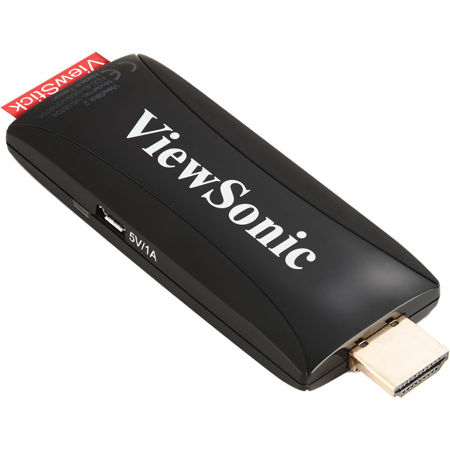
The ViewSonic ViewSync ViewStick 2 is a powerful and compact wireless dongle with an HDMI interface. Working with the AutoProject app, the ViewStick 2 enables 1080p contents from mobile devices, PCs and laptops to be wirelessly streamed to any projector or display. The broadcasting contents include multimedia, documents, browsers and files on cloud storages. Built-in storage, it can play contents directly without computers. Compatible with diverse devices and WPA2 security, the ViewStick 2 is the perfect solution for wireless presentations or personal sharing.
Stream 1080p Content with No Wires, No Cables
Sophisticated Wireless Projection - Enjoy a cable-free projection without swapping or moving cables.
Content Casting from Laptops and Mobile Devices
Up to 8 connected content sources, such as smartphones, tablets and notebook, can be shown one after another (1 is displayed and the other 7 are on standby) on a projection via 2.4GHz to create interaction with multiple attendees or presenters. Devices with Windows/Mac/iOS/Android platforms are supported.
Seamless Installation with Display Devices
Featuring an integrated HDMI connector, as well as a small form factor, the ViewStick 2 seamlessly integrates into almost any display device with an HDMI input. This includes televisions, large format displays, digital signage and projectors. The included HDMI extension cable is handy for connection into the HDMI port to avoid port connection interference.
PC-less Multimedia Play
Jump start a photo directly from the ViewStick 2 without waiting for your PC to boot up. A practical, user-centric design enables your projector to broadcast video, music and photos instantly via network control system.
Fits into PortAll: Discreet Wireless Streaming
The ViewStick 2 fits into LightStream PJD7 Series /Pro7827HD, Pro8 Series or Laser projectors' Port. All-a hidden compartment with an integrated and secure MHL/HDMI port that lets you discreetly stream multimedia content.
Diverse Content Broadcasting
For Windows and Mac OS Devices: With the ViewSonic software AutoProject, users can now share any displayed contents which include multimedia content or run popular document file formats wirelessly from their notebooks or PCs. Users can access cloud storage for online photo or documents viewing anywhere. The AutoProject software edition is available on ViewSonic website.
For Android and iOS Devices: With the ViewSonic mobile app AutoProject, users can now share multimedia content or run popular document file formats wirelessly from their smartphones or tablets. Without needlessly transporting PCs or notebooks, users can access cloud storage for online photo or documents viewing anywhere. The AutoProject app edition is on both Google Play and Apple App Store.
Note
1. For Android devices: ViewStick 2 can broadcast any displayed contents but audio.
2. For iOS devices: ViewStick 2 can broadcast photos/documents/browsers/cloud services via the AutoProject app and video via iOS devices screen mirroring.
A Convenient Interaction Tool
Allows real-time notes and controls from different users.
Annotations on Display (Under Mirror Mode)
The bundled software allows real-time annotations on content displayed from Windows or Mac laptops. These changes can be saved and updated instantly, allowing the presenter and laptop-connected audience simple, yet effective interaction. In addition, the included USB extension cable can be also linked with a Touch Monitor for interaction.
Remote Control (Under Mirror Mode)
The ViewStick 2 provides a USB back control function, allowing users to wirelessly connect and control a mouse or keyboard remotely. When a presenter holds a meeting/class, an assistant can help control the mouse remotely at the same time through the included USB extension cable.
Extended Screen with Auto Resolution Adjustment
Keeps private and public content on display with just one click. A dual screen provides the presenter flexibility to control a meeting/class. Discussion on the projected content while editing other content privately, the ViewStick 2 auto-adjusts the display resolution depending on the source, without setup steps.
Easy Remote Management
Equipped with a complete built-in network control system that an administrator can sit in front of PC and maintain the setting remotely through LAN IP. It applies to internet or intranet networking environment.