
Orders placed during Passover Holiday (Wed 4/1 after 4PM ET – Thurs 4/9) will ship Fri 4/10. View our holiday shipping schedule.

Overview
Compare
Specs
Protection

Reviews about this item

Review Summary

2021-06-29T21:17:35

Rated 4 out of 5

Long term review from dual machine user.

I have used this monitor for over a year. I am running both a Windows and MacOS simultaneously with this monitor. My Windows machine is connected via DisplayPort and I have a M1 MacBook Pro connected via USB-C Thunderbolt. The built in KVM switch works excellent. I am sharing a Spyder 5, a webcam, a Wacom Tablet, and a pair of external speakers with both computers via the KVM / USB ports on the monitor. When I switch inputs on the monitor (USB-C or Displayport) the USB ports on the monitor are automatically routed to whichever device is connected to the corresponding input. This is a must have feature for anyone running dual machines from a single monitor and it has thus far worked excellent. This monitor also provides adequate power via the usb-c port to charge my M1 MacBook Pro while plugged into the monitor. The quality of the display is excellent. Backlight bleed, while not completely absent, is adequately controlled. I returned a much more expensive monitor before purchasing this one because of backlight bleeding and green tenting on the panel. Colors are vibrant and contrast is excellent. While the manual could be better, I think that it is adequate for the targeted audience. This is a "budget PROFESSIONAL" monitor that will primarily be purchased by creative professionals or advanced hobbies. I believe that the majority of people in either of these groups will be familiar with the terms used in the manual and will not have much trouble setting it up. I have only found 2 negatives with this monitor. First is cable management. It is not possible to hide the cables between the monitor and the computer because of the design of the stand. There is a vertical split down the center of the stand which your cables must route through. Since the split extends to the base of the stand the cables will always be visible. A solid stand with hole near the top would have provided a much better esthetic once the cables are routes. My second complaint, and this is a rather recent one, is that the ViewSonic software used to hardware calibrate the monitor (Colorbration +) is not yet compatible with M1 Macs. To calibrate the monitor on a M1 Mac you must use the software that came with your colorimeter. This means that you cannot take advantage of the hardware calibration function on M1 Macs. This will probably be fixed sometime in the near future be as of the time this review was written only software calibrations can be performed on M1 Macs. Whether your using a Mac or Windows Machine this monitor is a great value and I'm confident in saying that it will meet the needs of most creative professionals.

ERRIC W.

2020-12-14T14:06:22

Rated 3 out of 5

Hard to set up

The monitor looks great, but the documentation isn't for the average or above average person. The manual gives very little explanation of the dozens of options. It assumes that you know what DisplayPort 1.1 is, and whether turning it on or off makes it backwards compatible or the opposite. The part of the manual describing the USB connections talks about upstream and downstream in similarly confusing ways. I've resorted to trial and error, and am still having problems. ViewSonic is offering to exchange this unit, and I will do that, but I have a feeling I'm dealing with compatibility issues of some kind.

JERRY S.

ViewSonic VP2785-4K Specifications

Display

Display

Jump to...
  • Screen Size

    27" (68.5cm)

  • Viewable Area

    27" (68.5cm)

  • Panel Type

    IPS

  • Display Resolution

    3840 x 2160

  • Resolution Type

    UHD (Ultra HD)

  • Static Contrast Ratio

    1,000:1

  • Dynamic Contrast Ratio

    20M:1

  • Light Source

    LED

  • Brightness

    350 cd/sq. m

  • Colors

    1.07B

  • Color Space Support

    10 bit (8 bit + A-FRC)

  • Aspect Ratio

    16:9

  • Response Time (Typical GTG)

    5ms

  • Response Time (MPRT)

    5ms

  • Viewing Angles

    178 Degree horizontal, 178 Degree vertical

  • Backlight Life (Hours)

    30000

  • Curvature

    Flat

  • Refresh Rate

    60Hz

  • Blue Light Filter

    Yes

  • Flicker-Free

    Yes

  • Color Gamut

    Adobe RGB: 109% size / 99% coverage (Typ)
    DCI-P3: 108% size / 95% coverage (Typ)
    EBU: 145% size / 100% coverage (Typ)
    REC709: 147% size / 100% coverage (Typ)
    SMPTE-C: 166% size / 100% coverage (Typ)
    NTSC: 104% size (Typ)
    sRGB: 147% size / 100% coverage (Typ)

  • Pixel Size (H x V)

    0.155 x 0.155mm

  • Surface Treatment

    Anti-Glare, Hard Coating (3H)

Compatibility

Jump to...
  • PC Resolution (max)

    3840 x 2160

  • Mac Resolution (max)

    3840 x 2160

  • PC Operating System

    Windows 7/8/8.1/10/11 certified
    macOS tested

  • Mac Resolution (min)

    3840 x 2160

Connector

Jump to...
  • USB 3.2 Type A Down Stream

    3x

  • USB 3.2 Type B Up Stream

    1x

  • USB 3.2 Type C Up Stream

    1x (DisplayPort Alt mode)

  • 3.5mm Audio Out

    1x

  • HDMI 2.0 (with HDCP 2.2)

    2x

  • DisplayPort

    1x

  • Mini DisplayPort

    1x

  • Power in

    DC Socket (Center Positive)

  • Eco Mode (Conserve)

    45W

  • Eco Mode (optimized)

    55W

  • Consumption (typical)

    67W

  • Consumption (max)

    70W

  • Voltage

    AC 100-240V

  • Stand-by

    0.5W

  • Power Supply

    External Power Adapter

Additional Hardware

Jump to...
  • Kensington Lock Slot

    1

  • Cable Organization

    Yes

Controls

Jump to...
  • Physical Controls

    Key 1, Key 2, Key 3, Key 4, Key 5, Key 6(power)

  • On Screen Display

    Input Select, Audio Adjust, ViewMode, Color Adjust, Manual Image Adjust, Setup Menu

Operating Conditions

Jump to...
  • Temperature

    32-104 Degree F (0 - 40 Degree C)

  • Humidity (non-condensing)

    20-90%

Wall Mount

Jump to...
  • VESA Compatible

    3.9 x 3.9" (100 x 100mm)

Input Signal

Jump to...
  • Frequency Horizontal

    15 - 204KHz

  • Frequency Vertical

    24 - 120Hz

Video Input

Jump to...
  • Digital Sync

    TMDS - HDMI (v2.0), PCI-E - DisplayPort (v1.4), PCI-E - mini DisplayPort (v1.4), Micro-Packet - Type C

Ergonomics

Jump to...
  • Height Adjust

    5.1" (130mm)

  • Swivel

    120 Degree

  • Tilt (Forward/Back)

    -5 Degree / 21 Degree

  • Pivot (Right/Left)

    90 Degree / 90 Degree

General

Jump to...
  • Regulations

    cTUVus, FCC-B, ICES003, CEC, MX-CoC, Mexico Energy, CE, CE EMC, CB, RoHS, ErP, REACH, WEEE, EAC, UkrSEPRO, UKCA, RCM, VCCI, PSE, BIS

  • Dimensions (W x H x D)

    24.1 x 16.35-21.47 x 8.5" (612 x 415.51-545.51 x 215mm)
    Without Stand: 24.1 x 14.3 x 2.2" (612 x 363 x 57mm)

  • Weight

    21.1 lbs (9.6kg)
    Without Stand: 8.5 lbs (3.8kg)

About ViewSonic VP2785-4K

Precision at Its Peak

4K UHD clarity & Adobe RGB color
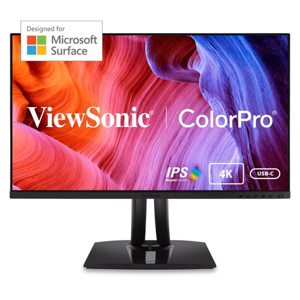
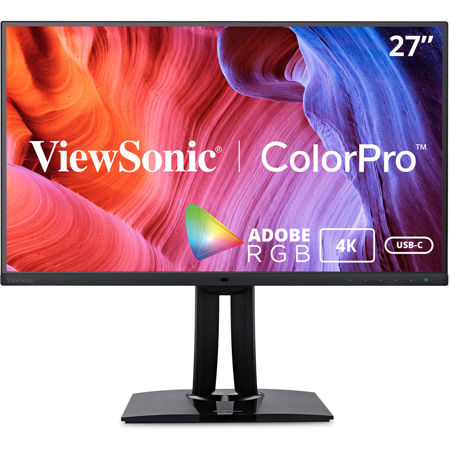
Covering 100% of the Adobe RGB color space and 95% DCI-P3, the ViewSonic VP2785-4K Ultra HD monitor meets the high color standards of photographers, graphic designers, video editors, print departments, and other design professionals. With a sleek and modern design, the VP2785-4K features future-proof DisplayPort technology, as well as HDMI and USB 3.1 type C ports. To ensure precise, uniform color, each of our monitors is factory calibrated to deliver an amazing Delta E<2 value for superior color accuracy. An integrated color uniformity function ensures consistent chromaticity across the screen, while a 14-bit 3D look-up table generates a stunningly smooth palette of 4.39 trillion colors. What's more, productivity-boosting features include an advanced ergonomic design, a built-in ambient light and presence sensor, and a KVM switch. Hardware calibration is also available with the optional ViewSonic colorbration Kit, which allows you to quickly and easily calibrate the monitor for photography, graphic design, content creation, and other color-critical applications.

Precision like Never Before

Extensive Color Palette
By achieving 100% Adobe RGB and 95% DCI-P3 color coverage, VP2785-4K provides the flexibility to work with a wider range of colors than sRGB. This extra color allows you to take advantage of using richer hues when preparing photos for printing.

Colorbration+ Long-term Color Consistency
ViewSonic's Colorbration+ offers hardware calibration that aligns communication between the graphics card and the monitor to ensure long-term consistency and accurate colors on ViewSonic ColorPro monitors.

Supported calibrators:
• ccDISPLAY PRO/ X-Rite i1 Display Pro
• ccSTUDIO/ i1 Studio/ X-Rite i1 Studio
• X-Rite i1 Pro 2
• Datacolor Spyder X Series
• Datacolor Spyder 5 (Windows only)

Flawless Color Reproduction
With Delta E<2 color accuracy, VP2785-4K delivers stunning color reproduction that ensures color in your photos are true-to-life and nearly indistinguishable from the color seen by the naked eye.

Balanced Uniformity
Viewing ViewSonic's uniformity correction balances luminance performance on VP2785-4K with calculated precision, improving delta luminance variance to <5% for more consistent brightness from edge to edge.

Vivid and Consistent Image Quality

4K Ultra High Pixel Density
With a 27" 4K UHD (3840 x 2160) resolution panel, pixel density on VP2785-4K reaches an impressively high 163 pixels per inch (PPI), including almost four times more on-screen information than Full HD and displaying images in magnificent 4K detail.

Cutting-edge ambient light sensor Technology
The advanced ambient sensor on VP2785-4K allows the monitor to reach its comfortable brightness output level to protect your eye.

Vibrant Video Detail
Viewing HDR10 High Dynamic Range content on VP2785-4K brings out the maximum possible detail in both the brighter and darker parts of the image for richer color and a better overall viewing experience.

Vibrant Color from Any Angle with SuperClear IPS Panel Technology
Enjoy accurate and vivid colors with consistent levels of brightness on VP2785-4K from any vantage point. SuperClear IPS panel technology delivers best-in-class image quality, whether you are looking at VP2785-4K's screen from above, below, front, or the side.

User Friendly Experience

Seamless Workflow Management
Industry-leading Keyboard, Video, Mouse (KVM) Switch technology with USB 3.1 Type-C allows user to control peripherals being used alongside VP2785-4K from a single keyboard and mouse. USB 3.1 Type-C provides Windows and Mac OS system users with user-friendly management of power charging, large-quantity data transmission, and video display.

Streamlined Editing
Picture-by-picture (PBP) in combination with a dual color engine offers a more productive approach to digital design. VP2785-4K's PBP functionality allows photographers and designers to simultaneously view and edit images while using separate color settings, virtually combining the work of two monitors into one.

Simplified Energy Efficiency with Auto Eco-control
VP2785-4K's built-in ambient light sensor and presence sensor automatically adjust the monitor's brightness and operating status to the optimal eco setting by detecting changes in ambient lighting and human movement for a more simplified energy efficiency mode.

Comfort & Flexibility
VP2785-4K provides a full range of swivel, pivot, tilt, and height adjustments that allow you to find the most comfortable monitor positioning for you, while Auto Pivot allows photos to automatically adjust to the screen's orientation when pivoted.

Versatile Connectivity with HDCP2.2 Decryption
HDMI, USB 3.1, DisplayPort, and Mini DP inputs offer more flexibility for connecting VP2785-4K with other devices. In addition, VP2785-4K also comes with future-proofed HDCP2.2 (High-Bandwidth Digital Content Protection) content protection to prevent digital image and audio resources from being infringed upon or copied and ensuring compatibility with future 4K content.

Flawless Color Out of the Box
Every unit is pre-calibrated at the factory and comes with its own color calibration report. Each report gives you a reading of your panel's Adobe RGB, DCI-P3, sRGB, EBU, SMPTE-C, REC709, and uniformity, giving you 10 additional item readings than a typical color report. In addition, time spent fine-tuning VP series monitors before they are ready to be used is four times more than competing brands, bringing our users the highest quality color calibration possible.
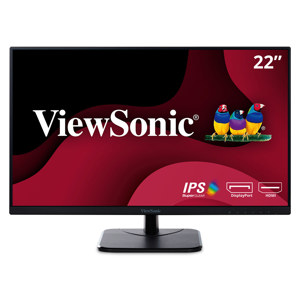
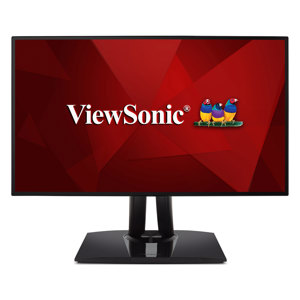
ViewSonic VP2785-4K Features

  • 4K Ultra HD resolution
  • Ambient light sensor
  • KVM Switch technology with USB Type-C
  • Ergonomic stand with auto pivot
  • Hardware color calibration

Key Features

  • 4K Ultra HD resolution
  • Ambient light sensor
  • KVM Switch technology with USB Type-C
  • Ergonomic stand with auto pivot
  • Hardware color calibration

What's in the box:

  • ViewSonic VP2785-4K 27" 16:9 4K UHD USB-C IPS LED HDR Monitor
  • 3-pin Mickey Mouse Plug (IEC C5)
  • Male-Male v1.2 Mini DisplayPort to DisplayPort Cable
  • Male-Male v3.2 USB A/B Cable
  • Male-Male USB Type-C Cable
  • AC/DC Adapter
  • Quick Start Guide
  • ViewSonic 3 Year Limited Warranty