

This item is no longer available.
Review Summary
2020-06-07T21:51:48
Practically new with 80% of the sticker price! Completely worth buying refurbished if you are in the market. Only thing I don't get is for such an expensive product and that gets double boxed, that the outer box still has the identifier that this is a Wacom Cintiq.
TIGER C.
2019-06-03T19:14:59
Really nice tablet to work on. The screen isn't as bright as my Samsung U28E that it's paired with but it's not too bad. It does pick up glare so you will want to arrange your ambient lighting for best viewing. The stylus works great, just like an intuos pro, and being able to write directly on screen is really helpful. No lag with "normal" strokes or general work and I don't notice any parallax. Biggest complaint would be that the Contrast/Brightness setting screen comes up really slow but I don't have to change that very often.
Scott K.
2019-03-26T11:25:12
I've had the Cintiq Pro 32 and the Ergo Stand for about a month now and I love it. The screen real estate is incredible and found that it was more than enough. I am still getting used to the Express Key controller but find that I use my keyboard more than anything. The applications I use mostly while on the Cintiq are Photoshop, Clip Studio Pro and Rebelle Paint 3. All feel great. The Etched glass mimics the feeling of paper so its not completely smooth but has a nice subtle grit that I enjoy when illustrating. As a regular monitor when I dont need to draw, its also beautiful. The colors are nice and vivid and even tried hooking up my xbox one to it and looks incredible.
Ramiro G.
2019-01-31T05:22:56
I love the Wacom Cintiq Pro 32. I have ample room to do my artwork and have all of my tools visible simultaneously. I especially love the touch screen and the pen.
Serena K.
2018-10-01T22:25:44
This is best experience I ever had. Top notch quality ! I recommend it to everyone.
President
Accidents happen where life happens. Protect your favorite Adorama products and purchase a protection plan to stay covered from accidental damage, mechanical or electrical failure, and more.
If we can’t fix it, we’ll replace it at no additional cost.
Protect your product from drops, spills, and more.
Enjoy your gear without fear. We have you covered!
When regular use of your product over time results in mechanical or electrical failure.
We will never charge you a deductible after the purchase of a plan.
Our claims process is simple & easy and our customer service team is happy to help.
Adorama Protect powered by Extend is available for purchase to customers in the United States. Not available for purchase Internationally or in U.S. Territories.
Browse our FAQ
23.59" (59.92cm) (Measured Diagonally)
IPS UHD high brightness panel
1.07 billion colors (10 bits color) (maximum)
16:9
3840 x 2160
Horizontal: 176 deg. (88 deg. /88 deg. )
Vertical: 176 deg. (88 deg. /88 deg. )
1000:1
350 cd/sq. m
14 ms
20.55 x 11.57" (52.20 x 29.39cm)
99% Adobe RGB
6500 deg. K white point default
USB type C port (supporting DisplayPort Alternate Mode) or DisplayPort or HDMI 2.0 port (required for 3840 x 2160 resolution)
Yes
8192, both pen tip and eraser
40 degrees
+/-60 levels
Pressure-sensitive, cordless, battery-free
4
Tip switch, 2 side switches, eraser
10 (6 standard, 4 felt) in pen stand
Yes - Pen Holder
Yes
Latex-free silicone rubber
Patented electromagnetic resonance (EMR) method
5080 lpi
17 customizable, application-specific on included ExpressKey Remote
Yes - on included ExpressKey Remote
No
Yes - on included ExpressKey Remote
Yes
Yes
Yes
Yes
Up to 160 hours, if a key is pressed every 30 seconds
Up to 2 hours
Integrated pop-out legs for 20 deg. angle (5 deg. angle without legs)
Right or left-handed use
USB-C supporting DisplayPort Alternate Mode (DPAM), or DisplayPort and standard USB-A, or HDMI port and standard USB-A port
4x USB 3 ports
1x USB C port
1x HDMI 2.0 port
1x DP port
2x USB-A Ports (one for ExpressKey Remote dongle)
Audio headset jack, built-in microphone
100 to 240 VAC, 50/60Hz
20 VDC, 2.25 A (max)
Power ON mode (Max.): 100W
Power sleep mode: 2.0W or lower
Power OFF mode: 0.5W or lower
Rechargeable Li-ion battery on included ExpressKey Remote
Kensington Lock Port (lock purchased separately)
PC: Windows 7 or later (latest service pack/build), Mac: OS X 10.11 or later (latest update), USB-C port with DisplayPort Alternate Mode (UHD), or Mini DisplayPort/DisplayPort (UHD) and USB-A, or HDMI 2.0 (UHD) and USB-A; Internet access for driver download
VCCI Class B, FCC Part 15 Subpart B (class B) and C, CE, IC ICES-003 and 210, RCM, KCC, BSMI, C-tick, CB, CCC, GOST-R, China RoHS, Korean RoHS, EU RoHS
26.65 x 15.5 x 1.9" (67.69 x 39.37 x 4.83cm)
ExpressKey Remote: 5.3 x 2.0 x 0.4" (13.46 x 5.08 x 1.02cm)
15.43 lbs (7.00kg) without optional stand
Create directly on screen with our most natural pen experience
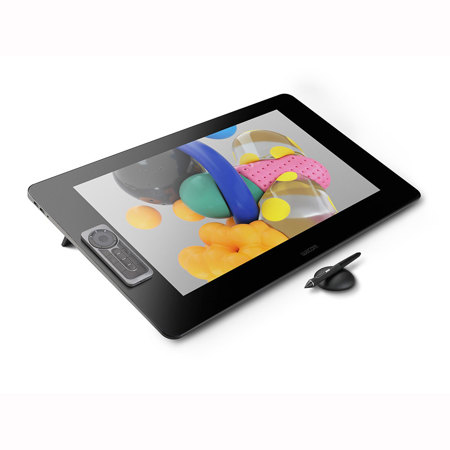
Use the Wacom Cintiq Pro 24 for absolute harmony with your work. Premium 4K screen with world class color performance and virtually no parallax, enhance every creative breakthrough. The Wacom Pro Pen 2 provides state-of-the-art creative pen technology, meaning every stroke, every move of your hand is followed with unerring accuracy.
Wacom Pro Pen 2: natural and precise
Our state-of-the-art creative pen technology. 8,192 levels of pressure sensitivity and unparalleled tilt recognition means that every stroke, every move of your hand is followed with unerring accuracy.
4x more pressure sensitive
4x more accurate
Virtually no lag
Natural tilt support
No parallax
No batteries or recharging
Ideas jump off the screen
4K resolution (3840 x 2160 px) is packed into a 24" LCD display with superb color accuracy (99% of Adobe RGB). You can see every tiny detail of your greatest artwork, design or photographic projects.
A display that looks and feels, totally natural
The etched glass screen provides a distinct, tactile experience as you draw, mimicking the feel of a pen on paper. And with minimized parallax and a screen strong enough to resist 'pooling' and rippling, each mark appears precisely where you expect it, every time.
Designed to increase your productivity
As a creative professional, time's rarely on your side. That's why Wacom Cintiq Pro puts productivity solutions right at your fingertips.
Connect your way
Connect to any Mac or PC with a single USB-C cable (included) to a USB-C port for both video and data. DisplayPort or HDMI are also included, which require USB port for data.
Make it match you
The ExpressKey Remote puts 17 programmable buttons within easy reach. The on-screen keypad and the radial menus offer further one-touch shortcuts.
A natural interface
Pan, zoom or rotate your work with multi-touch gestures - as simple as using your smartphone.