
This item is no longer available.
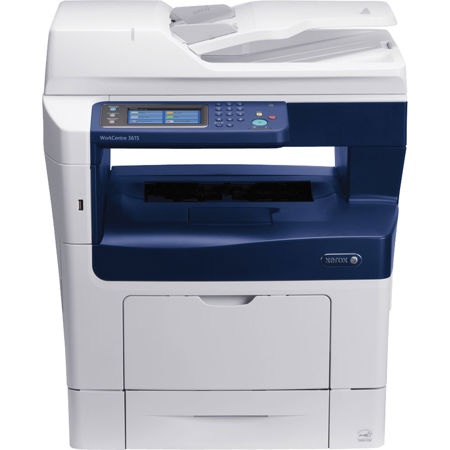
With copy, print, scan, email and fax functions, the Xerox WorkCentre 3615 monochrome multifunction printer offers a full productivity toolbox in one powerful device. Best-in-class speed, print resolution and paper capacity help you produce professional-looking documents quickly.
Productivity and Paper Handling
The WorkCentre 3615 multifunction printer offers a full productivity toolbox in one device, so you're more efficient every day.
• A 60-sheet Duplex Automatic Document Feeder scans two-sided originals for copy, scan and fax jobs
• The WorkCentre 3615 includes a 4.3-inch (109 mm) color touch screen with easily understood instructions and help screens to streamline walkup operations
• An easily accessible USB port allows users to quickly print from or scan to any standard USB memory device
• 250-sheet output tray with tray-full sensor
• 150-sheet Multipurpose Tray handles media sizes from 3 x 5 in. to 8.5 x 14 in. (76 x 127 mm to 216 x 356 mm)
• With the 550-sheet paper tray, standard paper capacity for the WorkCentre 3615 totals 700 sheets
• Up to three optional 550-sheet paper trays increase total paper capacity to 2,350 sheets
•Optional stand provides storage for toner cartridges, paper and other supplies
• Place the WorkCentre 3615 anywhere you need it with the optional Wi-Fi Network Adapter
Speed, Scanning and Print Quality
With best-in-class speed, print resolution and media capacity, your busy office can deliver professional-looking prints, without waiting.
Built for Speed
Print up to 47 pages per minute (ppm) - the fastest monochrome print speed in its class. Your first page prints in as few as 6.5 seconds.
Easily Scan Legal-Sized Pages
With the WorkCentre 3615 legal-sized platen, you can scan larger pages without disassembling your bound documents.
True Multifunction Capability
The intuitive 4.3-inch (109 mm) color touch screen on the WorkCentre 3615 lets you program your next job while another is in progress.
Crisp Details
Bring definition and clarity to your documents with true print resolution of up to 1200 x 1200 dpi. Your printed communications never looked better.
Digitize and Simplify
Easily turn cumbersome hard copy forms and documents into portable, digital files. Enjoy the added convenience of sharing your digital files automatically via email. You can even send your files to an established network folder or export them to any USB memory device.
Powerful Capabilities Built for Savings
Advanced tools improve security and save paper, power and time.
Reduce Paper Usage
You'll dramatically lower your paper usage and related costs thanks to automatic two-sided printing. Plus, N-up printing enables you to print multiple pages on one sheet - a useful option when sharing presentations.
Increase Efficiency
Extra-high capacity toner cartridges allow you spend less time loading supplies and more time getting work done.
Keep Information Safe
Secure Print keeps your sensitive documents out of the wrong hands by requiring users to enter a personal identification number at the device to print documents.
Use Less Power
Unique Xerox EA Toner fuses at a much lower temperature, reducing power consumption by up to 20% and CO2 emissions by up to 35%, compared to conventional toner.
All-in-one Savings
The WorkCentre 3615 combines the functions of a copier, printer, scanner and fax machine into a single, value-packed unit that can generate savings on energy and supplies costs.
Work From Anywhere
When you're on the go, you can still print to the WorkCentre 3615 and manage it remotely from a web browser.
Print When and Where You Want
With Apple AirPrint, you can print email and important office documents, directly from your mobile iOS device when connected to your office Wi-Fi network. And when working offsite, you can rely on Xerox PrintBack to print documents back at the office so they are waiting for you when you return.
Freedom, Unplugged
With optional Wi-Fi capabilities, the WorkCentre 3615 is ready to go to work wherever it's needed.
Manage From a Web Browser
Handle device administration remotely from any networked computer with Xerox CentreWare IS.
Additional Features
• Copy: Background suppression, Build Job, Darkness control, Edge erase, ID Card Copy, N-up, Photo mode, Program Ahead
• Print: Booklet printing, Collation, Custom page size, Fit-to-page, N-up, Print from USB memory device, Scaling, Secure Print, Toner save mode, Watermarks
• Fax: Address book, Broadcast fax, Delayed fax, Distinctive ring, Fax Forwarding to Fax, Email and Server with/without Local Print, Junk fax barrier, Polling receive, Secure fax: receive