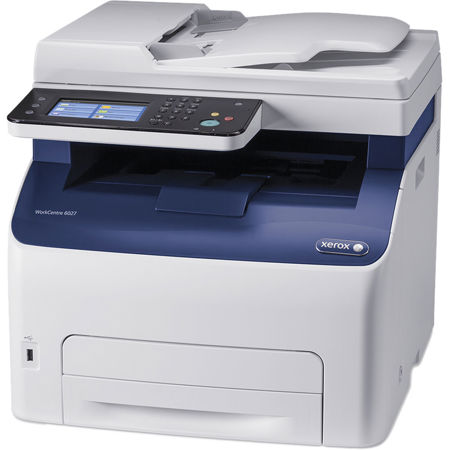

Xerox WorkCentre 6027/NI Wireless Multifunction Color LED Laser Printer, 18ppm Black/Color, 1200x2400dpi, WiFi - Print, Copy, Scan, Fax

SKU: XE6027NI

This item is no longer available.

Recommended Alternatives

Overview
Compare
Specs
Protection

Reviews about this item

Review Summary

2020-02-07T07:40:02

Rated 4 out of 5

Preforms well; daily business use

This printer is used daily for business;previous printers of the same version have preformed well for about a year. The first issue we experience is the document feeder slipping occasionally and reporting a jam. Color is good; scanning function preforms well with ease us use and it's own program; fax is perfect, no problems there. Toner is a little expensive so I suggest shopping around. Haven't printed a lot of color/photo's but am disappointed there is no separate paper tray or feeder for thicker or photo quality paper. Thick paper doesn't always want to feed through the single tray even with adjusting the settings. Overall, a 4 star, however if the document scanner feeding error wasn't an issue this little printer would have gotten a 5 star review. Would still recommend. It's a nice printer and Adorama has the ABSOLUTE BEST PRICING!

MICHELLE N.

2020-01-26T10:29:59

Rated 5 out of 5

Great multifunction printer

Setup is easy, love that the ink does not evaporate, great alternative to an inkjet.

Edward B.

2020-01-19T19:00:00

Rated 1 out of 5

Xerox printer

It’s a very fine printer but way more than what I needed for home use, and factory ink refills are very expensive . I’m only giving one star because it’s taking forever to have my account credited. I hate having to make a payment on something I’ve returned.

I’minoz

2020-01-10T19:00:00

Rated 1 out of 5

Bad rating

Bought this printer for all the features. Could never get it to work properly. After spendings hours with Xerox support and things still not resolved i am returning it.

Dissappointed

2020-01-07T19:00:00

Rated 1 out of 5

Don’t buy

Prints really slow I had a dell printer before and they recommended me to buy this one because it was same but is not. I am returning it

Gerson

2019-12-31T19:00:00

Rated 5 out of 5

Quality Printer!

Haven't owned long enough to know for sure if there will be any problems, but so far working very well and was fairly simple to set up. Only had one disk that showed a failure during install of scanner of a certain module but haven't scanned yet to see if that failure will effect anything. Will call customer service if it is a problem. Only disappointment is that the printer only came in White. All of our computer system and furniture in home is Black would have liked a color choice but color doesn't effect efficiency so still a great printer. Nice styling and makes great copies. Like most printers these days the refill toner cartridges are always a bit pricey.

David

2019-12-26T19:00:00

Rated 5 out of 5

Great Printer

This is our the 2nd one for our office. Very nice for the money.

Wendy

2019-12-25T19:00:00

Rated 1 out of 5

Stay Clear of this one

Would not to connect to New Dell Computer Sent it back for a refund.

Jim S.

2019-12-24T19:00:00

Rated 3 out of 5

UNACCEPTABLE

even though I paid for extended warranty, the department denied service

VLADY

2019-12-20T07:20:59

Rated 5 out of 5

Great machine to use in small office

This is my second unit. Great machine for small office.

Cesar V.

2019-12-17T19:00:00

Rated 5 out of 5

Very Pleased

Works great but haven't been able to try out all the functions this has to offer. Hook up was easier than I thought it would be for the wireless aspect. Price was very good. Compared to prehistoric system I was using before, this is wonderful.

N3870V

2019-12-15T07:33:23

Rated 5 out of 5

Xerox color printer

System was everything I was expecting and more. Very easy to set up and works perfectly. Would highly recommend this to any home user or small business. Excellent product..

Craig A.

2019-12-14T19:00:00

Rated 4 out of 5

Professional Look

Haven't been using it a lot,but for the time I have used it, so far so good. The print outs has a professional look about it.

Evelyn.K

2019-12-07T03:58:49

Rated 5 out of 5

Great Black Friday deal

Great printer was easy to set up. Just get the drivers from online if you have a Mac the ones that are in the IOS don’t give you full functionality if you have Catalina

PAUL S.

2019-12-02T19:00:00

Rated 3 out of 5

Manually Prints on both sides.

It does not worth the price. There are cheaper printers that print both sides automatically. This prints manually.

Tony

2019-11-29T19:00:00

Rated 2 out of 5

Lower quality than expected

It doesn't give a lot of options for customizing your settings or saving settings, for example the scanning to USB options, and a tiny USB isn't recognized. When printing labels the rollers put a light copy of the 1/2 sheet label onto the opposite side of the paper, so you ruin a whole sheet. It's a very basic, low quality printer. I was going to get two but I'll have to try something else.

goldy

2019-11-28T19:00:00

Rated 3 out of 5

Good Printer

works fine, just a little dragging on print jobs, but overall performs well

Jeanette

2019-11-28T19:00:00

Rated 3 out of 5

Middling

having problems getting the fax and email to work; print, copy and scan are good; price reasonable, but toner cartridge prices out of this world

Tom

2019-11-28T19:00:00

Rated 5 out of 5

I love my xerox printer

Make sure you have some room to put it. Because it’s a little bigger than most printers

Hector

2019-11-22T19:00:00

Rated 5 out of 5

Pros and con

Lots of functions. Only regret is that it's very big.

gbrookes

2019-11-22T19:00:00

Rated 5 out of 5

Review of printer

This printer works great; however, it was one of the hardest ones I have every installed on a computer.

Art S.

2019-11-22T19:00:00

Rated 1 out of 5

Performance

Mislead about the the printer's ability to service both my computers, and about the life of the cartridges. After just purchasing this printer and printing less than 10 pages it was asking the replacement of one of the cartridges. This is unacceptable.

BWW

2019-11-22T19:00:00

Rated 1 out of 5

Performance

Mislead about the the printer's ability to service both my computers, and about the life of the cartridges. After just purchasing this printer and printing less than 10 pages it was asking the replacement of one of the cartridges. This is unacceptable.

Scott

2019-11-21T19:00:00

Rated 4 out of 5

printer

works great, scans well, although sometimes whats supposed to be black comes out as a green. on a all black document.

Joe G.

2019-11-21T19:00:00

Rated 3 out of 5

It's ok

works ok. Does not have dual capability, meaning it does not print on both sides automatically. Just makes more work

P.D

2019-11-21T19:00:00

Rated 3 out of 5

Looks better than it works

The unit works great when it is working. I made four calls to tech support just make it this work. I am tech savvy and these problems were beyond me. Ink cartridges are pricey.

Jay

2019-11-21T19:00:00

Rated 3 out of 5

No envelope tray

Before i ordered I was told the printer could print envelopes without a separate tray and it cannot. You have to take out the paper and put in envelopes before you can print them. It is an extra step I wish I did not have to take.

William E.

2019-11-21T19:00:00

Rated 5 out of 5

Great multifunction home printer

Excellent multifunction machine! The color laser printing is stunning; magazine quality! I'm no computer guru; it was easy to set up.

John

2019-11-21T19:00:00

Rated 5 out of 5

Great Printer

I can't understand why i waited so long to get a laser printer. It has never given me a problem from remote printing to scanning to faxing. I have found this printer highly reliable and easy to use .

Babs

2019-11-21T19:00:00

Rated 5 out of 5

Best printer ever

Best printer ever had and ink is so reasonable. It seems to take very little to print.

L J.

Xerox WorkCentre 6027/NI Specifications

  • Print speed

    Color: up to 18 ppm
    Black: up to 18 ppm

  • Duty cycle

    Up to 30, 000 images/month

  • Processor speed

    525 MHz

  • Print memory (standard)

    512MB standard

  • Connectivity

    10/100BaseTX Ethernet, High-Speed USB 2.0, Wi-Fi Direct, Wi-Fi b/g/n

  • Maximum print resolution

    Up to 1200 x 2400 dpi enhanced image quality

  • First-page-out time, printing

    As fast as 13 seconds color / 12 seconds black and white

  • Page Description Languages (PDL)

    PCL 5c, PCL 6, PDF direct, PostScript 3 compatible

  • Print features

    Auto Screening (Standard, Fineness, Gradation), Bi-directional driver, Collation, Color Balance Adjust, Custom page size, Draft mode, Fit-to-page, Image Options (Standard, Photos, Presentation, Design, POP), Job Monitoring, N-up, PANTONE Color calibrated solid-color simulations, Reduce/Enlarge, Scaling

  • Mobile printing

    Apple AirPrint, Google Cloud Print, Xerox PrintBack

  • Maximum copy resolution

    Up to 600 x 600 dpi

  • First-page-out time, copying

    As fast as 30 seconds color / 20 seconds black and white

  • Copy features

    Auto exposure, Collation, Color balance, Edge erase, ID Card Copy, Lighter/Darker, Reduce/Enlarge, Sharpness

  • Scan features

    Black and white, Color, Grayscale, Image-only PDF/Multi-Page TIFF /Single-page TIFF/ JPEG

  • Scan destinations

    Application (TWAIN USB/Network), Mac 10.6 or later (USB/Network/MacICA), Scan to Network Computer (SMB/ FTP), Scan to USB, Scan to email, WIA (USB/WSD Scan), WSD

  • Fax features

    33.6 Kbps with MH/MR/MMR/JBIG/1-bit compression, Address book, Auto redial, Auto reduction, Cover page, Delayed fax, Fax forward to fax/email and server (FTP, SMB), Group faxing, Junk Fax Filter, Secure fax: receive

  • Security features

    IP filtering, IPSec, IPv6, Network Address Book Authentication (LDAP, Windows Kerberos), SNMPv3, SSL, Secure HTTP (SSL/TLS), Secure IPP, WEP(64/128 bit), WPA2-PSK (AES) and WPA/WPA2-PSK (Mixed Mode)

  • OS support

    Fedora Core 15-17, Mac OS version 10.5 or higher, Redhat Enterprise 4 and 5, SUSE 11, 12, Ubuntu, Windows Server 2012, Windows 2003 Server, Windows 2008 Server, Windows 7, Windows 8, Windows 8.1, Windows XP

  • Font capabilities

    PostScript fonts: 81
    PCL fonts: 81

  • Document handler

    Automatic Document Feeder
    Capacity: 15 sheets
    Size: 5.8 x 8.3" to 8.5 x 14" (148 x 210 mm to 216 x 356 mm)

  • Paper capacity

    Tray (Main tray): 150 sheets

  • Paper size

    Tray (Main tray): Custom sizes: 3 x 5 in. to 8.5 x 14 in. (76 x 127 mm to 216 x 356 mm)

  • Output capacity

    100 sheets

  • Power consumption

    Operating: 330 W
    Standby: 45 W
    Power save: 10 W

  • ENERGY STAR qualified

    Yes

  • Operating Temperature

    50 - 90 deg. F (10 - 32 deg. C)

  • Relative humidity (operating)

    10 - 85 % RH (noncondensing)

  • Dimensions (W x D x H)

    16.2 x 17.2 x 15.3" / 411.48 x 436.88 x 388.62mm

  • Weight

    37.3lbs / 16.92kg

  • UPC Code

    095205867961

About Xerox WorkCentre 6027/NI

FEATURED REVIEWS

Budget Printer, Commercial Quality

By WEade

I've used Xerox commercial products for quite a few years now (5000, 700, WC6545, 75, iGen 150) and have always preferred their products. My home inkjet printer was garbage and I was set to get a laser color printer due to the wasted money on ink carts that dried out and yielded 50 prints, at best. Doing a search, I stumbled across the WC6072 and found it to be economically priced. While it is manufactured for a small business environment, I knew it would be overkill for my home needs, but fo...

View full Review

Best work center I have ever used

By EAF49

I purchased this xerox workcenter when my all in one inkjet failed. I received the xerox and put it into service immediately-unfortunately, it failed miserably. Pulled multiple pages from the feed tray and jammed every time I tried to use it. Xerox sent their technician out twice to replace parts and adjust the unit-to no avail. It was still nonfunctional. Finally during one use there was a loud bang and the unit broke down completely. The tech returned, determined it was unrepairable and ord...

View full Review

The compact WorkCentre 6027/NI Color Multifunction Printer excels in small office environments where high-impact color, speed, Wi-Fi connectivity and ease of use are priorities. With efficient print, copy, scan, fax and email functions on one device, you can get your work done quickly, without a second thought.

Automatically feed documents
Save time copying and scanning multiple-page documents with the 15-sheet Automatic Document Feeder.

Speedy faxing
The WorkCentre 6027/NI Multifunction Color LED Printer comes packed with the most common fax capabilities at a speed of 33.6 Kbps.

Accomplish more and spend less time waiting
The WorkCentre 6027/NI Multifunction Color LED Printer features a print speed of 18 ppm in color and 18 ppm black-and-white and provides color prints in less than 13 seconds.

Plenty of power
The powerful 525 MHz processor and generous amount of standard memory handle your daily workload with ease, including pages full of graphics, photos and charts.

Superior image quality
The 1200 x 2400 dpi enhanced image quality delivered by the Hi-Q LED print engine provides high resolution color printing with precise image alignment and fantastic detail.

Color your way
Last-minute color adjustments are a snap for both the expert and novice user with powerful, easy-to-use controls in the Xerox printer driver.

Color touchscreen
The large, intuitive 4.3 in. color touchscreen user interface makes complicated tasks simple.

Convenient USB port
The WorkCentre 6027/NI Multifunction Color LED Printer's front-side USB port allows you to print from or scan to, any standard, portable USB memory device.

Streamline processes
Powerful features simplify tasks for small offices, including the Paper Setup Navigator, taking the guesswork out of printing on custom paper sizes and types from plain office paper to envelopes and labels.

Print from anywhere
Connect without the need for network cabling with standard built-in Wi-Fi, featuring one-touch setup. Simply press the WPS button on the printer, then the WPS button on your Wi-Fi enabled router and then work and print from anywhere.

Connectivity simplified
With Wi-Fi Direct, mobile phones, tablets and laptop computers can make a secure connection directly to the multifunction printer even if you don't have an existing wireless network.

Apple AirPrint
Stay mobile with built-in support for Apple AirPrint. Print emails, photos and important office documents directly from your Apple iPhone or iPad.

Scanning quickly converts paper into electronic documents
Save scanned documents to a location on your network or send them directly to email recipients, with a resolution up to 600 x 600 dpi, in color or Grayscale.

Plenty of copying features
Copying on the WorkCentre 6027/NI Multifunction Color LED Printer includes ID card copy, lighten/darken, reduce/enlarge, auto background suppression, collation and many more.

Unrivaled print technology
The proven Hi-Q LED print engine is the same advanced component found in many of the higher-end devices used by graphic designers and artists servicing clients in imaging and the arts.

Xerox EA-Eco Toner
Developed to provide bright, detailed images, smooth graphics and sharp text with remarkable gloss and clarity - while achieving low fusing temperature to save energy.

Print efficiently
The printer uses an easy-to-replace toner cartridges. No need to purchase, store and replace additional supply items, simplifying operation and supplies management while minimizing time spent changing parts.
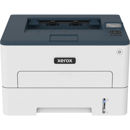
Key Features

  • Xerox WorkCentre 6027/NI Wireless Multifunction Color LED Laser Printer
  • 18ppm Black/Color
  • 1200x2400dpi
  • WiFi
  • Print
  • Copy

What's in the box:

  • Xerox WorkCentre 6027/NI Wireless Multifunction Color LED Printer
  • Toner Cartridge (Capacity: 500 Pages)
  • Power Cable
  • USB Cable
  • Software and Documentation
  • Xerox 1 Year Warranty