Share:
Closeout
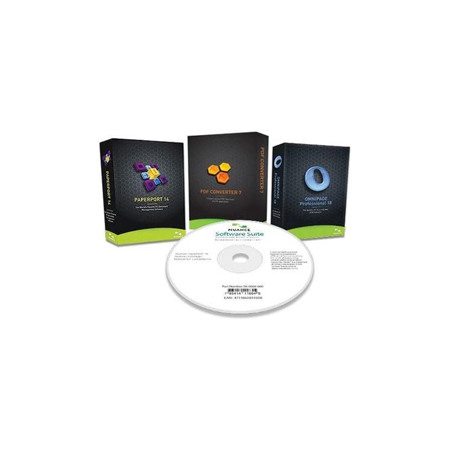
Nuance Software Bundle, Includes Paperport 14, PDF Converter 7, Omnipage Professional 18, CD-ROMs
SKU: XENPDFBNDL MFR: 96-0009-000
$2.99
$99.99
Save: $97 (97%)Key Features
- Effortlessly convert PDFs with advanced Nuance software, ensuring compatibility and reliability for all your documents.
- Streamline your workflow using PaperPort 14 for superior document management and organization.
- Accurately digitize documents with OmniPage Professional 18, enhancing your office's efficiency.
- Enjoy seamless integration across Windows platforms, making your office tasks simpler and faster.
- Boost productivity with this comprehensive software bundle, designed for modern office needs.
- Securely manage and share your files with robust features, offering peace of mind and data integrity.
Calculate Shipping
See Options
1

Need help? Ask our experts.
Overview
Compare
Specs
Protection
About Nuance Software
FEATURED REVIEWS
Excellent Product, Highly Recommended!
I find the suite extremely useful and easy to use. The software arrived just after a few days. Easy installation with productive professional results. Will certainly buy it again. Joe
Great Bundle to manage documents
Am long time home user and used this bundle of create apps for my new Win10 System. Have used the Nuance products to scan documents in both editable MS office documents and .PDF files for email attachments. When you need these apps, you really need them.
Paperport 14 Software:
PaperPort 14 is the fastest and easiest way to scan, share, search and organize documents, files and photos.
Get more organized
PaperPort provides a single way to scan paper and access, view, edit and convert files on your PC.
Be an expert in no time
PaperPort reduces the complexity of scanning to a single push of a button. Set-up is a breeze and once you get started, you will quickly have all your documents stored and accessible in one easy-to-use application.
Go green
Reduce waste and conserve energy by putting an end to your reliance on printing, faxing and mailing. You'll save money, too.
Keep track of documents
Once a document is filed electronically in PaperPort 14, it will never be lost, damaged or accidentally thrown away.
Get more done faster
PaperPort 14 includes a powerful PDF Viewer that replaces the free AdobeReader, so you can view, edit and share PDF documents like never before.
Find information instantly
Now you can create searchable PDFs from digital files and scanned paper documents. Just enter keywords or phrases into Windows or Google Desktop Search and quickly locate a specific file.
Clean up and enhance digital photos
Make your digital photos look better than ever with a feature-rich set of photo tools and optimal resolution for screen and print.
Convert paper into text
Just drag and drop onto any text application on the PaperPort Send To bar to turn scanned document images into editable text for use in popular word processing or spreadsheet software.
Fill out forms quickly, neatly
FormTyper converts scanned paper forms into electronic forms you can fill out, save as PDF and email. It's fast, easy and automatic.
Works with any scanner
Make your all-in-one printer, mobile scanner or desktop scanner faster and easier to use with PaperPort 14. Get better results, too.
PDF Converter 7.0 Software:
Unlock the contents of your PDF files-without the hassle of cutting, pasting and reformatting. PDF Converter 7 is the world's best-selling and most accurate tool for turning existing PDF files into fully-formatted, editable documents, forms and spreadsheets. There's no smarter, faster or easier way to access text, tables, charts and graphics trapped within PDF files. Designed to take full advantage of Microsoft Office 2010 and Windows 7 capabilities, PDF Converter 7 is Nuance's most productive and intuitive PDF conversion software ever.
The #1 Tool for Turning PDF Files into Fully-Formatted, Editable Documents
Save Time With The World's Most Accurate PDF Conversion Software
Convert PDF and XPS documents into editable Corel WordPerfect or Microsoft Office formats, including Microsoft Word, Excel and PowerPoint, with a single click. Superior conversion accuracy turns PDF files into fully-formatted documents--complete with column layout, charts and graphics intact. Smart, innovative Logical Form Recognition (LFR) technology accurately converts static PDF forms into editable Word forms--instantly. You can even combine all pages of a PDF document into a single Excel spreadsheet! PDF Converter 7 enables you to open PDFs directly from SharePoint, convert the files and save them back to your SharePoint network. It's never been simpler to access your converted documents from anywhere in your organization.
Increase Productivity by Repurposing Content
With PDF Converter 7, your converted documents include editable text, original tables and graphics that can be repurposed within new content. Need to transfer a table from PDF to an Excel worksheet or workbook No problem. You can quickly turn tables and spreadsheets into fully editable Excel files--without all that tedious copying and reformatting.
Boost Efficiency With Batch Conversion
Tired of opening and converting each individual PDF document PDF Converter 7 makes it easy to batch convert files for maximum time savings. Simply drag and drop all the files you need into PDF Converter 7. A single click is all it takes to convert multiple files at once. You can even select automatic language detection for optimal accuracy and convenience if you process multilanguage documents.
Better PDF for Business
Never Retype a PDF Document Again
Convert PDF files into fully-formatted RTF, Corel WordPerfect or Microsoft Word, Excel or PowerPoint files for the world's most accurate document re-creation. PDF Converter 7 even takes full advantage of the latest and greatest Microsoft Office 2010 capabilities so you can be as productive as possible.
Get Accurate "Flowing Column" Conversion
Eliminate the hassle of trying to edit content trapped in text boxes. With PDF Converter 7 converted documents retain flowing text and columns so you avoid time-consuming rework.
Customize Your Conversion Settings
Further improve accuracy by tailoring the conversion process to the type of document you're converting from PDF. Settings include Standard, Legal Pleadings, Spreadsheets and Forms conversion.
Access and Repurpose Charts and Graphics
PDF Converter 7 separates individual graphics in the converted document, enabling you to save them or integrate them into Microsoft Word, PowerPoint and other desktop applications with copy-and-paste ease and convenience.
Convert Directly From Your Desktop
Just right-click on a PDF file and select your conversion format to instantly create editable documents. PDF conversion has never been simpler!
Omnipage Professional 18 Software:
With OmniPage Professional 18, the best just got even better. Better OCR speed, better accuracy, better performance. With new improvements and added functionality, OmniPage 18 is still the market's leading OCR and scanning solution - and one that saves you time and money while increasing overall productivity. Whether you're already an OmniPage user or you're looking for a new document-imaging solution, OmniPage Professional 18 is the perfect choice for organizations of all kinds.
How can you get the document into the format you want without having to do extensive re-typing or re-editing
Now the answer is OmniPage Professional 18. This innovative solution lets you convert paper, PDF files and forms at lightning speed into documents you can edit on your PC or archive in a document repository. Amazing accuracy, combined with batch processing and comprehensive network features, make it the perfect choice for organizations of all kinds. OmniPage eliminates paper and digital inefficiency by improving productivity, enhancing responsiveness and reducing storage and material costs. Organizations save significant time and money by leveraging the superior OCR and document formatting accuracy of OmniPage to instantly convert documents into the format of their choice. Retyping is eliminated, tasks are automated, information is easily accessed and productivity soars.
Powerful Advantages:
• Take advantage of superior word accuracy to re-create documents quickly
• Maintain formatting so a converted document looks exactly like the original
• Make documents completely searchable while preserving existing text
• Batch convert paper and PDF files into documents you can edit and archive
• Automate the collection and conversion of forms and data
• Connect with leading cloud storage services and convert documents in them
• Redact and highlight automatically with workflows