2026-06-10T20:00:00
Rated 5 out of 5
High Quality Printer
I bought this printer about 2 years ago and I'm very happy with it. It is easy to use and the print quality is great.
Rochester B.
Originally posted at

2026-04-07T20:00:00
Rated 5 out of 5
Great Printer
This printer does everything we need! Couldn't ask for a better office printer for the money and size.
Matteis
Originally posted at
2026-03-25T20:00:00
Rated 3 out of 5
OK printer, not sure if I will use
This printer is OK. I feel that the set up is a little bit too much. You have to have an app on your phone and it doesn't easily connect to your computer. I also am unsure if there is a warranty for this product.
JessicaW
Originally posted at
2026-02-13T19:00:00
Rated 5 out of 5
Best Small Color Printer
I have used the C230 daily for several years. I enjoy the small fisical size with Big Printer
Quality. Awesome printer .
butch67
Originally posted at
2026-02-07T19:00:00
Rated 5 out of 5
Best printer
I absolutely adore this Xerox C230 printer. It is very easy to use. This is hands down the best printer I have ever owned. I definitely recommend this printer and brand!
Angelica H.
Originally posted at
2026-02-07T19:00:00
Rated 5 out of 5
The Xerox C230 is a fast, reliable color laser pri
I'm loving the Xerox C230, setup was quick and easy. It's been super reliable for everyday printing. The color quality is bright and sharp, and my pages come out clean with crisp text and clear images. I've printed the designs/stickers and they look great. It's also fast and doesn't jam often. Overall it's a great color printer for home or small office.
Pros: Great color + sharp text- fast printing- easy to use.
Cons: Toner can get pricy - but it last a while.
Nabeela S.
Originally posted at
2026-01-31T19:00:00
Rated 5 out of 5
I would recommend this laser printer for the high
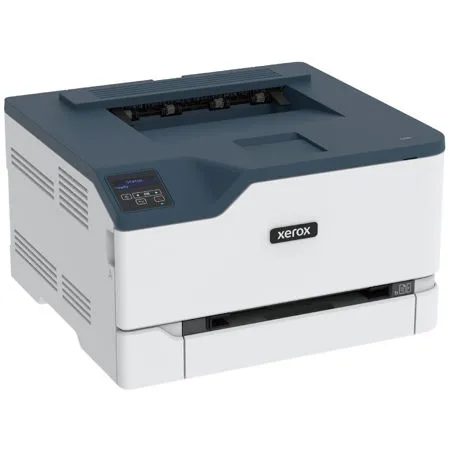
This printer is a great option if you plan on printing a large amount of pages in color and have the space for it. The printer is on the larger side which should be considered when purchasing.
The set up was the easiest out of any printer I've ever used. Once you have it on you can simply connect it to your WiFi network and it will appear findable from your computer. I printed out 30 or so full color. The pages print fast and they looked great. The paper loader is deep so you can put a ton of paper in there and not worry about it. The ink tray was easy to remove for when you replace the cartridges. With this specific printer there is not built in scanner, but there is a different Xerox model that includes a scanner on top of this printer.
As with any laser printer the ink cartridges are expensive, so you will likely only get your money's worth if you plan to print a lot.
Overall I would recommend this printer if you are in the market for a high quality full color laser printer.
jamesb310_698
Originally posted at
2026-01-21T19:00:00
Rated 5 out of 5
Amazing laser printer with best quality I've ever
Absolutely the best printer I have ever used! Easily connected to my phone and computer, it's a laser printer so quality is automatically so much better than inkjet! The color is brighter and truly took my work up a level! Super impressed.
ericap177_306
Originally posted at
2026-01-20T19:00:00
Rated 5 out of 5
High quality printer
I love this Xerox printer, the design is beautiful and the set up was very easy. The quality of the printout is very high. The best printer I've ever had!
nezl_8076
Originally posted at
2026-01-20T19:00:00
Rated 1 out of 5
Heap of junk - doesn't work properly
This device constantly fails to print, even when showing as connected to a computer.
An hour on the phone to Zerox fixed it for a month and then it stopped working again.
Would strongly recommend buying something else.
NealD
Originally posted at
2026-01-19T19:00:00
Didn't work for me I tried my best to get it to work even had some friends and family try but I'm sure it does work really good so don't give up on trying it just yet
lcs2_1146
Originally posted at
2026-01-14T19:00:00
This printer was heavy and easy to set up. The instructions were clear. In interface was easy to use and understand. It wasn't noisy when you turned it on.
krissyk9_384
Originally posted at
2026-01-11T19:00:00
Rated 4 out of 5
Prints fast and well
This printer is absolutely amazing! It took me a while to set it up but once I found the instruction booklet, it was a breeze. My husband works from home so this was am added bonus to our new office room. It works extremely well. The pages print well and the ink cartridge seems easy to replace. High quality product and it seems to print fast.I'm excited to play around with it more!
tiffanyt38_9806
Originally posted at
2026-01-09T19:00:00
Rated 5 out of 5
Small business game changer
I am very impressed with the Xerox C230 Color Printer. The setup was made easy with the app. The instructions are also simple and have detailed pictures for all the removal of safety parts before using. I haven't had to replace anything on it yet but maintenance appears to be seamless. When it comes time to change the ink it will be very easy with the sliding drawer and color marked sections so there's no confusion of what color goes where. Two snaps on easy side of the ink cartridge releases it for quick change outs. I am in love with this machine. All of the assists are great as well. Printing takes a little longer than my old printer but that's because it sends the job from my phone to the printer and that takes time. This is the first printer I've been able to use to print from my phone. I can't tell you how convenient and essential that is for me. The options available on your phone make it simple and easy. It's a simple toggle switch to print from color to black and white. The print itself is very clear and clean. I had an issue with the first page it printed. It left a black streak across the front and back page but when I printed a second and third time it didn't have that issue and I didn't have to do a clean up or any maintenance. I will say that this printer is loud at first and is noisy when it's printing but as it just sits waiting to be used it is super quiet. It takes up more space on my desk than I initially imagined but it works out great. Time will tell how well the ink cartridges perform and how long they last. It doesn't appear that this printer will waste my ink like other printers have. So far I am thoroughly pleased with this printer. One downfall is that I can't get it connected to my desktop. It is connected in every way except it won't print. I am completely ok with that because it prints from my phone which is a greater need and want over printing from my desktop. This printer is definitely a game changer for my little home business.
raw92775_5839
Originally posted at
2026-01-05T19:00:00
Rated 5 out of 5
Awesome printing quality and easy setup
I'm really happy with the print quality of this printer. The colors come out vibrant and sharp, and overall the results look very professional. For very large and highly colorful files, I did notice it can take a bit longer to print, but nothing unreasonable or frustrating.
The setup process was easy and straightforward. I especially appreciated that Xerox sends instructions by email to download the software, which is great for anyone who doesn't have a CD reader anymore.
I mostly print directly from my phone, and that experience has been very intuitive and simple. That said, as someone who used a competitor's printer for many years, I would love to see more improvements in the app, more actions available and a more modern, polished interface would make a big difference.
It's an awesome printer with an easy setup, and excellent print quality, especially for colorful prints.
brubs_5661
Originally posted at
2026-01-02T19:00:00
Rated 4 out of 5
Quick quiet printer
This printer is the perfect office equipment for my I'm home office. It's quiet, fast and you get thousands of pages from the included cartridges. My jobs were completed quickly and the quality was great. It was simple to set up and the manual was easy to follow. The one negative is that it doesn't have a scanner which I use frequently. I would definitely recommend this printer to anyone who has a home business or prints a lot. Even though the cartridges are expensive, you get a lot of printing from them.
joannak40_5458
Originally posted at
2025-12-30T19:00:00
Rated 5 out of 5
Great printer for home office
Great printer and size for home office. Easy to setup, app worked fine and connected to the printer in less than a minute! Its pretty quite and prints out nice quality pdfs, etc.
jyliansmm_2892
Originally posted at
2025-12-29T19:00:00
The printer is amazing the quality of the pics is amazing the quality is stunning and the speed at which it prints is so quick and it's lo maintenance ad its durability is premium.
b0n3zj0n3s_3001
Originally posted at
2025-12-29T19:00:00
Rated 4 out of 5
Heavy Duty and Easy to Use
I was surprised by how heavy duty this printer was. It was pretty easy to set up, and it even came with a disc to install the software if you did not want to use the app on your phone (I did but I feel like the disc makes it more user friendly). I printed off a worksheet that I use for my classroom, and there was a little ink smudges on the paper, but all in all, it's a pretty consistent printing device. I'm going to make it my work computer and I'm pretty excited for it.
taylorn150_7187
Originally posted at
2025-12-27T19:00:00
Rated 5 out of 5
Easy to use printer!
Amazing printer, just opened and everything was very easy to setup. The app works perfectly and connected to the printer in less than a minute! It also comes with ink.
seleprk_5268
Originally posted at
2025-12-24T19:00:00
Rated 1 out of 5
Memory nightmare....
I want to love this printer but trying to print a color image is a pain. The printer is way undersized with memory and has difficulty printing 1 color page. Horrible...
Gfelm
Originally posted at
2025-12-17T19:00:00
Rated 5 out of 5
Color laser printer for home or small office.
I've been using the Xerox C230 for a few weeks now, and overall I'm very satisfied with it. The print quality is sharp and colors come out vibrant, which is great for both documents and occasional graphics. Setup was straightforward, and wireless printing works well with my laptop and phone. Easy to setup if you follow the instructions.
Printing speed is decent for a small office or home use, and it's relatively quiet compared to other printers I've owned. Toner replacement is simple, though the toner can be a bit expensive.
Overall, the Xerox C230 is a reliable color laser printer that does exactly what I need. I would recommend it to anyone looking for good-quality color printing without needing scanning or copying features.
trucn17_1033
Originally posted at
2025-11-10T19:00:00
Rated 5 out of 5
Small office printer
The Xerox C230 is a great little color printer, easy to set up, prints super clear, and doesn't take up much space. It's fast and reliable, though a bit on the noisy side when it's running and only prints double sided. Overall, solid quality and totally worth it for home or small office use.
danielab377_1028
Originally posted at
2025-10-15T20:00:00
Rated 3 out of 5
Prints excellent typewritten words
I love the quality of print, even color on regular paper.
vern
Originally posted at
2025-09-15T20:00:00
Rated 5 out of 5
Well saturated colors.
Colors brighter than others I have seen. First page out is a bit slow, but not enough to bother. A fine choice for home office or occasional home use.
Moe42
Originally posted at
2025-07-19T20:00:00
Rated 5 out of 5
Excellent Home Printer
I print high capacity for work and this home printer is always excellent. No delays, no paper jams and easily handles the load required. Ink is reasonable to purchase.
Vivid
Originally posted at
2025-07-15T20:00:00
Rated 1 out of 5
HORRIBLE PRINTER
I bought this printer less than a year ago and have had to have it serviced multiple times without any success in fixing the printer. When putting in a new ink cartridge it prints about 5 clear pages and then prints faded or with no ink at all. This is the worst printer I have ever purchased and when trying to get help fixing the printer they have horrible customer service. Supposed to be covered under 1 year warranty and they continue to give a run around in trying to get the printer fixed.
Kate
Originally posted at
2025-06-17T20:00:00
Rated 1 out of 5
First (and Last) Xerox product my company has owne
My company owns about 10 or so printers at any one time - we have probably owned over 40 in the past 30 years. This is the most frustrating piece of equipment I can remember ever trying to use. I purchased it for my home office and have probably wasted enough time trying to get it to work properly to have paid for 3 different printers. The user interface is horrible and it takes forever to process a print job - the printing is fast, but the waiting for it to start time makes the overall time ridiculously long. Once the totally inadequate memory fills up, you wait and wait for the print to start, and it just cancels your job - no notice, no indication that it won't print, it just goes back to ready. The process to sanitize the memory simply doesn't work; the Settings commands go around in a continuous circle and then you have to completely set up the printer again. It is easier and faster to travel the 15 minutes to my office to print anything than to deal with this piece of junk. I've wrestled with it for a year (including probably $400 in cost to our IT consultant), but I'm replacing it with something else that will actually complete a print job bigger than one black and white page.
FrankA3
Originally posted at
2025-04-22T20:00:00
Rated 5 out of 5
Much Better than Ink Jet
I use my printer so seldom that the ink dryed out and I had to purchase new ink nearly every time I used my Ink Jet printer. My new Xerox toner is ready every time. I khave discovered that it is better to use high capacity toner cartridges.
Barb7704
Originally posted at
2025-01-06T19:00:00
Rated 5 out of 5
A workhorse!
This has been my go-to printer for about 3 years. I've had exactly one paper jam in that entire time. I've used it for color dense printing and for just black in and it does an excellent job. The cartridges are easy to change, and I like the Xerox "return and recycle" program.
My only complaint is that it doesn't feed exactly right for labels, so I have to adjust the top margin, but that's a small mater in the overall scheme of things.
PatR
Originally posted at