


See Options
Need help? Ask our experts.
Review Summary
2026-04-03T20:00:00
I bought this printer because it says it's for business. But it can't handle alternating types of manual paper; it is slow printing (and waking up!); it's pulling in my letter-sized card stock crooked; even when you can get it to print on different types of paper, it is so convoluted to press a bunch of buttons, even the tech got confused!; and the final insult is that all my supplies are OK, but I just tried to print 5 copies of a workbook in color and 4 copies came out almost in black-and-white! I just tried to print the last two pages of the first workbook (after that) and it prints fine, so it's just that the printer can't handle printing 50 sheets at once or it messes up. It also offsets my page borders occasionally, forcing me to check every single page and then reprint the ones that don't print properly. Xerox has been here twice to try to fix the initial paper type problems, but now this is too much. This is NOT a good printer for business. If you have only a few personal things to print, it's good, but I can't even count on it to print my jobs right or quickly... and now, after spending all this time and money on the printer and $1,200 worth of toner, I have to buy a new printer because I can't get my work done. So frustrated! You can see in the attached photos how one set of pages is in color and one is in black and white (from the same print job), and I ripped up the pages with the offset border, but you can see what it did in the piece I photographed. So frustrated!!
Sandyg500

2026-03-02T19:00:00
Printer gets the job done! We have not had any issues thus far.
Lab P.

2025-11-13T19:00:00
This is a decent printer for jobs on regular paper, but a bit slow and it takes forever to wake up after it goes to sleep! Also, if you have to use the manual tray, it is AWFUL! I set the tray as manual in my document, and then also tried it on the print settings, but it doesn't work either way; it can't recognize my paper in there. It keeps telling me to load Tray 1, but it's an odd size, and just one sheet, so when I put it into tray 1, the printer thinks the tray is empty! So, now I can't print on the cardstock I specifically bought for certain purposes. So frustrating!
Sandyg500

2025-08-19T20:00:00
The Xerox C410?what a printer! Once fired up, the printer connects flawlessly to my computer or my phone. I was able to easily print a shipping label from this single-purpose printer. I then test-printed a picture from my phone - instant connection and 3 second printing on a full page. I am impressed! Both the color and the black ink are strong. This would be a great home office option for back-to-school needs. The toner cartridges are easily removed and replaced when needed. I highly recommend this printer; it has replaced the previous one I had in my home office.
jamiem34d4_2668

2025-08-17T20:00:00
Wonderful color printer! My husband and I both use the printer constantly. I was so happy to receive this highly efficient and modern printer. It comes with all the bells and whistles. Setup is a breeze with the simple instructions they include! I don't think we will need to be replacing a printer for years. I feel the price is fair for the quality you are getting with this xerox. Well worth it.
ginagiselle_9147

2025-08-15T20:00:00
This is a really nice printer! The box is huge, but the printer is a lot smaller than I thought it would be. It was a little difficult to set up, but if you're pretty tech smart, it should be pretty easy. It took my husband about 45 minutes to get it up and going. There's an app you can use to print from your phone, which is great. I haven't had it long enough to know if the ink lasts, but we'll see!
juliec629_1150

2025-08-02T20:00:00
This color laser printer is amazing! It prints beautifully. Looks like a professional print job. It was easy to hook up. Works great with wifi. It is very heavy so you will want to put it in it's place and leave it there. Love that you can print right from a USB drive.
kevinw64_4249

2025-07-27T20:00:00
Once you get this printer set up it works great. The setup took a bit longer than I anticipated with the wifi connection (ended up having to do it through the printer itself and not the mobile app). But all-in-all it was still under 20 minutes from unboxing to printing. Thia thing is a beast! Quite heavy and well made. The ink cartridges are nice and large and should last a while and easy to get to. The wifi dongle is easy to install as it is in the ink area as well. The printer is super fast and can blow through big files with ease. The first image I printed (pictured) is a photo my daughter took on a picnic. The colors are stunning and true to life. Now that setup is complete mobile printing is simple. There is also the option to print right from a USB drive with easy access to the port right in the front of the printer. Aside from the early headache/inconvenience, this is a fantastic printer.
rogues20_9433

2025-07-24T20:00:00
This machine is a workhorse. The sound is what I would expect if a machine is going to turn out 100 pages in 2 minutes, which it did. For the price, I am missing the scanner and copier options on my old machine. This machine was heavy during the unboxing but surprisingly sleek once set up. The unit measures about 17" x 16" x 12.5". I used my phone to download the Xerox app, to set up the device, and to send an installation link to my laptop. I'm not a tech savvy person and had zero problems with the set up and installation. Super user friendly! I checked the xerox website for toner replacement and learned that each toner runs about $124-$130 per color for a cartridge that will yield 2000 pages. If you're looking for a machine to work hard on high quality print jobs with expedient production, the Xerox C410 is sure to meet your needs.
jenniferd578_2553

2025-07-23T20:00:00
This printer is so easy to set up it took me less than 5 minutes. If you have a lot of things to print off for a job or your kiddos needs stuff printed off for school this is a printer that works I printed off 105 pages in less than 2 minutes. If you are close to it it's a little loud but if your on the other side of the room it's quiet. Worth investing in.
nikip37_2748

2025-07-19T20:00:00
Upon first glance I thought, wow I finally have a printer that I can finally print larger documents and batches with. The setup was easy once all the drivers were installed. The printer automatically connected to my internet and it is so quiet. I mean it doesn't shake the table when printing and again it is quiet. The ink cartridges are big as well which means it will be some time before I run out of ink. I am so glad I got this if you have an office that needs a good quality printer, even a jome office, this is the product to get, it comes fully loaded with ink and a wireless adapter. I Love it!!!!!
jenniferj6_5400

2025-05-31T20:00:00
They really hide the fact that you need to buy a network adaptor. Just put it in large print in the description. I think most people assume everything is internet enabled now. I have printed 200 color pages and already getting the message that the yellow toner is low.
cat_rescue

2025-01-22T19:00:00
I bought a Xerox WorkCentre 6515 Magenta Toner from Dell on Dec 11, 2024, and installed it on Dec 13. After less than 220 pages in 40 days, it ran out. Dell claims a 90-day warranty, but after endless calls, they said it's only 30 days and directed me to Xerox. After 20+ calls to Xerox, no help! Both companies pass the buck with zero accountability. I'm done with Dell and Xerox-HP seems like a better option! Avoid these brands!
Bubbles

2024-08-20T20:00:00
I bought this printer about a month ago for color separations for artwork that is in illustrator or pdf files and the color is great! It is not the fastest printer but it's perfect for what we need in our office.
mer16

2024-07-01T20:00:00
This is a great printer. While it's a bit heavy, the appearance of it is sleek and efficient. It's easy to understand how to look at its different parts and open trays/ink cartridges - everything is quite self-explanatory. I would have to say this applies to the initial set up of the printer as well! The touch screen allows for a quick sequence of steps to guide you through connecting to your wifi and selecting your account settings. There is also an app that comes with the printer, all you have to do is scan the QR code on the manual and your phone will assist in this process while allowing you to pair your phone as well as other devices to the printer. It prints beautifully and unlike a lot of other printers I've tried, there is no headache when printing your first sheet after the test sheet. All in all, this printer has excellent quality and I'm excited to put it to good use and be able to print high quality photos for all kinds of projects.
mrscrompton09

2024-06-30T20:00:00
This printer works great. The color of the pictures come out really nice. It's easy to use. Easy to set up. Great product. It's sturdy. Fits perfectly on my desk. If I need to move it to a different location I can. You can also print in black only as well. This is a great printer and I would recommend for your color pictures.
melissaf428

2024-06-27T20:00:00
Very nice, durable printer. Trusted brand that has been around for a while and is very reliable. I do wish that it had scanning and copying capabilities.
tracie12

2024-06-16T20:00:00
This is an EXCELLENT printer. While it's a bit heavy, the appearance of it is sleek and efficient. It's easy to understand how to look at its different parts and open trays/ink cartridges - everything is quite self-explanatory. I would have to say this applies to the initial set up of the printer as well! The touch screen allows for a quick sequence of steps to guide you through connecting to your wifi and selecting your account settings. There is also an app that comes with the printer, all you have to do is scan the QR code on the manual and your phone will assist in this process while allowing you to pair your phone as well as other devices to the printer. It prints beautifully and unlike a lot of other printers I've tried, there is no headache when printing your first sheet after the test sheet. All in all, this printer has excellent quality and I'm excited to put it to good use and be able to print high quality photos for all kinds of projects.
lexacarina

2024-04-25T20:00:00
I bought this printer to replace one I'd had over 16 years. The footprint is smaller than my previous printer and the print quality is great. I hope to keep this for many years.
judyk

2024-02-07T19:00:00
I bought this a few weeks ago and it is working very well. It is fast and takes card stock consistently.
C410

Accidents happen where life happens. Protect your favorite Adorama products and purchase a protection plan to stay covered from accidental damage, mechanical or electrical failure, and more.
If we can’t fix it, we’ll replace it at no additional cost.
Protect your product from drops, spills, and more.
Enjoy your gear without fear. We have you covered!
When regular use of your product over time results in mechanical or electrical failure.
We will never charge you a deductible after the purchase of a plan.
Our claims process is simple & easy and our customer service team is happy to help.
Adorama Protect powered by Extend is available for purchase to customers in the United States. Not available for purchase Internationally or in U.S. Territories.
Browse our FAQ
Color: Up to 42 ppm
Black: Up to 42 ppm
Standard
Up to 10,000 pages
Up to 125,000 images/month
1.0 GHz
1000 MB standard
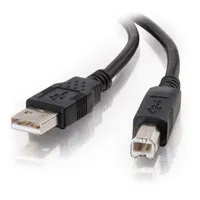
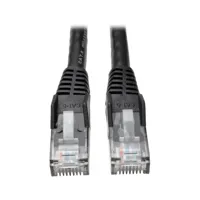
Gigabit Ethernet, Hi Speed USB 2.0 (Type A), Hi Speed USB 2.0 (Type B) (optional: Wireless Network Adapter (802.11 b/g/n/ac))
1200 x 1200 dpi, 4800 Color Quality
As fast as 6.1 seconds black and white / 6.4 seconds color
Direct Image, PCL 5 Emulation, PCL 6 Emulation, PDF v1.7 Emulation, PostScript 3 Emulation
Booklet Layout, Collation, Draft Mode, Duplex, Earth Smart Settings, N-up, Normal, One Touch UI, Orientation, Print Job ID in Margins, Print Quality, Rotate Image 180 Degrees, Saved Settings, Saved and Sample Set Job Types, Secure, Tray and Toner Status, Watermark
Apple AirPrint, Chromebook Printing, Mopria Print Service, Wi-Fi Direct
Microsoft Universal Print, Windows Server 2012, Windows Server 2012 R2, Windows Server 2019, Windows Server 2022, Windows 10, Windows 11, macOS 11.x, macOS 12.x, macOS 13.x
Xerox CentreWare Web, Xerox Easy Assist, Apple Bonjour, Email alerts, Xerox Embedded Web Server
Tray (Main tray): 250 sheets
Tray (Manual feed slot): 1 sheets
Tray (Multipurpose Feeder) (optional): 100 sheets
Tray (550-sheet Feeder) (optional): 550 sheets
Tray (Main tray): Custom sizes: 3.8 x 5.8 to 8.5 x 14" (98 x 148 to 216 x 356mm)
Tray (Manual feed slot): Custom sizes: 3 x 5 to 8.5 x 14" (76 x 127 to 216 x 356mm)
Tray (Multipurpose Feeder) (optional): Custom sizes: 3 x 5 to 8.5 x 14" (76 x 127 to 216 x 356mm)
Tray (550-sheet Feeder) (optional): Custom sizes: 5.83 x 8.27 to 8.5 x 14" (148 x 210 to 216 x 356mm)
125 sheets
Plain Paper, Light Paper, Heavy Paper, Card Stock, Labels (Paper Labels), Envelopes, Colored Paper, Letterhead, Preprinted, Bond, Glossy, Rough/Cotton, Recycled
Access Controls, Certificate Management, Confidential Print, Digitally Signed Firmware Updates, FIPS 140-2, Image Overwrite, Non-Volatile Memory Wipe, Port Filtering, Protected USB Ports, Secure Password Reset, TCP Connection Filtering, TLS 1.3, Trusted Platform Module (TPM), WPA3 Support
50 Degree F - 90 Degree F (10 Degree C - 32 Degree C)
20 - 80 % RH (Non condensing)
ENERGY STAR qualified
EPEAT
ENERGY STAR
Blue Angel
Green World Alliance
17.9 x 16.6 x 12.5" (455 x 423 x 318mm)
45.3 lbs (20.6kg)
095205041088


Simple, Reliable and Secure
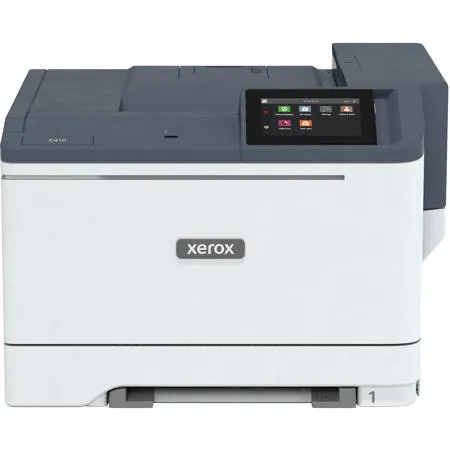
Ready to take the hassle out of hard work The Xerox C410 Color Printer provides everything you need and nothing you don't to get more done - right-sized functionality, fast print speeds, vibrant, high-quality output and optional Wi-Fi.
Setup is a snap.
Perfect for small to midsize work teams that need dependable printing, the C410 Color Printer is ready for business right out of the box. The Xerox Easy Assist App provides guided Wi-Fi setup from the convenience of your mobile phone. That means you get on with your day and start printing in minutes and not hours - all without IT support.
Conveniently compact and quiet.
Time and office space are at the top of your list of priorities. And now you can get more out of both.
Ideal for point-of-need and tight office spaces, the C410 Color Printer is quiet, lightweight and has a small footprint. Whether it's under a counter, at a reception area or on a desk, these right-sized printers fit exactly where you need them.
Make work easier.
Think you need to call IT for maintenance or troubleshooting Think again.
Advanced tools such as Xerox Easy Assist, Xerox Print Drivers and the Xerox Print and Scan Experience provide enhanced productivity features and offer a better way to install, use, monitor and manage your printer.
In addition, the C410 Color Printer is made for mobile workers like you with built-in support for Apple AirPrint, Mopria and optional Wi-Fi Direct. And with the ability to print Microsoft Office files directly from a USB drive, it's even easier to keep work moving.
Sustainable savings.
Shrink your eco impact with the C410 Color Printer. Made from high levels of post-consumer recycled plastic, these printers meet or exceed the highest global standards for environmental performance, including ENERGY STAR and EPEAT. They minimize paper waste with Earth Smart Printing, and the Xerox Green World Alliance program simplifies collection, reuse and recycling for spent imaging supplies.
Quality that can't be missed.
The C410 Color Printer elevates your everyday communications with vibrant color that creates impact, so your important documents look their best.
Print Driver: Less Effort, More Features
The Xerox Print Drivers and the Xerox Print and Scan Experience App provide quick, easy access to print functionality from your laptop or desktop.
Timesaving ease.
These tools allow you to get more out of every minute of the workday by simplifying tasks such as:
Send and release secure print jobs
Set up print jobs for custom paper sizes or specialty media (postcards, envelopes, etc...)
Save and recall presets to set up repetitive jobs in just a single click
Direct PDF printing - print PDF files without having to open each file
Monitor supplies status and view printer settings
Connectivity: Anytime, Anywhere Printing from any Device
Connectivity and convenience you can count on.
Wireless work demands wireless printing. Add optional Wi-Fi with Wi-Fi Direct to stay securely connected to your printer from your favorite devices, eliminating the need for routers or complicated setups.
Microsoft Office file formats.
The C410 Color Printer makes it easy to keep work flowing with the ability to print Office files directly from a USB drive.
Apple AirPrint
Print directly from your iPhone or iPad without the hassle of installing drivers. Instead, your Apple device will automatically locate and connect to your printer over your Wi-Fi network. Just like that.
Chromebook Printing
Print directly from your Chromebook with a simple range of print settings. Most common document types can be printed directly from your Chromebook without installing additional software or drivers.
Mopria Print Service
Android device users can quickly and wirelessly connect and print to your printer without having to install drivers or downloading additional apps or software. Just connect, print, and go. It's that easy.
Print: Future-ready Print Features
Your work never slows down. So why should your printer With fast print speeds and day-in, day-out dependability, the C410 Color Printer is made to meet the demands of modern work.
Simple Setup: Setup Is as Easy as 1, 2, 3
The C410 Color is ready to go right out of the box, so you can get up and running in no time without the headache of long, complicated installations.
The Xerox Easy Assist App eliminates the need for IT support for fast setup with guided installation of your printer from your mobile phone. Get connected to your home or company Wi-Fi in minutes and send links straight to your inbox to begin installation of print drivers with a single click - no more searching for the correct software.
Intuitive Intelligence: Intuitive Simplicity, Built-in Productivity
The large 4.3-inch color touchscreen simplifies interactions and provides clear real-time status of your printer. Whether it is releasing a print job, changing supplies, or setting up a custom print job, the user interface provides easy-to-follow, helpful feedback. That adds up to valuable time savings.
Security: Comprehensive Security
The C410 Color Printer offers comprehensive security to combat increasingly sophisticated cyber threats.
End-to-end protection.
Printers can be vulnerable to cyberattacks, especially for those working outside of the safety net provided by a corporate IT infrastructure.
With Xerox, your printer doesn't have to be your weakest security link. Our holistic, multi-layer approach to security protects against unauthorized access and keeps sensitive data and documents safe.
Security features include:
Digitally Signed Firmware Updates
Trusted Platform Module (TPM)
Transport Layer Security (TLS) 1.3
Certificate Management
Secure Password Reset
TCP Connection Filtering
Port Filtering
Access Controls
Confidential Print
Non-Volatile Memory Wipe
Protected USB Ports
Login Restrictions
Sustainability: Easy on Your Pocket, and the Environment
The C410 Color Printer helps you save in more ways than one - less maintenance, low total cost of ownership and improved eco-credentials through use of post-consumer recycled plastics and cartridge recycling.
Achieving EPEAT certification means these products meet comprehensive criteria for environmentally friendly design, production, energy use and recycling.
Our Green World Alliance program makes it easy to recycle your spent consumables and reduce your environmental impact.
Print and Scan Experience: Print from Your Computer
The Xerox Print and Scan Experience App helps you get more out of your devices, with seamless access to their capabilities right from your desktop or laptop.
The app and installer perform printer discovery and automate driver installation. Live media and toner-level reporting ensure the printer is always ready to use.
Xerox Easy Assist: Support Right from Your Mobile Phone
The Xerox Easy Assist App simplifies installation, monitoring, and management of your printer right from your mobile phone. It assists with the installation of the latest driver software for your printer on your computer, provides real-time monitoring of printer status and delivers easy access to self-support services.
866-495-6286