

See Options
Need help? Ask our experts.
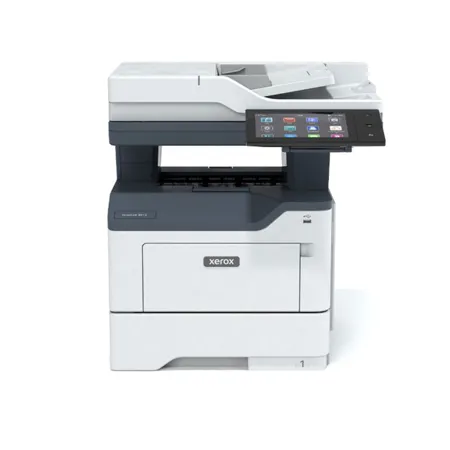
The VersaLink C415 Multifunction Duplex Color Laser Printer has a high monthly duty cycle of 125,000 pages, making it suitable for high-volume printing needs.
The VersaLink C415 Multifunction Duplex Color Laser Printer offers a range of connectivity options, including AirPrint, Ethernet, NFC, USB, and Wi-Fi.
The VersaLink C415 Multifunction Duplex Color Laser Printer features smart, multi-layered security measures that work to protect your data and documents from unauthorized access and potential threats.
Yes, the VersaLink C415 Multifunction Duplex Color Laser Printer is composed of more than 25% post-consumer recycled plastic and meets or exceeds globally recognized standards for product environmental performance, including EPEAT, Blue Angel, and ENERGY STAR.
Review Summary
2026-06-08T20:00:00
This printer recently replaced our basic HP office printer. This Xerox model is unnecessarily complicated and often has long wait times when attempting to perform basic functions. Employees constantly have to shut the printer down completely to perform functions. The touchscreen display will often zoom in or out unitentionally. The printer is also the size of a 1990s Chevrolet Silverado.
I H.

2026-06-04T20:00:00
I bought this about 3 weeks ago. No instructions. Hard to set up. Prolonged pause to print first page. Cannot use old Xerox scanner interface. Current one does not have a way to name the new scan.
do o.
2026-05-13T20:00:00
This machine has all the functions we were looking for to replace our old business machines that were leased. Email & scan to folder are features our furniture stores use a lot. The quality of the outputs are not great. Printing from the web is ok, but there is a lag time. When you make a color copy from original, colors do not match or come close. There is a huge difference even after attempts to calibrate and run updates by their customer support. I purchased high-capacity toners with machine purchase 2 months ago, and it's made about 4000 prints. The toners are at 10% for the 3 colors, 40% on the black. At almost $1000 for a set of 4, thanks ridiculously expensive to operate. The paper drawer does not hold a full ream either, only about 200 sheets.
Norris S.
2026-05-13T20:00:00
This is my 2nd VersaLink as I phase out some old Lexmark printers.
Doug
2026-05-11T20:00:00
Previous Xerox Printers have been tremendous devices- Would expect the same from the VersaLink Multifunction
Dr C.
2026-04-17T20:00:00
I bought this about one month ago and am super happy.
Legal1993
2026-04-05T20:00:00
Have had the printer for several years and much of it we do not use because the lack of directions for setup and what there is is unuseable. No support available to assist
Dennis
2026-02-07T19:00:00
I bought this fax machine, but I couldn't use because it has no WiFI adaptor, Now I have to Waite a week to receive this part & pay for it, extremely bad business, Also I do not know yet if this machine actually will work
wecare
2026-02-05T19:00:00
I can't give an accurate rating because I have never used this printer. I currently have a Xerox WorkCentre 6515 that keeps jamming on me. It is no longer under warranty, it's not on any service maintenance plan being that it's an at home personal use unit. I was thinking of upgrading & this printer caught my eye. My concern is it has a lot of 1 star ratings. I want to ensure if I do go with this model, I'm going to get the support I need. I am a senior disabled vet on a limited income. I can't afford Xerox's fee to have someone come out to repair my 6515. Should I chance it & get this equipment or pass?
TJinMaryland
2026-01-14T19:00:00
I bought the printer last month, but it failed on me on my first few prints. I called Xerox to come and get it fixed (brand-new!!!), but no one has contacted me for a couple of days.
BenZ
2025-12-21T19:00:00
We have a history of using xerox machines for multiple businesses with great performance. Just purchased this one for that reason and we received the printer and couldn't use if for Two WEEKS due to a problem with quality control! Dealing with their service system was a nightmare, barely speak English can't understand US and we can't understand them. Finally resolved after HOURS on hold over multiple calls. Service line needs to be based in the USA. Sad to see what used to be a solid company functioning this way. Regret the purchase now.
larryg
2025-12-14T19:00:00
This was a replacement for a Xerox Work Center 6515. We were happy with it, but it "died". I like the Versalink C415 even better.
Jakey
2025-11-06T19:00:00
This printer has been amazing! My husband runs a business and he is constantly printing stuff for work. It is fast and the the print quality is amazing. The setup was a breeze and the large screen shows all the steps and different options it has. We love it!
trenac2_4620
2025-11-05T19:00:00
I use this printer for general marketing material. The quality is not as good as professional but still nice enough for everyday. I am a little disappointed that the ink cartridges don't last as long as I would have expected. Set up was a little awkward, and I had to call in the younger generation who still struggled a little. Even still, it is a nice printer.
Chief W.
2025-10-13T20:00:00
We bought this product during the summer for the upcoming school year and the product has worked out well and is very dependable
Dee55
2025-10-06T20:00:00
Since installation, we've had nothing but problems. Prints two copies; stops. Resources required. IT checks it out. All seems fine. Prints out a copy. "Waiting to print." Goes into waiting mode. Then goes into Waiting to Print. For hours. Delete jobs. Shut printer down, and unplug. Wait an interminable time to power up. Prints two copies. Go through the whole cycle again. When it does deign to give us a copy, the quality is good.
Discouraged
2025-10-01T20:00:00
Historically, we have not had great luck with our printers. This printer, however, has been pretty perfect. It is fast and has all the features we want. We tend to go through a lot more ink than I would've expected, but I can't blame the printer for that. We did have to call customer service at one point because of an issue, and the person that helped me was very helpful and resolved the problem which I really appreciated
JenT
2025-10-01T20:00:00
The Xerox VersaLink C415 has been an excellent addition to our office. Setup was straightforward, and the large touchscreen makes it feel as easy to use as a tablet. Print quality is sharp and vibrant, even for detailed graphics, and the speed easily keeps up with our busy workflow. I especially appreciate the secure printing options and cloud connectivity, which let us print from anywhere without hassle. Scanning and copying are equally smooth, with high-quality results every time. Overall, the VersaLink C415 combines professional performance with user-friendly design, making it a smart investment for any business that values reliability and efficiency.
canijolagartijo
2025-09-24T20:00:00
I purchased a Xerox C415 used on eBay to test before submitting a larger order for 10 units. I'm glad I did, because while the printer's core functions and output quality are solid, the design of the output tray poses real usability challenges. Collecting prints requires reaching uncomfortably far into the machine, which is not practical in a busy office setting. In addition, the output flap occasionally catches paper, causing the front compartment to pop open. These design flaws can slow down workflows and create unnecessary frustration for end users. Suggestion for Xerox: A reworked output tray-ideally one that extends outward or angles prints toward the user-would go a long way toward resolving these issues. Improving this element would make the C415 much more viable for organizations looking to standardize across multiple devices. The reason I'm sharing this publicly is because the C415 otherwise has strong potential, but this design oversight prevents it from being the right fit for our environment. I hope Xerox takes this feedback into account for future models, as many organizations evaluate printers not only on output quality but also on how easy they are to use day to day
searobit
2025-09-10T20:00:00
We had a C405 that worked great. We "upgraded" to the C415 - what a mistake. Just about every time we try and print it makes us change paper from plain white to pre-printed form - for no reason. It can be from the same application printing a second document. The C405 just printed - whether it was a check or a document. And there is NO WAY TO TURN OFF this "feature". I wish we had stayed with the C405.
Andy57
2025-08-17T20:00:00
We have owned this printer for several years now with no issues. Very dependable machine.
MaryU
2025-07-23T20:00:00
I could not ask for a better printer. The print quality is 10/10, it's fast, and surprisingly enough very quiet. It has an auto sleep feature when not in use so you don't need to power it on and off constantly. The touchscreen is easy to use and intuitive. I like that you can download apps to handle all of your printing and scanning needs. (e.g. scan to email, print/scan directly from one drive or Dropbox). If your device for some reason isn't comparable to use directly, being able to access files from the cloud makes this printer a game changer. The mobile app is very user friendly. This printer is quite large, but so worth it. So far, I do not have any negative feedback. I just started working from home and this has been absolutely perfect.
nicholeb1_1889
2025-07-21T20:00:00
I received the Xerox VersaLink C415 Color Multifunction Printer free from Influenster, and I absolutely LOVE it. As a busy real estate professional, I'm constantly printing flyers, contracts, checklists, and more. This printer has become a total game changer. Setup was incredibly easy. In fact, my 12-year-old configured it for me without a hitch! That's how intuitive and user-friendly it is. The print quality is crisp and professional, which is essential when I'm handing materials to clients. I also appreciate the multifunction capabilities: it scans, copies, and prints effortlessly. Whether I'm working from home or prepping for a showing, the Xerox VersaLink C415 keeps up with all the demands of my business. Highly recommend to any small business owner or entrepreneur looking for reliable performance and sleek functionality. Thank you, Influenster and Xerox, for making my work life easier!
kristinen38c6_389
2025-07-21T20:00:00
One of the best printers I have used for my office. It is easy to install and connect. The quality of the printouts are unbeatable and it is quick to perform. It us saving me so much time and effort.
martinas123_9503
2025-07-19T20:00:00
We have this printer set up in our home office (my husband work from home) and I am so happy we replaced our precious printer with this. It handles large jobs effortlessly. The print quality is great and it prints so fast. We've been using this printer every single day for a little over a month now and have not had any problems with it. I'd highly recommend it for any small business or home office.
thanllj_5291
2025-07-17T20:00:00
Wow. I feel so blessed to have received this amazing dual printer Xerox machine to review. The ease of use first of all has been so insane and unlike any other printers I have used in the past. I feel like the user was really put in mind when creating this printer. It is multi use, amazing printing quality, and quick and easy. I never get paper jams and have a fairly decent time connecting to my laptop for print jobs. I would recommend this machine to any small office looking for an upgrade. It has helped me out tremendously.
ginagiselle_9147
2025-07-16T20:00:00
Purchased the unit several weeks ago, and am impressed with the capabilities and function. Print quality and speed are excellent as described, and the unit was easy to learn to use.
LawOffice
2025-07-15T20:00:00
I was super excited to use this printer with my small business. I do a lot of shipping so this printer was going to make things easier. Unfortunately during set up it would not let me fully install due to my computer being a MacBook.
thee_ashleigh_8517
2025-07-10T20:00:00
This thing is fast, reliable, and packed with features. Quality is excellent, and the touchscreen makes it easy to use. Setup can be tricky- I had a hard time connecting it to the app and it seems the refill toner costs are high- I looked after unboxing, but overall it's a solid choice for small offices vs a home printer! It's a pretty cool printer!
brandien4_9817
2025-07-06T20:00:00
This printer is amazing! It prints quickly and nicely! It's easy to use and set up as well. Connects to my WiFi and I can use any device to print from with it! Handles the paper well too. Nothing has gotten jammed so far! It goes to sleep once it hasn't been used for a bit which helps on saving energy too! This is going to be a great thing to have at my desk now that I work from home! The scanning option works great as well! Things are copied crisp and clean!
jessicah919_5666

Accidents happen where life happens. Protect your favorite Adorama products and purchase a protection plan to stay covered from accidental damage, mechanical or electrical failure, and more.

If we can’t fix it, we’ll replace it at no additional cost.

Protect your product from drops, spills, and more.

Enjoy your gear without fear. We have you covered!

When regular use of your product over time results in mechanical or electrical failure.

We will never charge you a deductible after the purchase of a plan.

Our claims process is simple & easy and our customer service team is happy to help.
Adorama Protect powered by Extend is available for purchase to customers in the United States. Not available for purchase Internationally or in U.S. Territories.
Browse our FAQ
Copy, Email, Fax, Print, Scan
500+ GB Hard Disk, Wi-Fi Printing
Color: up to 42 ppm
Black: up to 42 ppm
Laser
Up to 10,000 pages
Up to 125,000 images/month
251 Sheets
1,451 Sheets
Standard
Gigabit Ethernet 10/100/1000, Hi Speed USB 2.0 (Type A), Hi Speed USB 2.0 (Type B), NFC (optional: AirPrint (iOS) including iBeacon (Bluetooth), Wi-Fi (802.11 b/g/n/ac), Wi-Fi Direct)
600 x 600 dpi
As fast as 6.2 seconds black and white / 7 seconds color
Annotation, Authentication for Services, Auto Paper Select, Auto Reduction & Enlargement, Auto Tray Switching, Automatic 2-sided/Duplex Booklet Creation, Bates Stamping, Build Job, Collation, Covers, Dividers, Edge Erase, Features Help, ID Card Copy, Image Quality Adjustments, Image Shift, Invert Image, Large Job Interrupt, Multi-up, Sample Set, Save Job Settings, Touchless Workflow Accelerators
1200 x 1200 dpi (up to 1200 x 1200 enhanced image quality)
As fast as 6.2 seconds black and white / 6.8 seconds color
1.2 GHz
Quad Core
4 GB standard
Adobe PostScript 3, Adobe PDF, PCL 5c, PCL 6
Application Defaults, Bi-directional Real-time Status, Booklet Layout, Encrypted Secure Print, Hold All Jobs, Job Identification, Job Monitoring, Print Around, Print from Cloud Repositories (Dropbox, OneDrive, Google Drive), Print from USB, Print on Alternate Paper, Scaling, Store and Recall Driver Settings, Two-sided Printing (as default), Xerox Earth Smart Driver Settings
Apple AirPrint, Mopria Print Service, Xerox Print Service Plug-in for Android Printing (optional: AirPrint (iOS) including iBeacon (Bluetooth), Wi-Fi (802.11 b/g/n/ac), Wi-Fi Direct)
FTP, HTTP, HTTPS, SFTP, SMB, Scan to Network, Scan to USB, Scan to email
JPEG, PDF, PDF/A, TIFF
Other solutions available through various Xerox Business Innovation Partners at xerox.com/Software-Solutions, Print from and Scan to Xerox DocuShare Go Content Management Platform, Scan to Cloud Repositories (Dropbox, OneDrive, and Google Drive), Xerox Scanning App for DocuShare
1-Touch Apps, Password-protected PDF, Scan to Folder, Scan to Home, Single/Multi-Page PDF/TIFF, TWAIN support, Touchless Workflow Accelerators, Unified Address Book
Direct Fax, Fax Forward to Email, Fax dialing, LAN Fax, Server fax, TWAIN driver, Unified Address Book, Walk-up Fax (optional: Scan to Cloud Repositories (Dropbox, OneDrive, and Google Drive))
JBIG/SG3, MH/G3, MMR/SG3, MR/G3
Xerox CentreWare Web, Xerox Easy Assist, Xerox Workplace Cloud, Automated Meter Read, Configuration Cloning, Fleet Orchestrator, Xerox Support Assistant
Cloud-based remote management with Xerox Workplace Cloud, Managed Print Services Suite
Configuration Cloning, Configuration Watchdog, Fleet Orchestrator, Remote Control Panel, Security Dashboard, Unified Address Book
Android, Fedora Core, Mac OS 13.x,12.x, 11.x, Ubuntu, Windows 10, Windows 11, Windows 8.1, Windows Server 2012 and R2, Windows Server 2016, Windows Server 2019, Windows Server 2022, iOS
73
93
251 sheets
1,451 sheets
150 sheets
Single-pass Duplex Automatic Document Feeder (DADF)
Capacity: 100 sheets
Tray (Manual feed slot): 1 sheets
Tray (Main tray): 250 sheets
Tray (550+100 Sheet Tray) (optional): 650 sheets
Tray (550-Sheet Tray) (optional): 550 sheets
Tray (Manual feed slot): Custom sizes: 3 x 5" to 8.5 x 14" (76 x 127mm to 216 x 356mm)
Tray (Main tray): Custom sizes: 3.8 x 5.8" to 8.5 x 14" (97 x 148mm to 216 x 356mm)
Tray (550+100 Sheet Tray) (optional): Custom sizes: 3 x 5" to 8.5 x 14" (76 x 127mm to 216 x 356mm)
Tray (550-Sheet Tray) (optional): Custom sizes: 5.5 x 8.3" to 8.5 x 14" (148 x 210mm to 216 x 356mm)
Plain Paper, Light Paper, Heavy Paper, Letterhead, Cardstock, Recycled, Bond, Labels, Glossy, Vinyl, Pre-Printed, Envelopes, Colored Paper, Rough Cotton, Custom
802.1x, AES 256-bit Encryption, Access Control, Audit Log, Automatic Self-signed Certificate, Cisco Identity Services Engine (ISE) integration, Common Criteria Certification, Configuration Watchdog, FIPS 140, Firmware Verification, HTTPS, IPsec, Image Overwrite for optional hard disks, Job Level Encryption via HTTPS and Drivers, Local Authentication (Internal Database), LogRhythm SIEM integration, Network Authentication, Port/IP/Domain Filtering
SFTP and Encrypted Email, SHA-256 Hash Message Authentication, SNMPv3, Secure Print, Security Certificates utilizing ECDSA, Security Manager, Signed Email, Splunk SIEM integration, TLS1.1/1.2/1.3, Trusted Boot, Trusted Platform Module (TPM 2.0), User Access, User Permissions
Xerox Workplace Cloud, Xerox Workplace Suite, Hard Disk (AES 256-bit) with multi-pass Image Overwrite (coming soon), Xerox RFID Card Reader
50 Degree F - 90 Degree F (10 Degree C - 32.2 Degree C)
15 - 80 % RH (noncondensing)
EPEAT
ENERGY STAR
Green World Alliance
18.9 x 18.7 x 19.3" (478 x 475 x 491mm)
59.5 lbs (27.1kg)
095205041118

Make your office operations seamless with the VersaLink C415 Multifunction Duplex Color Laser Printer, a high-quality, reliable, and durable solution for all your printing needs. This multifunctional printer is designed to handle high-volume printing with a monthly duty cycle of 125,000 pages, making it an ideal choice for businesses that require fast and efficient printing solutions.
The VersaLink C415 stands out with its high-resolution output of 1200 x 1200 dpi, delivering sharp text and outstanding image quality. Whether you're printing in color or monochrome, this printer ensures every print pops with clarity and vibrancy.
This printer is not just about superior printing; it also offers a range of connectivity options. With AirPrint, Ethernet, NFC, USB, and Wi-Fi capabilities, you can easily print from various devices, enhancing your office's productivity and flexibility.
The VersaLink C415 is powered by advanced Xerox ConnectKey Technology, transforming it into a modern Workplace Assistant ready to tackle any task. Its intuitive touch screen interface provides easy access to the Xerox App Gallery, offering a variety of apps to further enhance your office operations.
Security is a top priority with the VersaLink C415. It features smart, multi-layered security measures that work tirelessly to protect your data and documents from unauthorized access and potential threats.
In addition to its impressive performance, the VersaLink C415 is also environmentally responsible. Composed of more than 25% post-consumer recycled plastic, it meets or exceeds globally recognized standards for product environmental performance, including EPEAT, Blue Angel, and ENERGY STAR.
The VersaLink C415 Multifunction Duplex Color Laser Printer is more than just a printer; it's a comprehensive solution for modern, mobile work. With access to popular cloud storage platforms and wireless flexibility, it allows you to work when, where, and how you want.
Experience the power of the VersaLink C415 and elevate your office productivity to new heights.
866-495-6286
