
This item is no longer available.
Review Summary
2020-05-19T20:00:00
It's just a piece of useless junk, waste of money, time, and mental health. This YWA-10 WILL NOT CONNECT BY ANY MEANS. Just forget about it and move on. Yamaha - deeply disappointed. (Couldn't be bothered writing my own complaint. Just more wasted time)
Laurie

2018-02-02T19:00:00
Waste of money! Worked OK the first year. After the, nothing but intermitted error messages that I can't connect to the internet. Buy something else!
MLB
2018-01-18T19:00:00
junk. drops signal repeatedly. replaced with a less expensive netgear wnce2001 bougt cheap on ebay and it is flawless. no signal drops no need to reboot receiver and ywa-10.
khunter
2014-08-14T20:00:00
Set up just doesnt work. Yamaha reciever info window shows unit connected, ip address, network name. Ip does not connect in manual ip. Manual set up equally useless. Maybe 1 in 100 times of trying to do this has set up window opened and allowed access. Once acess achieved one is confronted by blank fields with no clue where to find required info. Ofcourse once wrong info invariably input set up window fails and can no longer be opened. First purchased 2 yrs ago. Same problem except brand new. Much time spent on phone with tech support. Waste of lots and lots of time. They couldnt figure it out. Hired IT guy, $100, 3 hours, and finally found ip that would connect to app, though he was uncertain how. Since then ip has randomly changed, but able to find new ip in yamaha info window. Have also reset successfully after power outages. Recently reset router. All other wifi devices easily reconnected except for the blatently false easy connect ywa-10 wi fi adapter.
displaced p.
2014-07-26T20:00:00
Instructions very incomplete need to be simplified
t_man
2014-03-24T20:00:00
screen says successful, then not, then loading, and back to error. maybe the unit is defective.
Stu
2014-02-11T19:00:00
A few months ago, I gave a very good recommendation on the YWA-10. However, since then I have had constant connect problems, and I can no longer recommend this product. I am hoping that Yamaha decides to update the firmware with the solution.
John D.
2014-01-26T19:00:00
It is none of the modern plug-n-play products available on the market. If you think of buying YWA-10 then consider either sth else than Yamaha or a receiver with built-in WiFi. It's just a piece of useless junk, waste of money, time, and mental health. I have connected 11 other devices to my WiFi network just by entering access password. This YWA-10 WILL NOT CONNECT BY ANY MEANS. Just forget about it and move on. Yamaha - deeply disappointed.
Antoni B.
2013-12-28T19:00:00
this device is the worst, I have a feeling the ratings on her here rigged because if you go elsewhere to see user reviews you see over half or more of them are bad reviews. And most that gave it good reviews are because it worked once or twice when first setup then realized how buggy and it was with constant disconnects in the middle of playing music. Here's my nightmare: I have $8000 invested in my home theater all yamaha which I loved and because if this device now hate. I got my rx-a3020 over a year and a half ago and can't stream music like was advertised. I first was streaming through itunes on my pc and blamed it on my virus program so I shut that off, worked periodically but not working more then working. Then I thought maybe it was my network driver so I updated those and didn't work so I rolled them back to manufacturer approved drivers then I reformatted my hard drive and re-installed my O.S several times. Then I thought it was my d link router so I purchased a new router that didn't work so I thought the new router might be bad so I purchased a top of the line worlds fastest netgear A/c router. Then I purchased Apple TV and guess what... Apple TV connects and is always connected and works but it doesn't run all my channels of music because Apple TV doesn't support it, after a year and a half of this junk I did research and found hundreds of people also saying how bad this adapter is, so unless I'm watching a movie my $8000 system is junk for music and I was mislead. And I also did manual connection with this adapter still nothing,
Neo
2013-12-20T19:00:00
Very simple, just follow the instructions and your connected.
Tradervic
2013-12-05T19:00:00
This connects once every dozen attempts and works for awhile before dropping the wireless connection.
Daniel
2013-11-28T19:00:00
I have the YWA-10 hooked up to my RX-V475 receiver to provide a wireless internet connection for Pandora. I frequently get an "access error" message when trying to listen to Pandora. Sometimes the message displays at start up, sometimes after Pandora has been streaming, and sometimes several times a day. Very frustrating and apparently I'm not the only person experiencing this issue. The device is properly configured. Restarting the device overcomes the problem - temporarily. No other wireless device in my house exhibits such connectivity behavior including a Sony Blu Ray player (which has built-in wi-fi and features Pandora) and sits right below the Yamaha equipment. Ugh!
Johnny
2013-10-12T20:00:00
Requires manual setup with TV monitor and laptop with Apple time capsule, not user friendly. Worked fine after initial setup then started dropping or locking up every few hours requiring power reboot to work again (making remote control with yamaha app frustrating). Extremely disappointing
Rellimjj
2013-10-06T20:00:00
Because most Yamaha AV receivers don't have Wi-Fi included, this is a must have product in order to receive product updates and to connect to internet radio and Pandora. Set up is cumbersome but once it's connected, it's very useful.
DCMORENO
2013-09-24T20:00:00
After numerous attempts and speaking with local dealer I have not been able to set this up. I have an Apple router, and have numberous computers, printers, ipads, smart tv, iphone, working on this network. Really frustrated as I just purchased a new Aventage RX-A730 receiver and cannot get full functionality. I went through the set up process on the PC and item would not work. Attempted the setup process again and now cannot get to the web page using either IP address or ywa.setup. Waiting for tech support to respond and help me out. Talked to the dealer and he said he would take item back and provide refund. I cannot believe how difficult this is to set up. Any other item you plug in, enter SSID and password, and done.
Grasshopper
2013-09-01T20:00:00
This unit links my Yamaha RX-V475BL AV RECEIVER with my computer and allows me to play my iTunes, Internet radio stations, USB audio files, and preferred Internet music sites to my receiver. The sound quality is excellent, especially on bass. I have had no problem with it at all. The set up was easy because I have the automatic setup feature, WPS, on my modem and this unit. Just push the buttons in the correct order and they connect almost immediately. If you do not have the automatic setup feature, WPS, on your modem, then it might be more difficult, but can be done manually according to the instructions.
John D.
2013-07-06T20:00:00
I bought my YMA-10 about 5 months ago to connect with my yamaha RX-V673 receiver. Initially, following the manual setup instructions (my wifi router/gateway has wps, but the yma-10 WPS automatic connection wouldn't work) the adapter connected perfectly and worked well. At one point I shut off and un-plugged my receiver. I could never get the YMA-10 to connect to the wifi again. I re-connected the device to my laptop, and tried re-setting and rebooting the device numerous times as described in the instructions, tried to re-connect to the wifi but, I never could get it to work. Only intermittently could I connect to the device via its IP address and see the setup menus (I could never use the yma.setup url suggested by the instructions), but mostly, my browser would just return with an error that it couldn't connect to the device, the device at the IP address was not available. Even when connected, tried both the connection wizard and the manual connection menus, I could not succeed to connect to my wifi, even though the same settings work successfully with all other devices (phones, xbox, laptops) that my family uses. I spent several hours trying to get the yma-10 to work again. Pretty frustrating. I liked it when it worked. I think that I will try another manufacture's device.
dmt
2013-06-26T20:00:00
Having a second Ethernet port is handy for my RaspBMC. I do not broadcast my network's SSID, so I have to manually configure the network. No big deal, but when the power takes a hit, the YWA-10 loses its programming and you have to connect it back to a laptop to reconfigure it. It needs to save this to NOVRAM, so it will comeback up with the power. It would be nice if you could label the ports with what is connected to them.
Sarpaul
2013-03-08T19:00:00
Product provides seamless networking without having to run a cat5 cable and install a wall plate. Using with a Yamaha a720 receiver that is replacing a 25 year old Preamp/multiple amp system.
Louis
2013-01-13T19:00:00
Difficult to install since I have Apple Airport Express Wireless. Installed it after several tries and customer service phone calls. Had to install the DC power from the front of my RX-V671. Not totally keen on that. Takes time to connect to the WiFi. Overall satisfied.
NT
2012-12-17T19:00:00
Purchased this to wirelessly connect my Yamaha RX-V673BL receiver to my internet router. It seemed incapable of maintaining the connection to the router. While playing music from Pandora or internet radio, every hour or so the music would stop and an Access Error wouild show on the display. After a repeated attempts I would be able to restart the music only to get another Access Error message. At first I though the signal from my router might be too weak, even though the internet connected TV and BluRay that stood next to the receiver had no problems staying connected. I tryed installing a router range extender closer to the unit but this did not help. I finally gave up and returned the unit.
Lenny
2012-12-13T19:00:00
As far as I can tell, this is just a wi-fi router that is powered by the USB connection. WPS is also potentially dangerous as it can be hacked into and your wi-fi passwords can be gotten. Another silly thing is that if your Yamaha receiver has its USB on the front (mine does) a cable will be sticking out from the front all the time! For the same amount of money (but minus one ethernet port) I think I would rather get an Apple Airport Express. In my case, I will just repurpose an old first gen aging Airport Extreme to the stereo equipment and buy a new Airport Extreme as my main wi-fi base station. Originally I tried to extend the network out to the stereo using a first gen Airport Express "g" but, that model does not let you activate the ethernet jack on it when in that mode. Newer "n" Expresses do. Yamaha should just include wi-fi in its networkable receivers. It is crazy that I can buy a Roku with latest wi-fi and bluetooth for $100. Audio companies still do not get it!
Thinker
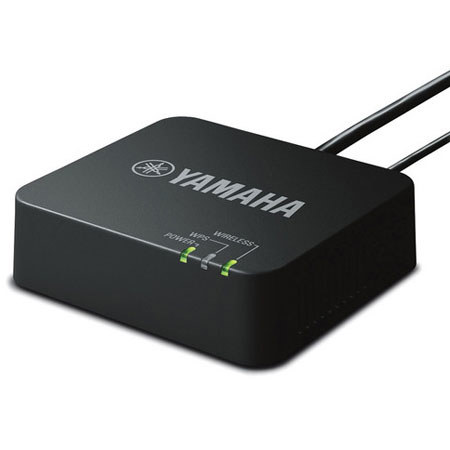
The Yamaha YWA-10 Wireless Network Adapter can be used to connect a Yamaha network AV receiver to a wireless home network. The YWA-10 connects to the Ethernet port on the back of your Yamaha network receiver and communicates directly with your wireless router. It's powered by the DC out jack or USB port of the receiver, so there is no need to take up an additional electrical outlet. The YWA-10 even has a second Ethernet output that can be used to provide network access to another device such as a Smart TV or Blu-ray Disc player.