Share:
New Arrival
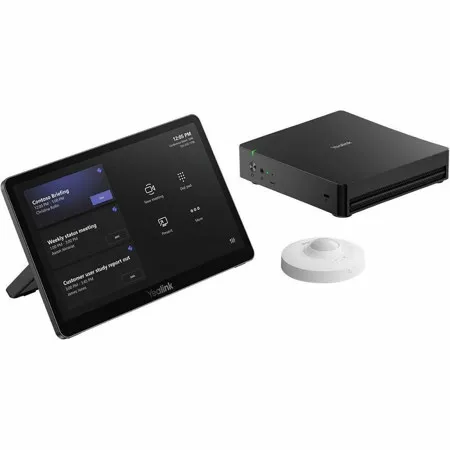
Yealink MCoreKit-C5U Base System Kit with MCore 4 Mini PC, MTouch Plus 11.6" Controller and RoomSensor for Microsoft Teams Meeting Room
SKU: YE1206709 MFR: 1206709
$2,799.00
$2,999.00
Save: $200 (7%)OR
Key Features
- Experience top performance with the Intel Core Ultra 5 125H processor for seamless Microsoft Teams meetings.
- Enjoy a great value with this comprehensive kit, including a Mini PC, touch controller, and RoomSensor.
- Benefit from a durable build, ensuring reliable operation and long-lasting use in your meeting spaces.
- Achieve easy setup with Windows 11 IoT Enterprise and pre-installed Microsoft Teams rooms app.
- Ensure seamless compatibility with your existing Microsoft Teams ecosystem for enhanced collaboration.
- Trust in the reliable Yealink brand for high-quality, efficient, and innovative meeting room solutions.

Need help? Ask our experts.
Overview
Compare
Specs
Protection
About Yealink MCoreKit-C5U
Basic Component of Microsoft Teams Room System
The Yealink MCoreKit-C5U is a state-of-the-art solution designed to elevate Microsoft Teams Rooms, delivering a seamless and intelligent video conferencing experience. This powerful combination integrates the high-performance Mini-PC MCore 4, the intuitive large-screen touch panel MTouch Plus, and the detect sensor RoomSensor, working in unison to enable seamless automation and intelligent integration within conference rooms.
The MCoreKit-C5U ensures a smooth and efficient meeting experience with its native Microsoft Teams user interface, allowing users to effortlessly start and manage meetings with one-click controls. Powered by the Intel Ultra 5 125H processor, the MCore 4 delivers outstanding data processing capabilities and powerful AI computing power, offering every participant an immersive video conferencing experience.
Additionally, to streamline meeting control, the MTouch Plus features an 11.6-inch touch interface for intuitive device operation, while the RoomSensor intelligently detects the occupancy status of the meeting room and simultaneously displays real-time environmental metrics like temperature and humidity on the MTouch Plus interface, delivering intelligent room management solutions.
To cater to diverse meeting scenarios, the MCoreKit-C5U supports flexible connectivity options for audio devices and cameras, allowing users to choose between wired or wireless configurations. It also supports both wired and wireless screen sharing, enabling participants to share content effortlessly and enhance collaboration. Meanwhile, the system's simple deployment and remote management capabilities make it easy to install and maintain, reducing setup time and operational complexity.
Seamless Meeting Experience with Native Microsoft Teams Integration
The entire MCoreKit-C5U bundle is equipped with a native Microsoft Teams user interface, ensuring a familiar and intuitive experience for users. The MTouch Plus touch panel provides easy access to one-click conferencing, call control, camera adjustments, and content sharing, while the RoomSensor automatically monitors the meeting room's occupancy status. This seamless integration ensures that meetings start effortlessly and run efficiently, enhancing productivity and collaboration.
Outstanding Data Processing Capability
At the core of the MCoreKit-C5U is the MCore 4, powered by the Intel Ultra 5 125H processor, boasting exceptional data processing capabilities and powerful AI computing capabilities with its NPU. It ensures smooth and efficient meetings, enabling intelligent conferencing features. The MCore 4 empowers smart meeting rooms, providing a stable and efficient operating environment for immersive remote communication.
Real-Time Content Sharing for Enhanced Collaboration
The bundle supports both wired and wireless content sharing for maximum flexibility. Wireless content sharing is made simple with the WPP30 adapter, enabling one-click sharing at 1080P/30fps resolution for a superior viewing experience. Wired sharing is also available via USB-C or HDMI ports. Additionally, the MCore 4 is equipped with an HDMI-In interface, supporting 4K resolution auxiliary stream input to ensure lossless image presentation, further enhancing the content-sharing experience.
Flexible Audio and Connectivity Options
The MCore 4 is equipped with a rich array of ports, including VCH, USB, and HDMI-In, providing versatile connectivity options for various peripherals. Users can choose between wired or wireless microphones, ensuring crystal-clear audio quality in any environment.
The MCore 4 also supports seamless connectivity with camera devices such as the AVHub or SmartVision 80 via the USB port. When multiple cameras are connected to the AVHub, the system expands its range of connected video devices, enabling single or multi-camera AI tracking modes to intelligently frame each active participant. This flexibility ensures that the MCoreKit-C5U can adapt to diverse meeting scenarios, from small huddles to extra-large conference rooms, delivering a tailored and immersive experience.
Simple Deployment and Easy Use
The MCore 4 and MTouch Plus offer multiple installation options, allowing users to choose the most suitable deployment method based on the actual layout of the meeting room. With flexible installation methods, these devices can be positioned to make full use of every corner of the conference space.
A single CAT5e cable is sufficient to connect the MCore 4 and MTouch Plus, enabling both data transmission and power supply without the need for additional cables or power sources. Additionally, the RoomSensor operates via Bluetooth (BLE), eliminating the need for extra cables to reduce the complexity of cabling and simplifying device deployment, making the system easier to install and maintain.
Remote Device Management
These devices can support the Yealink Device Management Platform/Cloud Service, enabling remote management, monitoring, configuration, updates, and diagnostics of all connected devices. This feature ensures that your meeting room is always up-to-date and operating at peak performance.
- MTouch Plus 11.6" Touch Controller -
With a spacious 11.6-inch 1080P IPS screen, the new MTouch Plus offers a remarkable control experience, ensuring enhanced visibility and convenience. The sleek space black design and premium texture make it an ideal fit for your elegant meeting rooms.
Unleash Multi-Screens Potential
With the Yealink MTouch Plus-EXT, you can set up multiple touch panels in the same room for flexible collaboration needs. This allows participants to control the camera and switch layouts from different areas of the room at the same time. (Sold Separately).
- RoomSensor -
Enterprise Multifunctional Wireless Occupancy Sensor
Yealink RoomSensor, the enterprise-level wireless Passive Infrared sensor (PIR sensor), is enabled for multiple sensing features of space occupancy, light condition, temperature and humidity, etc. With the built-in Bluetooth 5.0 and lithium battery, it's compact and cable-free to deploy. Moreover, the RoomSensor can be associated with various IoT devices and Yealink Workspace Management Platform, to build an intelligent and energy-efficient workspace.
Remarkable Sensitivity, Reliable Transmission
Featuring passive infrared (PIR) technology, Yealink RoomSensor performs excellent occupancy detection with remarkable accuracy. The built-in Bluetooth 5.0 keeps the signal transmission stable and reliable.
Ideal and Scalable Solution for Multi-size Space
As a compact all-in-one sensing appliance, a single RoomSensor is ideal for usage in huddle to medium meeting rooms. And for large-sized ones, a multi-sensor network via Bluetooth mesh can be adopted to implement broader coverage.
Cable- and Trouble-free Installation
Powered by the replaceable lithium battery and wireless connectivity, the RoomSensor can be deployed without any cable. The magnetic design also makes the installation/maintenance easy and convenient. Moreover, the adjustable "lens" allows for different sensing area configurations and adds more adaptability to the deployment.
Integrate with IoT Terminals Bring About Smart Workspace
The RoomSensor is eligible for coordinating and linking with other intelligent IoT terminals, bringing features such as automatic check-in, lighting control, meeting room release and so on, to transform the traditional meeting rooms into smart workspace.
Occupancy Sensing
Auto room release/reservation by pairing with the RoomPanel through Yealink Workspace Management Platform.
Lighting Sensing
Auto light switch on/off based on ambient light condition detection via the connected light controller.
Temperature Sensing
Auto environmental adjustment for pleasant meeting space by associated with gateway to control air conditioner.
Yealink MCoreKit-C5U Features
- Native Microsoft Teams interface with one-touch meeting controls
- Intel Ultra 5 125H processor delivers powerful AI-driven performance
- 11.6" touch panel with real-time room status monitoring
- 4K content sharing for seamless collaboration
- Flexible audio and camera connectivity for any meeting space
- Remote device management with easy deployment and updates