
Orders placed during Passover Holiday (Wed 4/1 after 4PM ET – Thurs 4/9) will ship Fri 4/10. View our holiday shipping schedule.
This item is no longer available.
Review Summary
2015-12-06T19:00:00
If only I could buy two of this, I will. But that is absurd.
Paul J.

2014-03-15T20:00:00
I pre-ordered the MX-61 last year after having read about it and stalked reviews and demonstrations from the European release and eventually the winter NAMM show. It's been just over a year since it was delivered to my local music shop. I had an old digital 88 key console keyboard with fully weighted keys that died about a year earlier and I was looking for a keyboard/synth to replace it. I considered keyboard controllers coupled with software and keyboard/synths and determined for my casual use, the MX-61 was as near perfect a match for me. I especially was looking to get away from the fully weighted piano-like keys from my old deceased digital piano. The voices, the arpeggio options, the built-in performances all contribute to a great starting point. Where to go from there is limited only by my (or most user's) imagination. Although I have had the MX-61 for a full year now, I feel I have only scratched the surface of it's capability and the enjoyment it will bring me.
mx61_fan

2014-02-04T19:00:00
I was looking for a keyboard to do my own score's for the videos I produce. The Yamaha MX61 was perfect for the task. I'm not a professional musician but after a few hours I got it. The last keyboard I owned 30 years ago was heavy and did a few instruments. The MX61 has so many voices it is almost overwhelming. I like that. I don't have any idea of the keyboards longevity I can only hope it will be with me for a long time. Good Work Yamaha.
Smitty

2014-01-04T19:00:00
I replaced a motif classic with this unit, it is much easier to transport but has the same great sound.
Benny R.

2013-08-17T20:00:00
I bought this to replace an old Alesis keyboard I have. I am not a pro but I found the MX61 very easy to setup and right away I was enjoying it. It connected up to my Mac with ease after downloading the drivers. The keyboard is light weight and easy to carry.
NotAPro

2013-05-18T20:00:00
This is just a follow up after about two months of using the mx. The software editor vycro mx is a necessary companion to the mx61. Being able to dig deeper into the features of the keyboard allowed me to fix one of the biggest concerns that I've seen most have with the mx series and that was the output level. The editor also takes an already versatile keyboard and expands on the features. I'm in love with my mx61 now and its a beast in the studio and live.
the j.

2013-03-18T20:00:00
I use the mx61in the studio as a controller for my vst's and as a daw controller. I also use some of internal sounds in the studio. I use it live as my main board and a sound card for my pc. The mx61 is a versatile keyboard with some great tricks up its sleeve. The pianos and e.p.'s are top notch as well as the other sounds but those are what I use the most. The ability to use the arp when using it as a controller is cool. Few things I don't like, you will know its an entry level board. Its lightweight which is cool but this means all plastic construction. The plastic is a bit creaky. I don't think it will break unless you abuse it. The other thing is it seems like the output is not as loud as it should be. This can be compensated using the velocity settings and the eq settings. Overall the pros outweigh the cons, I love it and recommend it highly. Thanks Yamaha for pretty much creating my dream board.
jazzmann620

2013-03-14T20:00:00
I use this synth live as my main board. I also use it in the studio for its sounds and as a master controller. It is a very functional product as the applications and installation capabilities seem endless. The sounds are suppose to be the same as from the motif xs. Whether they are or not they are inspiring. My favorites are all the e.p.'s. If you have ever touched any Yamaha the button layout should be straight forward for you. The amount of control you have is great for most users. Some who like to create there own sounds will be disappointed but the available soundset and amount of control that's available is sufficient for me. What I don't like is that I guess because it is all plastic it is a bit creaky. I don't think it will break in half but its a concern. Also the Ai knob feels cheap. I'm not a fan of the way the keys are made, seems like one could break easily. My only other concern is the price difference between the 49 & 61key. I would say if you are a mainly studio guy or if this will not be the main board in your rig save the $200.if you need this as the main board for live playing you will need the 61. I had to pay the extra for one more octave but overall I'm satisfied. I would def recommend to anyone that loves Yamaha as much as me but doesn't need the sequencer. I didn't talk about the arps and layered drum stuff because its an unnecessary feature for me but may be useful for someone. Overall its a great little board.
the j.

after one year, I am still thrilled!
By mx61_fan
I pre-ordered the MX-61 last year after having read about it and stalked reviews and demonstrations from the European release and eventually the winter NAMM show. It's been just over a year since it was delivered to my local music shop. I had an old digital 88 key console keyboard with fully weighted keys that died about a year earlier and I was looking for a keyboard/synth to replace it. I considered keyboard controllers coupled with software and keyboard/synths and determined for my casua...
View full Review
2 month follow up
By the j.
This is just a follow up after about two months of using the mx. The software editor vycro mx is a necessary companion to the mx61. Being able to dig deeper into the features of the keyboard allowed me to fix one of the biggest concerns that I've seen most have with the mx series and that was the output level. The editor also takes an already versatile keyboard and expands on the features. I'm in love with my mx61 now and its a beast in the studio and live.
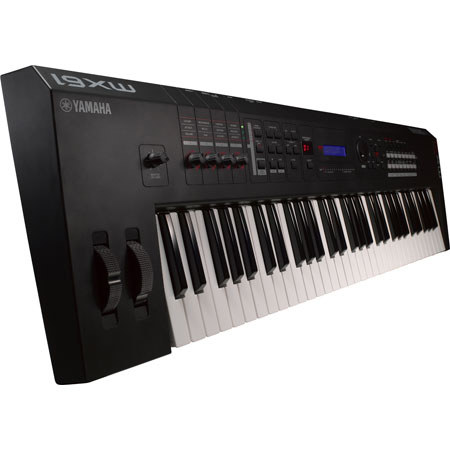
The Yamaha MX61 is a 61 key music synthesizer that combines MOTIF XS sounds, USB Audio, MIDI connectivity and DAW and VST controller features. The MX61 includes more than 1000 voices directly from the Yamaha MOTIF XS. It includes acoustic sounds like piano, electric piano, strings, drums as well as complex 8-element synth sounds. Each voice can be customized and stored. You can also use the on-board VCM effects, which are designed to simulate the effects found on vintage keyboards.
The keyboard also includes the performance mode feature also found on the MOTIF keyboard line. This mode allows you to combine voices for play on the keyboard using the dedicated "split" and "layer buttons" and is handy for creating performances that simulate a whole band playing.
In addition to the tone generator and performance mode, the MX61 is also a capable USB Audio and MIDI Interface. Connect a USB cable to your computer and you can monitor all the sounds from your DAW via the headphone output of the MX61, or you can listen by connecting to external studio monitors. The MX61 audio interface is bi-directional so you can record the internal sounds of the keyboard directly to your computer, without ever going to the analog domain. Also, you can connect an additional controller to your computer via the MIDI in port, or use the keyboard to control other MIDI devices such as hardware sequencers and groove boxes by connecting them to the MX61's MIDI out port.
Beyond the USB audio/MIDI port, the keyboard also has a USB to Device port so you can connect USB devices for storing MX61 data to external memory. You can also play back .wav files directly from a USB stick using this port. For playing back audio from external audio devices like iPods, you can connect to the AUX input using a 3.5mm mini stereo cable.
The MX61 is also equipped with knobs and buttons for controlling internal sounds, DAW parameters and VST instruments. The interface can be customized with the included remote template editor so that any VST can be set up to be controlled by the MX61. There are also advanced integration templates for use with a variety of DAWs. When used with Cubase for instance, there is a feature that allows any parameter can be controlled by the keyboards rotary encoder just by mousing over it.