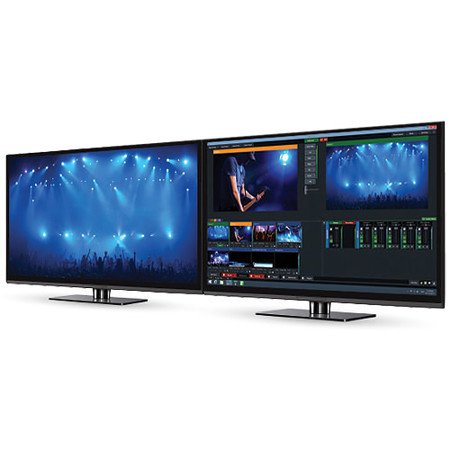
Yuan vMix 4K Live Production, Streaming & Mixing Software, Electronic Download
SKU: YUSIVMIX4K
This item is no longer available.
Share:
Overview
Compare
Specs
Protection
About Yuan vMix Live
Produce, Stream & Record With Vmix
vMix is software that allows you to create professional quality productions on your own computer at a fraction of the cost. vMix gives you the power to add multiple cameras, videos, images, audio, web streams, Powerpoint, titles, virtual sets, chroma key, and much more to your production. You are then able to display, record and live stream your production all at the same time!
Vmix can be used in large scale multi-camera events or simple webcam one person productions. There is a once off payment to use vMix so you don't need to pay a yearly subscription fee. Once you pay for vMix you also get free Version upgrades for 12 months! After the 12 months you can pay a small upgrade fee to have the latest and greatest version of vMix.
Produce Your Own Live Productions
vMix gives you the flexibility to be your own producer and create your own live productions and streams.Switch between a variety of inputs including cameras, video files, DVDs, images, Powerpoint and much more.
Features:
All Your Inputs in One Place
• Video Cameras: 4K, HD and SD capable. Support for Webcams and capture cards.
• NDITM:Send and receive high quality, low latency video and audio on the local network between vMix systems and any NDI compatible sources.
• Video Files: Support for all popular formats including AVI, MP4, H264, MPEG-2, WMV, MOV and MXF.
• DVDs: With menu navigation.
• Audio Files: MP3 and WAV.
• Audio Devices: Mix multiple audio sources such as SoundCards, ASIO Audio Interfaces and capture card audio.
• Video and Audio PlayLists: Combine multiple video and/or audio files into a single Input Web Browser, RTSP, PowerPoint, Photos, Solid Color and more.
Simultaneous Streaming, Recording, And Output
• Live stream to your favourite streaming providers including Facebook Live, YouTube, Twitch and Ustream.
• Live Record in full HD to AVI, MP4, MPEG-2 or WMV
• Output via AJA, Blackmagic and Bluefish cards to professional recording decks and monitors
• Virtual Camera support for streaming out to 3rd party software such as Skype, Zoom, Google Hangouts and VLC.
13 Transition Effects
Cut, Fade, Zoom, Wipe, Slide, Fly, CrossZoom, FlyRotate, Cube, CubeZoom, Vertical Wipe, Vertical Slide and Merge transitions available with 4 customisable transition buttons for easy access to your favourite effects.
Professional HD Production On A Modest Pc
• vMix is the most efficient live production software on the market thanks to full 3D acceleration.
• Create productions with multiple HD sources without breaking the bank or your CPU.
Easy To Use, High-Performance, Animated Graphics
• Choose from 100+ built-in animated titles, scoreboards and tickers.
• GT Designer Standard Create custom static titles and animated tickers (all editions)
• GT Designer Advanced Create custom animated titles and import layers from Adobe Photoshop PSD (vMix 4K and Pro)
HD Virtual Sets With High Quality Real-Time Chroma Key
• Built In Virtual Sets - Or build your own.
• Full Motion Zoom - Customisable camera position presets.
• High Quality Chroma Key - Use with or without virtual sets to suit your production needs.
• Available in all editions
PC And Mac Desktop Sources
• Utilise screen capture from remote desktops running on your network.
• Great for PowerPoint and Skype.
• Audio Capture support also available.
Vmix Call: Add Up To 8 Remote Guests Quickly And Easily
The easiest way to add guests to your live show is built right into vMix HD, 4K and Pro editions. vMix Call allows anybody with a browser and webcam to become an instant guest!
Video Delay / Instant Replay
• Create a Video Delay input and assign it to any available Camera or Output.
• Save multiple Video Clips of notable events for playback at a later time.
• Configurable slow motion playback from 5 to 400%.
• Full four camera slow motion instance replay also available.
Web Browser Input
• Display a website directly in vMix.
• Full use of mouse and the ability to scroll pages.
• Natively supports browser audio and HTML 5 video playback!
• No need for an additional computer just to bring in a browser, do it all through vMix!
Built-In Audio Mixer
• Audio Mixer allows you to easily keep track of all audio sources and includes the ability to Mute, Follow (Auto Mixing) and Delay any source.
• A VU Meter is also included with a peaking display to ensure each inputs level is broadcast ready.
• Fine tune every audio source with built in EQ, Compressor and Noise Gate effects.
Live Video Effects
• Color Correct, Deinterlace, Sharpen, Zoom, Rotate, Pan and Crop any input in real time.
• All effects are processed in 4:4:4 32bit color space for optimal video quality.
Input MultiView
Combine multiple inputs together using the different "Multi View" presets or customise the position of each element with the available Zoom, Pan, Rotate and Crop controls.
Full NDI Capabilities
• vMix allows you to send and receive NDI sources to any other NDI compatible device.
• Use NDI to transmit your output, cameras, audio and graphics across your local network.
• Connect vMix to your favourite NDI program or device such as Caspar CG, NewBlue Titler, Adobe CC and many more.
4 Overlay Channels
vMix includes 4 Overlay Channels in addition to the Multi View feature. Each overlay channel can have its own transition effect, position and border.
Touch Screen Web Interface
• Control vMix remotely using the vMix Web Controller on your Surface, iPad, iPhone, Android or other touch screen device using the built in web interface.
• Customisable shortcut buttons can also be created to activate common production scenarios.
Professional Color Correction & Monitoring Tools
• Professional color correction on every input
• Lift/Gamma/Gain/Hue/Saturation controls with industry standard color wheels and bars
• Import/export color correction presets to use in other productions
New Waveform and Vectorscope monitors in Preview and Input settings windows
• Select the RGB icon to select from the various display options
• Choose from Waveform RGB, Waveform Y, Parade RGB, Vectorscope and split (side by side) layout options
Yuan vMix Live Features
- All Your Inputs in One Place
- Simultaneous Streaming, Recording, and Output 13 Transition Effects
- Professional HD Production on a Modest PC
- Easy To Use, High-Performance, Animated Graphics
- HD Virtual Sets with High Quality Real-Time Chroma Key
- PC and Mac Desktop Sources
- Vmix Call (2 Caller)
- Video Delay / Instant Replay
- Web Browser Input
- Built-In Audio Mixer
- Live Video Effects
- Input Multiview
- Full NDI Capabilities
- Overlay Channels
- Touch Screen Web Interface
- Professional Color Correction & Monitoring Tools