
This item is no longer available.
Review Summary
2024-01-25T19:00:00
HP doesn't make the wifi adapter anymore for this printer. Waste of money
Kaita

2023-03-10T19:00:00
This printer is all bark and no bite. I'm not technically savvy enough to know if it's a driver problem or something else. But straight out of the box, it won't duplex anything but letter from the main tray. The bypass feeder tray jams after every page of cardstock or postcards no matter how many sheets are in the tray. If I print something specified to print on non-plain media, it prints it on plain media from the main tray even though that tray is set in the printer setup as having plain paper. In other words, many of its promised features and even normal functionality don't work. For a printer this expensive, it's a HUGE disappointment. We wanted a printer for our home office that could auto duplex up to 11x17. We've always used HP laser printers and been satisfied, so we stuck with HP this time. We're not unfamiliar with how HP laser printers and their drivers work. We've owned our M375nw for more than 15 years, and it still works like a champ. My recommendation would be to steer clear of the CP5225dn unless you're prepared to spend a LOT of time trying to get the right driver and configuration to make it work properly.
HazMatt
2022-07-29T20:00:00
It did not work, even with 2 trips from repair tec
Donna K.
2020-07-24T20:00:00
Setting up having to dig for old wires to connect to the internet, router not accessible in another room. Glad I had a wi-fi extender to fix the problem.
Cris A.
2020-06-25T20:00:00
Received the printer with a hardware malfunction. The printing kept coming out skewed at a near 40 degree angle. Called support and they immediately sent me a replacement. New one came in just a few days and works perfectly. I use HP exclusively in my graphic design business and really appreciate the quantity, service life, and the support HP has. Thank you!!!
Larboard D.
2020-06-14T20:00:00
This is the lowest printer I have ever used. Get ready and buy some extra time if you want to live with this!
Simn08000
2020-04-25T20:00:00
This printer is speedy and meets our main needs of large format printing 11x17. So far it has been a great addition to our small business. I don't expect any issues as I have used HP Laser printers for many years without issues.
DocOz
2020-03-24T20:00:00
easy to set up on our home network, nice user friendly features.
semisweetcorn
2020-03-23T20:00:00
Really like HP printers but I am disappointed in the speed and loudness of this one. Time will tell if it is worth it.
Beegle
2020-03-09T20:00:00
This is the 4th printer that has been purchased. Easy to change toner and add paper. Very satisfied
Greg F.
2019-12-27T19:00:00
Great image quality prints fast, so far its great.
QualityPrints
2017-08-08T10:10:53
The printer is working well. Good in black and white. Good in color. Quiet. Fast. Hopefully it will continue to work well for years to come. MF
JAMES D.
2017-07-25T20:00:00
Great printer and our Engineering department loves it.
CJ29
2016-01-12T19:00:00
I purchased this printer a little over 18 months ago. The technical specs were just what I needed for my startup marketing firm. There's just one problem ... the color performance is downright horrible. There is simply no accuracy between screen and printed result. Have tried technical support. Had a service call tell me the machine was technically fine (all the technician did was look at the test page). I bought an expensive ColorMunki calibration system and that helped to bring some of the colors into the realm of believability, but it's nowhere near accurate. Where the printer output really falls down is photography and illustrations. It drops the yellows off the far end of the spectrum to the point where they're barely visible. Greens and reds are pretty rough, too; very muted and dull (but what do you expect, both colors need yellow). It handles vector artwork okay, but there is something wrong with the image processor. I can take the same file to an offset printer or a short run provider like Kinkos--heck even to an inkjet and the colors are exactly what I expect to see. It's not an issue with my color-calibrated monitors and software. It is hands-down, a printer issue. I've been a graphic designer for over 20 years and know my way around color calibrating from screen to print. I have never, stress NEVER, seen a printer perform this poorly. Apparently I'm not the only one, either. Do a search for poor color reproduction in HP tech support, or online and the results will be replete with people experiencing the same issue. Don't buy this printer if color accuracy is at all important to your workflow.
BigThumbedMonkey
2015-04-27T20:00:00
Very happy with this unit, Very reliable with all the key features to meet our office needs. Very reliable and easy to connect and maintain
CUAU2015
2014-07-15T20:00:00
Printer works fine. I have 3 -4 hours into trying to get it to work on a machine running Windows Vista Ultimate Service Pack 2 64 Bit. Unable to get it to print Setup as a network printer. Network install works fine on machine with Windows Vista business 32 bit using supplied disk and Windows 8.1 Pro 64 bit using the Universal Printer Print Driver.
JRRYAN
2014-04-22T20:00:00
Worked great right of the box. Nice clear printing, very quiet operation. We setup 11" x 17" paper to load from the outside tray and 8.5" x 11" from the main feeder.
jon123
2014-03-30T20:00:00
the HP website information to the contrary, the software drivers are not supported on Macintosh OS 10.3.9 — when the drivers were installed, every attempt to send a 'print' command crashed the machine. A singularly expen$ive paperweight.
tammy46
2013-11-13T19:00:00
I use this printer in my small business and it has performed very well. The speed isn't what I really wanted but it gets the job done. The pictures are very good and sharp. I have enjoyed this product.
fanmae
2013-07-04T20:00:00
I am extremely happy with this printer. It has great color and works reliably. If you have Windows 7 you must use the Add a Printer on the computer instead of the enclosed CD. I elected to make this printer wireless with the HP Jet Direct wireless option. Again the CD did not work and I had to call Tech Support to install it. However it works great, and also allows printing from the iPad and iPhone. I also got the extra 500 sheet tray and I recommend it if you wish to install a complete pack of paper at a time.
GeorgeV
2013-01-28T19:00:00
Excellent image quality, clean and crisp. Optional paper tray is an excellent addition.
mhk562
2012-10-10T20:00:00
This printer does everything we need it to do.
Ravenbrick
2012-10-07T20:00:00
I have only had this printer for a couple weeks, but so far it has been great. The USB connection makes it easy to set up. Printed colors come out great. The speed of the printer is good as well. I would recommend this printer.
CZ24
2012-08-28T20:00:00
Needed a larger format (11x17). Great price as compared to others. Great Print quality / fast
Jamiewise
2012-05-22T20:00:00
Other than the box it was shipped in looking like it sat on the shelf for years the printer is Excellant. I totally recommend to anyone looking for a color wide format printer.
Joegoob
2012-01-10T19:00:00
This printer was purchased to replace our HP LaserJet 4 Plus - which was purchased new in 1994 and is still running strong. We needed a wide format printer for building plans/design drawings, and we wanted to combine that with a color printer. As we have always been in the past, we are once again very pleased with this HP product! This was extremely easy to set up and get connected into our network. The print and colors are crisp and clear, and this printer is so much more quiet than our old one. We've run a variety of printing projects through it - from envelopes to cardstock to large format paper - and are pleased with the output. Love the power saving feature, too. Our only "disappointment" would be the price of the color toner catridges; however, we would definitely recommend this printer to others.
L2intheoffice
2011-11-24T19:00:00
This printer I purchased as a replacement for the less expensive CP1525nw which was also a good color laser printer but with one drawback - it only printed two-sided with a manual feed. I needed an automatic two-sided laser printer that would print the many color pictures that I was planning with the new book that I was writing. This CP5225dn fit the bill, and so far with nearly a thousand pages printed, it has performed flawlessly with brilliant colors on every page, and two sided just as I needed it. The only thing that I would remind anyone thinking of buying this printer - there is an extra tray offered (which increases the total available trays from two to three) which can come in very handy when printing with several different quality papers. However, only a single extra tray will work with this printer. Otherwise, I would highly recommend this printer for anyone who wants a top flight printer for printing bright colors on both sides automatically. The ink lasts up to 6,000 sheets, which makes up for the cost. It is a Great Printer for the Price.
StarWriter
2011-11-02T20:00:00
Out of the box, faint lines were noticable on every page. Initial "auto" color calibration was unsuccessful, two more calibrations were required. Print quality is still poor, even for this wimpy 600dpi. I expected much more from a machine that needs 1k in cartridges.
kotzebue

Accidents happen where life happens. Protect your favorite Adorama products and purchase a protection plan to stay covered from accidental damage, mechanical or electrical failure, and more.

If we can’t fix it, we’ll replace it at no additional cost.

Protect your product from drops, spills, and more.

Enjoy your gear without fear. We have you covered!

When regular use of your product over time results in mechanical or electrical failure.

We will never charge you a deductible after the purchase of a plan.

Our claims process is simple & easy and our customer service team is happy to help.
Adorama Protect powered by Extend is available for purchase to customers in the United States. Not available for purchase Internationally or in U.S. Territories.
Browse our FAQ
Up to 20 ppm, letter/A4 and black-and-white/color
Black-and-white: as fast as 14.5 seconds, letter (as fast as 16 seconds, A4); Color: as fast as 15.5 seconds, letter (as fast as 17 seconds, A4)
HP ImageREt 3600; Up to 600 x 600 dpi
2-line, 16-character backlit display; 5 buttons (Cancel job, Left arrow, Right arrow, Select, Back); 2 LED indicator lights (Attention, Ready)
540 MHz
192MB, expandable to 448MB via one open DDR2 DIMM slot
Recommended monthly page volume: 1,500 to 5,000 pages; Duty cycle: up to 75,000 pages
100-sheet multipurpose tray 1, 250-sheet tray 2; optional 500-sheet tray 3
250-sheet face-down output bin
Automatic
Built-in Fast Ethernet 10/100 Base-T networking; built-in automatic two-sided printing
Tray 1: A3, A4, A5, A6, RA3, SRA3, B4, B5, 8k, 16k, 10x15 cm, post cards (JIS single and double); letter, legal, executive, 11 x 17 in, 12 x 18 in, 4 x 6 in, 5 x 8 in,8.5 x 13 in; envelopes (DL, C5, B5, No. 10, Monarch); custom: 76 x 127 mm (3 x 5 in) to 320 x 457 mm (12.6 x 18 in) Tray 2: A3, A4, A5, B4, B5, 8k, 16k, double postcard; letter, legal, executive, 11 x 17 in, 8.5 x 13 in; custom: 148 x 182 mm (5.8 x 7.2 in) to 297 x 432 mm (11.7 x 17 in);
Optional tray 3: A3, A4, B4, B5, 8k; letter, legal, executive, 11 x 17 in, 8.5 x 13 in; custom: 148 x 210 mm (5.8 x 8.3 in) to 297 x 432 mm (11.7 x 17 in) Automatic two-sided printing: A3, A4, A5, RA3, SRA3, B4, B5, 8k, 16k, double postcard; letter, legal, executive, 11 x 17 in, 12 x 18 in, 8.5 x 13 in
Paper (bond, brochure, colored, glossy, letterhead, photo, plain, preprinted, prepunched, recycled, rough); cardstock; glossy film; transparencies; labels; envelopes
Tray 1: 60 to 220 g/m2 (16 to 58 lb bond) Tray 2, automatic two-sided printing unit, optional tray 3: up to 120 g/m2 (up to 32 lb) plain papers, up to 160 g/m2 (up to 43 lb) coated papers
1 Hi-Speed USB 2.0, built-in Fast Ethernet 10/100 Base-T network port
HP PCL 6; HP PCL 5c; HP postscript level 3 emulation
84 scalable TrueType fonts
Standard: Windows 2000, Windows XP Home, Windows XP Professional, Windows Server 2003, Windows Vista, Windows XP Media Center, Windows XP Professional x64, Windows 7 (HP UPD only); Mac OS X v 10.3, Mac OS X v 10.4 or higher; Linux; Optional: OS/2, UNIX, Linux
Windows 2000, Windows XP Home, Windows XP Professional, Windows Server 2003, Windows Vista, Windows XP Media Center, Windows XP Professional x64,Windows 7 (HP UPD only); Mac OS X v 10.3, Mac OS X v 10.4 or higher; Linux
Via built-in networking solution: TCP/IP, IPv4, IPv6; print: TCP-IP port 9100 Direct Mode, LPD (raw queue support only), Web Services Printing; discovery: SLP, Bonjour, Web Services Discovery; IP Config: IPv4 (BootP, DHCP, AutoIP, Manual), IPv6 (Stateless Link-Local and via Router, Statefull via DHCPv6); management: SNMPv1, HTTP
Password-protected network embedded Web server; enable/disable Network ports; SNMPv1 community password change
Operating: 10 to 30 Deg. C (50 to 86 Deg. F)
Recommended: 15 to 27 Deg. C (59 to 80.6 Deg. F)
Storage: 0 to 35 Deg. C (32 to 95 Deg. F)
Operating: 10 to 80% RH
Recommended: 20 to 60% RH
Non-operating: 10 to 90% RH
49 dB(A)
Printing: 6.3 B(A); Ready: 5.3 B(A)
Input voltage: 115 to 127 VAC (+/- 10%), 60 Hz (+/- 2 Hz), 12 A; 220 to 240 VAC (+/- 10%), 50 Hz (+/- 2 Hz), 6 A
Active: 440 watts; Standby: 30 watts; PowerSave: 4.4 watts; Off: 0.5 watts
Without trays and covers extended: 545 x 599 x 338 mm (21.5 x 23.6 x 13.3 in)
With trays and covers extended: 862 x 1066 x 370 mm (34 x 42 x 14.6 in)
40.9 kg (90.2 lb)

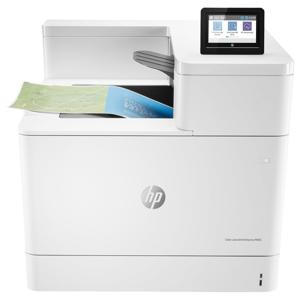
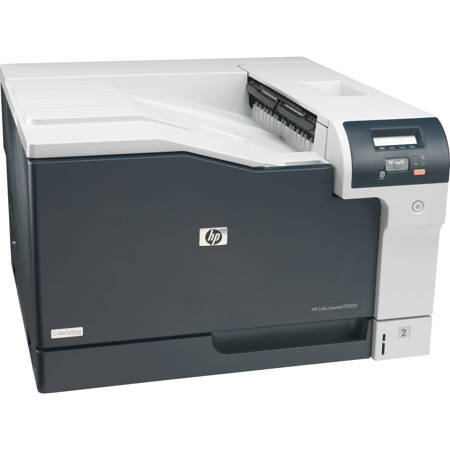
Now you can handles all your business printing and A3 output in your own office using a single printer. With HP Color LaserJet Professional CP5225dn Printer print everyday business documents and marketing materials as well as wide-format projects - often less than printing at a copy shop. Enjoy superior print quality at speeds of up to 20 ppm and a black-and-white first page out in as fast as 14.5 seconds, letter (as fast as 16 seconds, A4). Instant-on Technology provides a warm-up time from low-power mode that's up to 50% faster compared to competitive models. In fact, your print job may be finished before many printers have started printing.
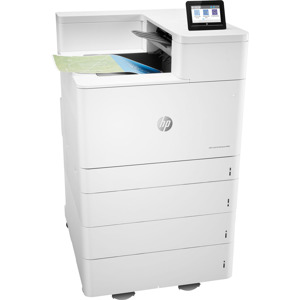
Easily print on different types of paper - plain, premium and glossy - with adjustable paper trays. The printer supports sizes from 3 by 5 in up to 12 by 18 in and weights up to 220 g/m2. The 100-sheet multipurpose tray and 250-sheet input tray offer flexibility. Add the optional 500-sheet tray for a maximum input capacity of up to 850 sheets. HP Color LaserJets CP5225dn Printer helps you make an impact by putting your business in the best light. Confidently print spreadsheets, line drawings, marketing materials, client presentations and more. Using in-line printer architecture, four colors are aligned and applied in a single pass for reliable, accurate print quality.