Fans of Adorama’s new Wish List App on Facebook have a cool new way to drop hints to friends and family about what they’ve got on their must-have gear list. Here’s how easy is it to drop hints for what you want for your birthday, graduation or other big events!

Step 1: It’s really simple. Visit our Facebook.com/Adorama and click on the Online Store Tab (this may be your default view) to get started! Then click on the My Wishlist tab. The App will ask permission to access your FB account to operate.

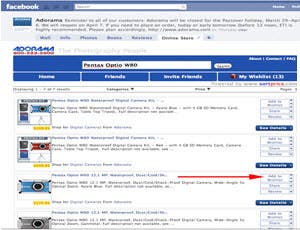
Step 2: Here you can see the items that “Jack Orama” has added to his wishlist so far. As you can see, you can comment on, like, share, review, or remove any of these items at any time. We’re going to add a new item, the Pentax Optio W80 waterproof camera in blue finish next.

Step 3: We use the Search box to find the Pentax Optio W80, and it brings up a number of results. We want the blue finish, camera only. So we click Add to Wishlist.

Step 4: Clicking Add to Wishlist will pull up the top prompt box. We can make our new item public or private. We choose public and click Add to Wishlist which then pulls up the lower box. Clicking Tell your friends allows you to share this new wishlist item with some or all of your contacts.

Step 5: You can customize a message to go along with your wishlist posting, and you can choose your privacy settings. Share with Everyone, down to just one or two contacts under Customize. Once you’re set, click Publish.

And there you go! Your wishlist item and your personal message will be posted to your wall, (and your friends’ walls, too, depending on both your settings, and their settings.) Notice the Think Tank Hydrophobia posting in this screenshot. This was posted via the “share button” from the online store–not the Add to Wishlist button. (It’s similar, but not the same. That’s the Facebook architecture for you…)
It’s really easy to get in on the fun! Head on over to our Facebook page to get started!