2026-03-18T20:00:00
Printer hasn't been used for anything other than printing music lyrics. It has a faint line that does not print. This is the second time in 2 years this has happened. The first time I cleaned the head several times and it takes ink to do it. I contacted brother and the person said to do do a heavy cleaning which took 2 times and used all the ink. I had to buy new ink cartridges which wasn't cheap. Now it's doing it again. This printer is defective. I called brother and complained and the woman I spoke to offered me 20 dollars to shut me up. I'm throwing this junk in the trash and buying a 50 dollar canon printer at Walmart that comes with ink. Thought I was buying a good printer at brother. Was I wrong.
Ronald G.
Originally posted at

2026-03-17T20:00:00
Rated 5 out of 5
New Novice Operator
Instructions could be a little less confusing for novice.
Richard
Originally posted at
2026-03-11T20:00:00
Rated 3 out of 5
Need to change the layout of the printer
The printer does its thing but here are af ew improvements that would improve the product immensly.
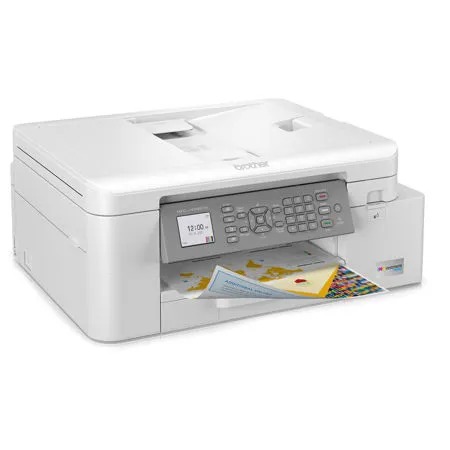
1) have a backlight on the pad so I don't need to use a flashlight to read it.
2) Change the layout of the pad so that a thing like PRINT is larger than the rest of the pad so I don't have to inspect the pad like inspector cousseau.
For some reason the printer does not assosciate with all my applications when i want to print.
Joe B.
Originally posted at
2026-03-08T20:00:00
Rated 5 out of 5
Brother MFC J4335DW
I needed a printer that would be reliable and able to print with AirPrint. I don't do a lot of printing and I don't print photos. It's a simple but capable printer and does a good job. It's easy to set up and use. I can print from my phone and laptop.
I can also use the cable it came with so I could print from my PC.
Judith M.
Originally posted at
2026-03-04T19:00:00
Rated 2 out of 5
Within 6 months of purchase I began to jam regular
Thought I got a small home copy scan fax machine I could depend on but it could never scan to my iMac even though it would print from it
David W.
Originally posted at
2026-03-02T19:00:00
Rated 5 out of 5
Worth the purchase Price
User friendly, easy to connect to computer, nice printouts. Color photos turn out great
Vixda
Originally posted at
2026-03-01T19:00:00
Rated 5 out of 5
Self clesning is a plus!
This printer has been a blessing for our family. Ink cartridges can last up to 6 mos which really saves money. Great printing and the self cleaning is wonderful. Will always stsy with Brother for printers.
Brent R.
Originally posted at
2026-03-01T19:00:00
Rated 1 out of 5
Save Me a Trip to the Dump, PLEASE
Where is support for getting started????? I've hunted various routes but always end up at a dead end but at best end up on hold with an estimated wait time of 2+ hours. So far my only assistance is myself with good old trial and error. After decades of working with HP printers I decided to give Brother a try.
gosh I wish I could get some help.
Richard
Originally posted at
2026-03-01T19:00:00
Rated 1 out of 5
not recomended
Bought it from staples and it did not printed at all. did not have color inc just black. and it was complicated to connect with the wifi and the computer.
Abraham
Originally posted at
2026-02-28T19:00:00
Rated 1 out of 5
Unable to download latest update
I am having a great deal of difficulties in downloading your latest update - I have tried over 5 times over the last week and the update continues to hang
KennyG
Originally posted at
2026-02-28T19:00:00
I am very happy w/ the operation of this printer for my needs, and thankful for your replacement program!!
Bruce
Originally posted at
2026-02-26T19:00:00
Rated 5 out of 5
Get a great printer AND a great value too!
I'm more than impressed with all the features, speed, options and value packed into this printer.
Chuck T.
Originally posted at
2026-02-26T19:00:00
The only way to get it to print via wifi is through its proprietary program. It doesn't recognize any other program so that you can print directly from inside the program.
not a.
Originally posted at
2026-02-24T19:00:00
Rated 4 out of 5
Great printer but with some issues.
Great little printer but the user interface leaves a lot to be desired. Trying to make changes or select options can be tedious and confusing. A menu base operation with point and click user interface would be mu preference. Despite those shortcomings it does a great job printing and ink supply seems to go a long way!!
Old U.
Originally posted at
2026-02-23T19:00:00
Second time's a charm, works like it should. The weekly self cleaning always catches me off guard.
Mr K.
Originally posted at
2026-02-20T19:00:00
Rated 1 out of 5
Disappointed
Not happy with this. 1) Doesn't seem to want to scan; 2) get frequent messages about updating it, unsure why; 3) ink cartridges do not last long, and that was a big reason we bought this; 4) glossy paper will not feed. All-in-all, it's difficult to use and seems low quality.
KLBMpls
Originally posted at
2026-02-19T19:00:00
Rated 1 out of 5
Oh, Brother!
Couldn't Maintain WiFi connection so, after months of frustration, I returned the printer and exchanged for HP. Very unhappy with this product.
pcspov
Originally posted at
2026-02-17T19:00:00
Rated 3 out of 5
Ok, but not Excellent
Certainly not the best printer I've ever had. It tends to jam a lot; although jams are easy to fix. It's also pretty slow. It does the job, but I'm not very impressed with it.
CoLo
Originally posted at
2026-02-17T19:00:00
Rated 5 out of 5
the printer is very nice to use.
I think the paper tray is a much better design then some i have seen. My MFC-J4335DW printer is easy to use. I do wish i could scan legal size pages but i like how fast it scans.
Dave
Originally posted at
2026-02-15T19:00:00
Rated 2 out of 5
sometimes it won't work, sometim it will
I have and still have issues with my copier . When I ask it to print sometimes it won't
Jeff W.
Originally posted at
2026-02-12T19:00:00
Rated 5 out of 5
Great Price and Easy Installation
I saw a good review for this printer in a national magazine. You can't beat it for the price. The printer and scanner work great but I especially like the software as well. I found installing the Wi-Fi easy but you can direct wire it as well. I liked it so much that I bought another one for my winter home!
Dave C.
Originally posted at
2026-02-10T19:00:00
Easiest printer to set up. I had returned to other brands before purchasing this Brother.
I was very happy to see how easy it was to attach to my hoe network. Print quality is very good and it's fast enough for my purposes.
Johnnyocean
Originally posted at
2025-12-27T19:00:00
Rated 1 out of 5
throwing it out
Throwing it out and buying a new one. We have had it a couple of years but the color has always been bad. Now it's even worse. I have gotten all the updates and the color cartridges are good. Have never had such a junk printer.
judit
Originally posted at
2025-12-13T19:00:00
Rated 1 out of 5
Extremely inferior brother product!
The brother MFC-J4335DW is a waste of money and time. Even after several cleanings the printing quality
continues to be worse than poor - faint and non-readable. This product should never have been put on the
market - fooling customers! My previous brother MFC-255CW was far superior.
hannemann
Originally posted at
2025-10-22T20:00:00
Rated 1 out of 5
NOT Worth It
Print heads clog easily even using Brother INk exclusively. The printer has a regular self cleaning routine designed to eliminate this problem, but if you check the youtube channels, this occurs far too frequently. Cleaning is a tedious,messy job that doesn't last long. I had high hopes fo this printer. But I can't print in color anymore and for that reason, I can't recommend it. Printer is about 1 1/2 years old.
Marc
Originally posted at
2025-10-19T20:00:00
Rated 1 out of 5
Waste of time. Constant problems
Constantly having to clean the print heads and fix issues every time I want to print something. Also not getting nearly the amount of prints as it states. Printer said 700 pages for black. I printed 2, cleaned the head twice because there were lines missing, then it was empty. Complete waste of money and time. The ink and the printer are not cheap.
ron1
Originally posted at
2025-09-17T20:00:00
Rated 1 out of 5
extremely frustrating
I am using a Chromebook so if you do too, stay away from this. I had to reset to factory settings for every printing setting. Now it stopped working all together. I didn't even get through the first cartridge of ink. This is disposable garbage. Do not buy. I wasted so many hours trying to set it up. It is designed to fail. If zero stars was available ...
aram
Originally posted at
2025-09-12T20:00:00
Don't buy this printer. As another review stated, the ink gets clogged. I don't have the time, the patience, or the skill to be able to clean the printer heads (wherever those are). In a time when I need my printer during a project, I am doomed. I ran out to buy new ink cartridges, spend over $100, and still to learn that the headers must be clogged and a new cartridge isn't going to fix anything. If I can throw this printer out the window, I would, but i don't want my neighbors to think I am crazy.
had h.
Originally posted at
2025-08-02T20:00:00
Rated 2 out of 5
Cloggs a lot
Works ok if you use it often. Let it sit for awhile and you are highly disappointed.
SadCustomer
Originally posted at
2025-08-02T20:00:00
Rated 4 out of 5
Excellent all-in-one printer
Having a year of use-experience with this printer, I have almost nothing but good things to say about it. Compared to various hp printers I've had, the Brother is VERY thrifty with ink. Considering how people often spend way less on ink than they do on the printers themselves, this is no small thing. The printer has been conspicuously glitch-free, especially or an all-in-one. Prints are very fast and look fine, if not "photo" quality. In all, it does exactly what it should do, and it does it all really well.
If the review process allowed, I would have given this printer an "four and a half" star rating. The only PITA here is that using the front panel's many available physical buttons to do printing/scanning/copying without going into the attached computer's Brother Software (*"I-Print" "I-Scan") is klutzy and even undoable for me. I tried online "how to's and YouTube videos, but some things just wouldn't work. Ultimately, I relented and just control the printer from the computer, which is fine for sure!
hondo
Originally posted at