34% Off

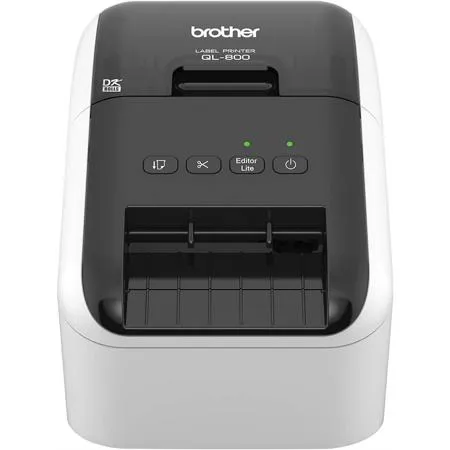
Brother QL-800 High-Speed Professional Label Printer

SKU: BRQL800 MFR: QL800
$124.99
$189.99
Save: $65 (34%)
Earn VIP Reward Points

Key Features

  • Create professional-looking labels quickly with this high-speed label printer.
  • Print black and red labels using Brother DK continuous label rolls for vivid results.
  • Enjoy versatile connectivity options with USB interface for easy setup and use.
  • Use with PC to create custom labels with barcodes, logos, and graphics easily.
  • The automatic cutter provides precise, clean cuts on both die-cut and continuous labels.
  • Organize files, create name badges, and more with this durable labeling machine.
See More Product Details
Ships from Manufacturer?
Calculate Shipping

See Options

1

Need help? Ask our experts.

Overview
Compare
Learn
Specs
Protection
Q&A

Questions & Answers

FAQ

Can the Brother QL-800 High-Speed Professional Label Printer print in colors other than black and red?

No, the QL-800 is unique in its ability to print in both black and red using the Brother DK-2251 tape. However, it does not support other colors.

Do I need to install software to use the Brother QL-800 High-Speed Professional Label Printer?

For basic label printing, you can use the 'Plug & Label' feature which doesn't require software installation on Windows PCs. For more advanced label customization, you can use the included P-touch Editor software.

Can I print labels from my Android device?

Yes, you can design and print labels from your Android device using the Brother free iPrint&Label app. Note that this requires a USB to Go cable, which is available for additional purchase.

What type of printing technology does the Brother QL-800 High-Speed Professional Label Printer use?

The QL-800 uses direct thermal printing technology, which means it does not require ink or toner.

What types of labels can I print with the Brother QL-800 High-Speed Professional Label Printer?

The QL-800 is versatile and can print a wide variety of labels including those for envelopes, packages, barcodes, file folders, and more.

Shopper : Why Did You Choose This?Naomi N : FOR WORKKETANKUMAR P : Friend have the sameORVIE G : Good Experience with past Brother Products, Looking for wireless solution to a dated label machine and good reviews/recommendations

Reviews about this item

Review Summary

2026-04-07T20:00:00

Rated 1 out of 5

I called customer service and stated that i thought this came with cartridges since it says it prints up to 30000 pages. I was told that was a dumb question and before i could ask if i could return it he wasvery rude and hung up on me

Wass

2026-03-09T20:00:00

Rated 5 out of 5

A 1.5 inch WIDE LABEL-MAKER??????

I BADLY needed a 1.5 inch label maker. I DIDN'T need one with a keyboard since I much prefer using a PC to print labels. This unit is QUICK, QUIET, and produces perfect label's every time????

Tom4278

2026-02-18T19:00:00

Rated 1 out of 5

Bad Product - Worse Product Management

This P-touch PT-P710BT was a huge waste of time and money. It was so bad I returned it to Amazon and will continue to use my much older Pt-D400 which was slow, but reliable. After multiple sessions on line with Brother Support totaling many hours, I was finally told that the driver for this P-Touch was incompatible with the latest version of Windows 11....... Really????!!!!????

Gee G.

2026-01-22T19:00:00

Rated 3 out of 5

Important

What kind of paper do I buy with this for a MFC J985DW an will this ink work

Rockrock

2025-08-10T20:00:00

Rated 1 out of 5

Wasted Tape

Waste a lot of tape. Left margin can't be adjusted but the right can.

Jack

2025-06-01T20:00:00

Rated 5 out of 5

Best Garden Label Maker EVER!

I LOVE this label printer. I bought a case for it and I take it everywhere with me. I label my garden plants with the waterproof labels. HIGHLY RECOMMEND. Best labeler ever! I wish it was a color label maker. I would definitely use that all the time too. Best purchase ever!

CoCrazyWoman

2025-05-26T20:00:00

Rated 5 out of 5

Loan Signing Agent

This is a wonderful printer. The dual tray and fast printing is perfect for my business.

Tanya

2025-05-24T20:00:00

Rated 2 out of 5

Difficult to set up with the appropriate settings.

In order to use these labels for my brother label printer I had to jump through hoops to figure out the appropriate settings to change.

TenRivers

2025-05-23T20:00:00

Rated 4 out of 5

Great little label printer, except...

This is a very good label printer. Unfortunately, it won't allow me to print in red anymore.

Dave

2025-05-16T20:00:00

Rated 4 out of 5

Needs simpler recycling process

I would give it a 5 star if recycling the old unit was simpler.

Alan

2025-05-13T20:00:00

Rated 1 out of 5

Drivers don't work

Can't make the drivers work with the printer so I can't use it.

Adam R.

2025-05-13T20:00:00

Rated 5 out of 5

Helping at our volunteer charity bike shop

Great product and software, easy to set up and use

The C.

2025-05-02T20:00:00

Rated 5 out of 5

Love it

Works great, fast, quiet, easy. No regrets on getting this.

Jennifer

2025-04-29T20:00:00

Rated 5 out of 5

Print with Confidence

The toner was easy to order and arrived promptly. Use of genuine Brother toner maintains my confidence in smooth, reliable operation of the Brother HL-L8350CDW printer.

gkhud

2025-04-29T20:00:00

Rated 5 out of 5

Excellent Product and Service

From now on, I will buy any necessary parts from Brother direct. I am very satisfied with the service, prices, shipping, and products.

Radius T.

2025-04-16T20:00:00

Rated 5 out of 5

LABEL IT ALL

Easy to use. Labels are easy to read from a distance

31FROG

2025-04-14T20:00:00

Rated 5 out of 5

Helping at our volunteer charity bike shop

Great product and software, easy to set up and use

The C.

2025-04-09T20:00:00

Rated 4 out of 5

PT-P710BT Shortcoming.

Pleased overall with printer. Exception comes with inability to load bluetooth software,

PTP710BT

2025-04-07T20:00:00

Rated 5 out of 5

Amazing

Amazing this is the best printer ever. Easy set up beautiful print just love worth every penny.

NTS S.

2025-04-07T20:00:00

Rated 5 out of 5

So Easy

After 5 years, I had to replace the drum. I loved how easy it was to replace and its working like new.

Tracy

2025-04-07T20:00:00

Rated 5 out of 5

Great product

These are little expensive but last a long time and are great quality.

Tracy

2025-03-31T20:00:00

Rated 4 out of 5

Good Printer

Good printer. We use this to make barcode labels for our store. We've only been using it for a few months, but it seems to be a workhorse.

Wendy P.

2025-03-30T20:00:00

Rated 1 out of 5

Still waiting for replacement of broken part

If I could give zero stars, I would, but 1 was the lowest option. My printer was delivered with a paper tray that had a broken part, so it does not work. I submitted a claim, including photos; the customer service tech agreed there was a piece missing. I was promised a replacement, but it has been BACKORDERED for months! So I have a brand new printer that I can NOT use.

M P.

2025-03-28T20:00:00

Rated 5 out of 5

Great for card making

I live all the different types of tape i can use different sizes and color are great. I also love that i can change the fonts. When i dont have the right sentiments for a card this little guy is great.

Jessica

2025-03-27T20:00:00

Rated 5 out of 5

Wonderful

Great machine, perfect for my needs................

Nottttt

2025-03-23T20:00:00

Rated 5 out of 5

Great product for all your printing needs

Love this little tiny label printer it's great I use it all the time for the kitchen as well as home office and uses around the house. great product.

Lisa K.

2025-03-21T20:00:00

Rated 3 out of 5

Ink Cartridges were late arriving to my office

The product was not delivered by the time it was promised. I paid extra for that and did not receive it at the time promised. That did not help me for the timeline I needed to print.

BASE D.

2025-03-15T20:00:00

Rated 3 out of 5

The last drum did not last the 30,000 impressions.

While my printer is about six years old, my recent purchase was the third drum and I do not print 30K pages in two years. Even with the new drum in place, I still get messages to replace it. Not Good!

BOBS

2025-03-09T20:00:00

Rated 1 out of 5

Not Ecstatic

Light weight printer, not too heavy after the packaging has been removed. I currently struggle with the speed of the printing (slow and delayed!!), I struggle with the settings, printer always reads, its out of paper and its not. Very difficult and can not get ahold of tech support.

Blackshear

2025-03-07T19:00:00

Rated 5 out of 5

Works great

Easy to set up, works great. The brother GL-800 has saved us money.

Tiger

Select a plan in the Add Protection section above and purchase with this product by clicking “Add to Cart”.

image-protection

TRUSTED PROTECTION PLANS, EXCEPTIONAL SERVICE.

Invest In Your Gear and Peace Of Mind!

Accidents happen where life happens. Protect your favorite Adorama products and purchase a protection plan to stay covered from accidental damage, mechanical or electrical failure, and more.

Repair or Replacement

Repair or Replacement

If we can’t fix it, we’ll replace it at no additional cost.

Accidental Damage

Accidental Damage

Protect your product from drops, spills, and more.

Peace of Mind

Peace of Mind

Enjoy your gear without fear. We have you covered!

Malfunction Protection

Malfunction Protection

When regular use of your product over time results in mechanical or electrical failure.

Zero Deductible

Zero Deductible

We will never charge you a deductible after the purchase of a plan.

Customer-Focused Support

Customer-Focused Support

Our claims process is simple & easy and our customer service team is happy to help.

Adorama Protect powered by Extend is available for purchase to customers in the United States. Not available for purchase Internationally or in U.S. Territories.

Brother CN Specifications

Hardware

Hardware

Jump to...
  • Built-in Plug & Label Software

    Yes

  • Cutter Life

    Up to 300,000 (die-cut labels) 150,000 (continuous labels)

  • Cutter Type

    Automatic

  • Interface Types

    USB

  • Maximum Label Length

    3' (0.91m)

  • Maximum Label Width

    2.4" (6.10cm)

  • Maximum Print Resolution

    300 x 600 dpi

  • Maximum Print Speed

    93 (labels per min.)

  • Maximum Print Width

    2.3" (5.84cm)

  • Operation Modes

    PC Connected

  • Printer Emulation

    Raster

  • Printer Technology

    Direct Thermal

  • Standard Memory

    0MB

  • Tape Sizes

    Die-Cut, Continuous

  • ENERGY STAR Certified

    Yes

  • Power Source

    120V AC 60 Hz 1.7 A

Software

Jump to...
  • Bar Code Types: PC Connected

    CODE39, CODE128, UCC/EAN128(GS1-128), ITF(I-2/5), CODABAR(NW-7), UPC-A, UPC-E, EAN13, EAN8, ISBN-2(EAN13 AddOn2), ISBN-5(EAN13 AddOn5), Laser Barcode, POSTNET, RSS(RSS14 Standard, RSS14 Truncated, RSS14 Stacked, RSS14 Stacked Omni, RSS Limited, RSS Expanded, RSS Expanded Stacked), PDF417(Standard, Truncate, Micro), QR code(Model1, Model2, Micro), Data Matrix(ECC Square, ECC Rectangular), MaxiCode(Model2, Model3, Model4, Model5), GS1 Databar Composite, Aztec Barcode

  • Database File Compatibility

    CSV, TXT, XLS

  • Font Style

    True Type

  • Labeler Functions

    Date/Time Stamp, Rotate Printing, Vertical Printing, Mirror Printing

  • Maximum Number of Print Copies

    9999

  • Microsoft Word/Outlook/Excel Add-ins

    Yes

  • Mirror Printing

    Yes

  • Mobile Device Compatibility

    Brother iPrint&Label with USB to Go cable

  • Mobile Device Printing App

    Yes

  • Multi-copy Print

    Up to 9999 copies

  • Operating System Compatibility

    Mac OS X 10.11.x, Mac OS X 10.10.5 , Mac OS X 10.12.x, Mac OS X 10.13.x, Windows Vista, Windows 7, Windows 8/8.1, Windows 10

  • Postage Ready

    Yes

  • Rotate Printing

    Yes

  • Symbols for Windows (Clipart in editor)

    1379

  • Time/Date Stamp

    PC Generated

  • Vertical Printing

    Yes

System Requirements

Jump to...
  • SDK Support

    Yes

  • Software Included

    P-touch Editor 5.2 for Windows, P-touch Address Book 1.2 for Windows, P-touch Editor 5.1 for Mac, P-touch Update Software (Windows & Mac)

General

Jump to...
  • Dimensions (WxDxH)

    4.9 x 8.4 x 5.6" (12.45 x 21.34 x 14.22cm)

  • Weight

    2.5 lbs (1.13kg)

  • UPC Code

    012502646327

Related Articles & Videos

Tips for Winter and Snow Photography

Tips for Winter and Snow Photography

Have you ever admired a photo of beautiful winter scene and wished you were there? Winter photography can capture the raw beauty if nature. Unfortunately, a photo can’t capture just how cold it will be. I recently took a trip to Iceland and made some wise choices — and some mistakes — while filming ...
Read more
Gift Guide: Essential Accessories for Your Tablet
Level Up Your Virtual Meetings
The Essential Travel Photography Equipment You Must Have on Every Trip

About Brother CN

Where efficiency meets innovation, the Brother QL-800 High-Speed Professional Label Printer stands out as a top-tier solution for all your office labeling needs. This robust machine is engineered to streamline your labeling process, offering lightning-fast printing capabilities that can produce up to 93 standard address labels per minute with sharp black text at a 300dpi resolution.

The QL-800 is not just fast; it's also versatile. It's capable of creating striking black and red labels using the Brother DK-2251 tape, a feature unique to this class of office label printers. This dual-color printing capability enhances the visibility of important information on your labels, making it perfect for priority messages, special instructions, or categorization.

For those seeking a user-friendly experience, the QL-800's "Plug & Label" feature simplifies the process, allowing for the quick printing of basic labels without the need for software installation on Windows PCs. Additionally, the included P-touch Editor software for both Windows and Mac offers a more advanced platform to design and print custom labels, with the convenience of integrating with Microsoft Word, Excel, and Outlook for seamless label creation.

The QL-800 is designed with an automatic cutter to support the printing of single or multiple labels at a time, significantly reducing label waste and ensuring a professional finish every time. The printer's direct thermal printing technology means you'll never need to worry about ink or toner replacements, making it a cost-effective and low-maintenance choice.

Create customized labels with ease using the Brother free iPrint&Label app on an Android device, with the option to design your labels on-the-go. This feature requires a USB to Go cable, which is available for additional purchase.

For the best performance and to maintain the longevity of your printer, it is recommended to use Brother Genuine DK label supplies. These supplies are specifically designed to produce high-quality labels that are clear, durable, and reliable.

The Brother QL-800 High-Speed Professional Label Printer is the reliable, professional, and durable choice for businesses that value efficiency and quality. Its high-speed printing, dual-color capabilities, and user-friendly features make it an indispensable tool for creating a wide range of labels for envelopes, packages, barcodes, file folders, and more. With the QL-800, professional labeling is just a click away.

Brother CN Features

  • Print amazing Black/Red labels using DK-2251
  • Create cost-effective paper labels for packages, envelopes, file folders, name badges, postage and more
  • Convenient, drop-in rolls. No ink or toner needed
  • Prints Brother genuine DK pre-sized, easy-peel labels and continuous-length paper and film tapes. Auto cutter enables banners and signs up to 3 ft. long
  • High-resolution printing (up to 300 x 600 dpi), for crisp text and graphics
  • Plug & Label feature lets you create and print labels without installing software
  • Compatible with Windows and Mac and also Integrates with Microsoft Word, Excel and Outlook
  • Super-fast, printing up to 93 standard address labels per minute with black text at 300dpi
  • Label Collection feature provides beautiful, pre-designed labels and banners with commonly-used text
  • High-resolution (up to 300 x 600 dpi) printing for crisp text and sharp graphics
  • Convenient, Brother Genuine DK drop-in rolls for ease of use
  • Also works with Brother DK continuous-length paper and film tapes
  • Automatic cutter speeds up printing time and enables you to create banners and signs up to 3 ft. long
  • "Plug & Label" feature requires no software installation for Windows PCs
  • Print from Microsoft Word, Excel and Outlook
  • Create the customized labels you need from your PC or Mac via included USB
  • Windows and Mac compatible

Warranty Information

This product has a limited warranty of 24 months.

Key Features

  • Create professional-looking labels quickly with this high-speed label printer.
  • Print black and red labels using Brother DK continuous label rolls for vivid results.
  • Enjoy versatile connectivity options with USB interface for easy setup and use.
  • Use with PC to create custom labels with barcodes, logos, and graphics easily.
  • The automatic cutter provides precise, clean cuts on both die-cut and continuous labels.
  • Organize files, create name badges, and more with this durable labeling machine.

What's in the box:

  • Brother QL-800 High-Speed Professional Label Printer
  • Starter Rolls: DK-1201 Die-Cut Standard Address Labels (100 Labels)
  • DK-2251 2.4 " (62mm) Continuous Length Black/Red on White Paper Tape 16.4' (5m)
  • Software
  • USB Cable
  • Power Cord
  • Quick Setup Guide
  • Documentation
  • Brother 2 Year Limited Warranty