2024-01-26T19:00:00
Rated 5 out of 5
Great printer
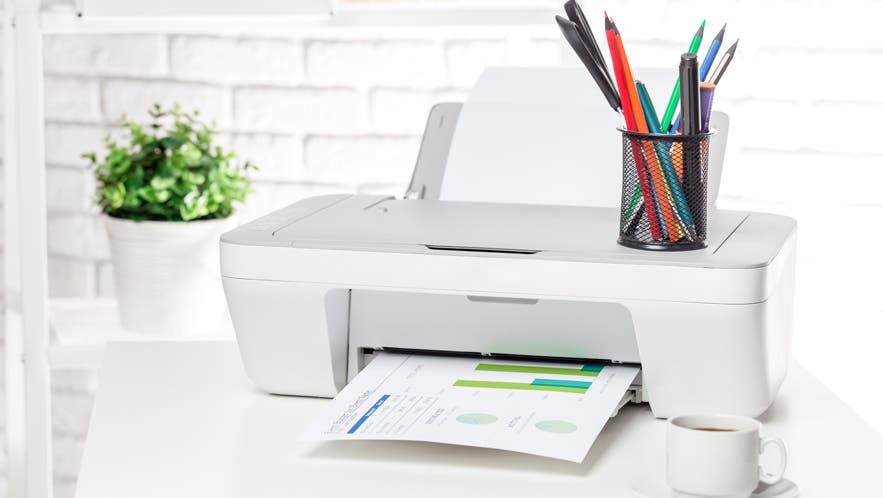
This printer is amazing in what you can do with it for such a small and compact machine.
RCMcC
Originally posted at

2024-01-02T19:00:00
Returned, not what I expected
Anne52
Originally posted at
2023-12-21T19:00:00
Rated 4 out of 5
Good for old folks
Works seemlessly on wifi.
Skipper88
Originally posted at
2023-12-10T19:00:00
Rated 5 out of 5
BEST MONEY I EVER SPENT...!
Best money I ever spent. It's small but sturdy. Got an amazing amount of ink out of the starter cartridge, too. If you only need black, remove the color cartridge and print away on just black. Do this because occasionally it will print color if you are not vigilant about clicking black only. Very fast, beautiful copies. On the downside, it does not print 2-sided and it makes a bit of noise printing. But I am beyond happy.
J H.
Originally posted at

2023-12-03T19:00:00
Rated 4 out of 5
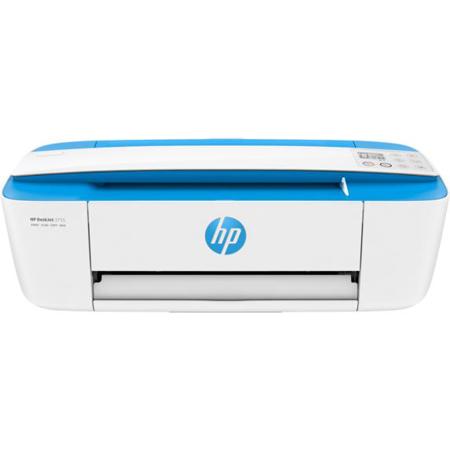
HP DeskJet 3755
I love the size of this printer. Prints well. The only concern is the power cord. It disconnects easily.
Jackieboo
Originally posted at
2023-11-25T19:00:00
It prints well and doesn't take up a lot of room.
Kgon
Originally posted at
2023-10-27T20:00:00
Rated 5 out of 5
Light and small
I purchased the printer on recommendation from a friend of mine . I will say the set up was easy and for me this is sufficient for what I use it for , however printing letters or recipes is painfully slow .
Rosaleen
Originally posted at
2023-10-04T20:00:00
Rated 4 out of 5
Printer working for now
So far so good.
bearcat245
Originally posted at
2023-08-31T20:00:00
Rated 1 out of 5
Only prints when it wants to
Printer pulls 2-3 pages at a time when printing. Also doesn't like to print emails, only prints partial lines. Sometimes the printing is fine. Other times only pieces of words /sentences are visible.
JBoone
Originally posted at
2023-08-22T20:00:00
Rated 4 out of 5
Mixed Review
The printer itself does a wonderful job printing, however, it keeps disconnecting from it's driver. Twice I had to call hp support and twice I was scammed. They asked to access my computer and to make a long story short asked for over $400 to correct my problem. I could have purchased 3 new printers for that amount. It doesn't make sense but I love the printer itself just not the stress that has come with it.
hp c.
Originally posted at
2023-08-11T20:00:00
Rated 5 out of 5
HP Deskjet 3755 All in One printer
Arrived quickly. Was easy to connect to my computer and wifi.
Gwen
Originally posted at
2023-07-23T20:00:00
Rated 3 out of 5
HP DeskJet 3755 All-in-One printer.
HP DeskJet 3755 printer is slower than I expected, otherwise works fine. I was disappointed the two-sided printing is a manual operation, not automatic. I suppose that is a compromised required for the lower price.
Bill A.
Originally posted at
2023-07-23T20:00:00
Rated 3 out of 5
Needed to Read Specs More Closely
First I love the color of the printer and the instruction sheet I was able to print was beautiful- clear and strong print. It does not work with my 5 G network so I returned. HP tried to be very helpful. It took three days to get it figured. Probably a good choice of printer to use with a 2.5 or smaller WIFi network. Also takes a lot of ink and color cartridge has all three colors in one cartridge so must be replaced when any one color runs out. Doesn't print many copies in a minute and stand up paper feeder only holds a few sheets. So just be sure you read all the specs and see if this really good looking and light weight printer works for you.
MDoran
Originally posted at
2023-07-16T20:00:00
Rated 5 out of 5
Best little printer
this is my second "3755"..best little printer ever!
Susie W.
Originally posted at
2023-07-13T20:00:00
I have been prevented from using the hp 3755 printer at all, because my iPad will not recognize the existence of the printer even although both wifi and Bluetooth are enabled and functioning. I have contacted hp service online but gotten no answer. I have telephoned the 1-888 number several times, during business hours, and each time I hear the hp recording but when the call is transferred I am cut off. Always. I intended to try to print and complete certain forms to send to government offices including but not only the American irs where I am required I believe to complete the paper form, but I am prevented from doing so because the printer with wifi is not functioning.
Mme S.
Originally posted at
2023-06-04T20:00:00
Rated 5 out of 5
Great Product
Very lightweight. Works wonderfully.
Verjim
Originally posted at
2023-05-21T20:00:00
Rated 5 out of 5
Review of HP 3700 DeskJet All-in-one Printer
Excellent product
satisfiedbuyer
Originally posted at
2023-05-20T20:00:00
Rated 5 out of 5
Amazing printer
Amazing product
Jones0912
Originally posted at
2023-05-02T20:00:00
Rated 5 out of 5
HP DeskJet 3755 All-in-One printer
Easy set up
BHulb
Originally posted at
2023-04-28T20:00:00
This small printer is great. I have a larger Envy but this one does everything as well, fits into my small area and l love. Very easy to set up and use.
Jenie
Originally posted at
2023-04-01T20:00:00
Awful product! We upgraded our home network and it knocked the printer off its wifi connection. I have done EVERYTHING I can think of to reinstall the printer and it won't work. It says it's missing the driver, then it can't find the printer and then the spinning wheel of death. It shouldn't be this hard to use a product. I've tried installing the self-help tool...nothing.
Awful P.
Originally posted at
2023-03-27T20:00:00
Rated 1 out of 5
Maybe OK - who knows?
The machine may be OK but I cannot use it at all. There is no manual and when I have tried to access methods online, I cannot do anything with this machine, apart from printing the odd document from my computer. Also, any online help is extremely limited. I would never buy HP again and regret buying this machine. They must be aware that some of us are old and need step-by-step instructions.
kikinaff
Originally posted at
2023-03-26T20:00:00
Rated 3 out of 5
HP 3755 Printer
I contacted the help desk and they worked for there hours to try and hook it up wireless and it didn't work. i tried to set it up with the usb cord and it didn't work either. I had to go and buy another printer so mom could have a printer.
memorable
Originally posted at
2023-03-16T20:00:00
Rated 4 out of 5
Decent printer for the price
Does what its suppose to do.
Peggypoo
Originally posted at
2023-03-14T20:00:00
Rated 1 out of 5
Don't work can't connect to my phone
I can't connect it they shows errors
Matthew 1.
Originally posted at
2023-03-07T19:00:00
Rated 3 out of 5
Set up clumsy
Took me a couple of times to set up the printer. I had to call HP as it was asking for an administrator password to set up for automatic updates. I had to print a couple of test pages. Quality was good. Would recommend HP puts 2 black ink cartridges and a color in their next design
Dyfj
Originally posted at
2023-03-05T19:00:00
Rated 3 out of 5
Disappointing.
Can't find a way to print from magazines or books. Feeding the page to be copied is not easy. I love my HP5255. Not much the 3755.
Norris F.
Originally posted at
2023-03-02T19:00:00
Rated 3 out of 5
Serves the purpose
Small & compact... I am not tech savvy at all & this connected to Mac ,Ipad & iPhone with no problem at all. Prints great... The only negative for me is not having the flatbed scanner which I knew going in. Does scan great but like scanning anything other than paper (cards, etc) could be an issue. Overall very pleased so far.
Argroomer
Originally posted at
2023-02-17T19:00:00
Rated 5 out of 5
Needed a small printer
Bought small printer for a vacation home. One that we can easily transport . So far It is excellent for printing and copying. It needs our needs perfectly.
Gates
Originally posted at
2023-02-17T19:00:00
Rated 5 out of 5
great price/value
Easy set up. Good print quality. Love the compact size.
sMccL
Originally posted at