31% Off

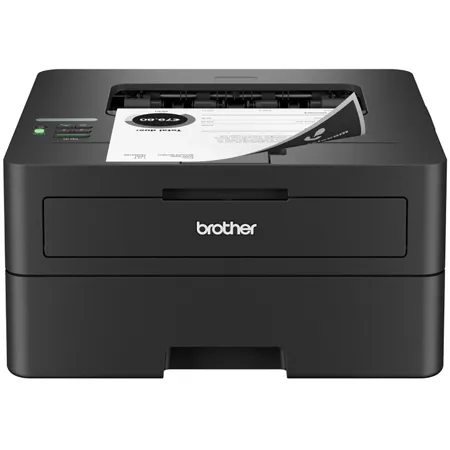
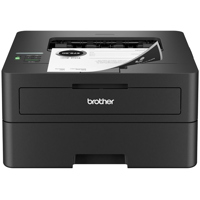
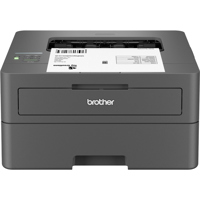
Brother HL-L2460DW Compact Wireless Duplex Monochrome Laser Printer

SKU: BRL2460DW MFR: HLL2460DW
$179.99
$259.99
Save: $80 (31%)
Earn VIP Reward Points

Key Features

  • Experience efficient printing with speeds up to 36 ppm using this Brother laser printer.
  • Enjoy automatic duplex printing, saving paper and reducing costs for your home office needs.
  • Connect via wireless, Ethernet, or USB for versatile printing from various devices easily.
  • Rely on crisp, clear 1200 x 1200 dpi resolution for professional-quality documents every time.
  • This compact laser printer fits seamlessly into any workspace, perfect for small offices.
  • Print from your mobile devices using AirPrint, Brother Mobile Connect, and Mopria for convenience.
See More Product Details
Ships from Manufacturer?
Calculate Shipping

See Options

1

Need help? Ask our experts.

Overview
Compare
Specs
Protection
Q&A

Questions & Answers

FAQ

What is the printing speed of the HL-L2460DW Compact Wireless Duplex Monochrome Laser Printer?

The HL-L2460DW Compact Wireless Duplex Monochrome Laser Printer can print up to 36 pages per minute.

What are the connectivity options for the HL-L2460DW printer?

The HL-L2460DW printer offers a range of connectivity options including dual-band wireless, Ethernet, and USB 2.0. You can also print remotely using the Brother Mobile Connect App.

Does the HL-L2460DW printer support duplex printing?

Yes, the HL-L2460DW printer supports automatic duplex printing, which helps save time and reduce paper waste.

What kind of toner does the HL-L2460DW printer use?

The HL-L2460DW printer uses Brother Genuine black toner cartridges. The compatible cartridges are TN830 (Standard), TN830XL (High Yield), TN830V (Value High Yield), and TN830XL 2PK (Twin-Pack).

Is the HL-L2460DW printer eco-friendly?

Yes, the HL-L2460DW printer has several eco-friendly features such as Toner Save Mode and automatic duplex printing. It is also ENERGY STAR compliant and EPEAT Silver rated.

Reviews about this item

Review Summary

2026-02-22T19:00:00

Rated 5 out of 5

Joy to Use

We love this printer. It is quiet and reliable. Setup was easy including Wifi connectivity.

Satisfied P.

2026-02-22T19:00:00

Rated 1 out of 5

Printer is in Coma mode

As I stated before this printer goes offline frequently and does not print know matter how much resetting I perform on my iPad and iPhone it goes past a "Deep Sleep" mode into a coma of not working at all, terrible.

Technically r.

2026-02-20T19:00:00

Rated 5 out of 5

Does its job

I was in the market for a new printer and this one ticked off all of my must haves. It was easy to set up, doesn't take up a lot of room and actually prints when I tell it to. I don't do a lot of printing so I wanted a laser printer because inkjet cartridges dry up with little use. I'm happy with this purchase.

Jones

2026-02-18T19:00:00

Rated 5 out of 5

Quality & Reliability

Excellent printer for basic b&w printing. Excellent print quality and very reliable. Easy setup.

Mike R.

2026-02-18T19:00:00

Rated 1 out of 5

Took 3 Days to Install

The HLL2460DW does what it was purchased to do, print. The one star is for the instruction and procedures to install. I have installed numerous Canon, HP, Epson printers all very simple to set up. This Brother took me three days with the help of the Copilot. Very annoying and confusing.

Pacificpci

2026-02-18T19:00:00

Rated 1 out of 5

NO TITLE NEEDED STOP BOTHERNG ME.

I do not have a HLL2460DW printer. returned it, NOT WHAT i WANTED

Mr D.

2026-02-17T19:00:00

Rated 1 out of 5

Toner depleted quickly

My printer became low on toner less than a month after I purchased it. That was very disappointing

Audrey

2026-02-16T19:00:00

Rated 5 out of 5

Very good.

Works very well. Set up fairly easy. Print is beautiful. Good replacement for my old Brother printer.

PeggySetter

2026-02-13T19:00:00

Rated 5 out of 5

Excellent wireless printer

Excellent wireless printer, set up for Mac (M4, OS 15, haven't upgraded to 26 yet because of wireless Time Machine) was simple, and when I unplugged it and moved to a new location, worked without any further changes. However, the thing about printing from my iPhone failed completely and seemed a waste of time, and I decided I didn't need to do it anyway.

Bill

2026-02-13T19:00:00

Rated 5 out of 5

JUst what the "doctor: ordered !!

Love this printer... does everything I need in a small footprint....very quick to print, and I LOVE the 2-side printing!!

Aba D.

2026-02-10T19:00:00

Rated 5 out of 5

Not to worry.

I read the ratings and saw that some people had problems but most did not so I was a little worried that I would have a problem with the printer. But I did not. Everything is fine so far. I have been using it for over a month now. I really like the 2 sided printing, a feature my old printer did not have. This printer replaced a 25+ year old HP LaserJet 5P that still worked fine. the problem was that the toner cartridges would not perform well or last long anymore because even the newest ones are 11 years old and the scrapers and drum surfaces are deteriorated.

TomRK

2026-02-10T19:00:00

Rated 3 out of 5

Software sucks

Good printer, but the software sucks. It disconnected from my network and needed to be set up again. Massive pain in the rear. Not at all plug and play.

Isaac

2026-02-09T19:00:00

Rated 5 out of 5

Nice product and compact

I like Brother HLL2460DW Black and White Laser Printer. It's simple to operate and I use it at home and good price.

Lailani

2026-02-08T19:00:00

Rated 5 out of 5

Awesome printer

Best printer I ever owned. Simple to use and the print quality is excellent.

Nick H.

2026-02-06T19:00:00

Rated 3 out of 5

It prints okay but too many automatic settings

I bought this to print art, but no matter the size of the art, it prints it to the size of the paper. I've tried to override the automatic setting but there is no option. So instead of making a quick print, it becomes an arduous task in trying to find which setting to change to get what I want. I would like the mobile app to have more function.

O b.

2025-12-27T19:00:00

Rated 1 out of 5

Worse product I ever Purchased

I have had thus printer fir over a year and it has only printed twice I have trued everything in the manual. Today I decided to print using csbke connection. Doesn't work either. The computer Ethernet opening is not wide enough for the cable connector plug and there is NO USB option. This is a scam machine and I will never purchase Brother product again.

Kathy

2025-11-16T19:00:00

Rated 1 out of 5

Deep sleep never wakes up & low yield cartridges

Based on good reviews from Wire Cutter, I installed three of these in my work environment. The printer goes into deep sleep and never wakes up so printing is a hassle. Changing margins in Word for some reason accesses the printer driver, and then Word hangs and needs to be restarted. A simple effort to change margins in a document is a hassle. Then, even though I have printed maybe 200 regular sheets of paper, single spaced, 12 pt Times New Roman, I get a message that I need replace the cartridge (which I have to buy because it never occurred to me to get a spare so soon after installing this model). Instead of being a helpful tool, this printer has turned my Monday into a really bad day.

Brian

2025-11-06T19:00:00

Rated 1 out of 5

HORRIBLE CUSTOMER SERVICE.

HORRIBLE CUSTOMER SERVICE. Their drivers will not support a 5-year-old MacBook. When I contacted, their response was "Too bad you're inconvenienced'. They would not discuss solutions or offer alternatives..."too bad". Next, when their 3000 page yield toner only lasted for about 1000 pages at most, Again, it was "...sorry you were inconvenienced". Both times, they closed the chat as quickly as they could. This was a brand new printer. My old Brother ran great on the MacBook. Never again. BEWARE. Obviously a brand in decline.

bob27

2025-08-23T20:00:00

Rated 2 out of 5

It works great... till it doesn't

I was given this printer as a gift for Christmas. It was connected to my laptop via WiFi. I barely used it, as I don't often need to print things out. But today I did. I went to print out some documents and suddenly I needed drivers. I go download them. Then I need a firmware update and it requires a password from the back of the printer. I enter the password and it says I need to create a new password but doesn't tell me how or give me a window to do so in, just cycles me back through the system. Now, as far as I can tell, I have a big black box taking up room on my desk that does nothing but drain power and my sanity.

KVance

2025-08-19T20:00:00

Rated 1 out of 5

Garbage

This laser printer is an absolute piece of garbage. I am so sorry I didn't pay more attention to the complaints about the difficulties of connecting to it. After struggling to finally get it connected to my computer (over an hour of time), after a power outage, it will no longer connect either wirelessly or via cable. I just ordered an HP laser printer and will never buy another Brother product again.

Jawmems

2025-08-14T20:00:00

Rated 1 out of 5

ALL AROUND AWFUL

Am quite efficient with computers, printers and have the latest iphone, yet this product is AWFUL. My employer chooses Brother, something I would never do to begin with. This horrible device keeps going to sleep and won't print. Cannot turn the sleep mode off. Beyond frustrating. Cheap, my advice is ..get an HP!

NoTMYprinter

2025-07-11T20:00:00

Rated 1 out of 5

Awww shucks

I just got this and now realize it doesn't scan or simple copy. I don't regret it, but though at least did basic tasks.

globe

2025-06-19T20:00:00

Rated 1 out of 5

DOES NOT HAVE SCANNING OR COPYING CAPABILITIES !!!

Since it prints only in black ink we decided to purchase it for there is no need to purchase color cartridges when just one color of the three runs dry. I have used the printer to print work from my computer maybe 3 time since the purchase. My wife went to copy a letter and we found out that the printer does not make copies. What kind of printer doesn't make copies ??? No where in the description of the product states that this printer does not have scanning or copying capabilities

Drew01

2025-06-16T20:00:00

Rated 5 out of 5

Prints FAST!

Not sure why I didn't buy this sooner to replace my 14 year old Canon Pixma MX432 All-In-One printer that was slow and noisy. This has a bit smaller footprint so it takes up a bit less space and is much quieter. It also prints very FAST!

ThomasJ

2025-06-08T20:00:00

Rated 5 out of 5

Great laser printer

It works perfectly just like my other one did for over 10 years

Janel2388

2025-06-07T20:00:00

Rated 1 out of 5

Awful product, awful customer service.... total waste of money

zach

2025-06-04T20:00:00

Rated 2 out of 5

Disappointing Printer

This printer was unreliable. It was hard to keep it connected to WiFi. When it lost connection it was very hard to find the place in the menu to reconnect the WiFi. I finally discarded this printer out of my frustration with it.

Chas 4.

2025-06-02T20:00:00

Rated 4 out of 5

Great Printer, but.....

It is a pain to keep it connected to the wireless internet. I have great internet. Printer likes to go into deep sleep, and is difficult to "wake" it up.

MikeEF

2025-06-02T20:00:00

Rated 5 out of 5

Great product

Everything has been letter perfect (if you'll pardon the expression).

Mark K.

2025-05-31T20:00:00

Rated 1 out of 5

Poor letter/manual feed

Poor manual feed for envelopes, always crinkled the bottom left corner. Tried to fix it with Brother's assistance and no luck. I complained within 30 days of purchase. Brother told me that I was to get a new printer and Brother sent me a refurbished one (without a drum and without a cartridge). Sick and tired of the problems. Bought an HP.

cdcfmpm

Brother HL-L2460DW Specifications

Connectivity & Compatibility

Connectivity & Compatibility

Jump to...
  • Mobile Device

    AirPrint, Brother Mobile Connect, Mopria, Wi-Fi Direct

  • Operating Systems

    Mac, Linux, and Chrome OS

  • One-Push Wireless Setup

    Wi-Fi Protected Setup

  • Standard Interface

    Ethernet, Dual Band Wireless: 802.11 b/g/n (2.4GHz), 802.11 a/n (5GHz), Hi-Speed USB 2.0

  • Standard Network Features

    Printing

  • Supported Network Protocols (IPv4)

    APIPA (Auto IP), Web Services, ARP, BOOTP, Custom Raw Port/Port 9100, DHCP, DNS Resolver, FTP Server, HTTP/HTTPS Server, ICMP, IPP/IPPS, LLMNR Responder, LPR/LPD, mDNS, RARP, SMTP Client, SNMPv1/v2c/v3, TFTP Client and Server, WINS/NetBIOS Name Resolution

  • Supported Network Protocols (IPv6)

    Web Services, NDP, RA, DNS Resolver, mDNS, LLMNR Responder, LPR/LPD, Custom Raw Port/Port 9100, IPP/IPPS, SMTP Client, FTP Server, SNMPv1/v2c/v3, HTTP/HTTPS Server, TFTP Client and Server, ICMPv6

  • Wi-Fi Certified

    Yes

General

Jump to...
  • LCD Display

    1-Line

  • Maximum Monthly Duty Cycle

    35000 pages

  • Recommended Monthly Print Volume

    2500 pages

  • Standard Memory (MB)

    64

  • Toner Save Mode

    Yes

Paper Handling

Jump to...
  • Duplex Capability

    Yes

  • Manual Feed Capacity

    1 sheet

  • Media Type

    Plain, Bond, Envelopes, Labels, Recycled Paper, Colored Paper, Letterhead

  • Output Paper Capacity

    100 sheets

  • Size

    Duplex: Letter, Legal
    Manual Feed: Custom Sizes (W x L) 3-8.5 x 5-14" (7.7-21.6 x 12.7-35.6cm)
    Paper Tray: Letter, Legal, Executive, A4, A5, A6, B5, B6, Folio 8 x 13" (20.3 x 33cm)

  • Sheet Weight

    Manual Feed: 16-61 lbs (7.3-27.7kg) bond
    Paper Tray: 16-43 lbs (7.3-19.5kg) bond

  • Standard Paper Capacity

    250 sheets

  • ENERGY STAR Certified

    Yes

  • EPA ENERGY STAR TEC Value (kWh/Week)

    0.04

  • Machine Noise (Ready/Printing)

    30dB / 49dB

  • EPEAT Registered

    Silver

  • Machine Noise (Ready/Printing)

    30dB / 49dB

  • Operating Environment (Humidity)

    20 - 80 percent

  • Operating Environment (Temp)

    50 - 90 Degree F (10 - 32.2 Degree C)

  • Power Consumption

    (Power Off / Deep Sleep / Sleep / Ready / Printing) 0.06W / 0.4W / 3.80W / 44W / 470W

  • Power Source

    110 - 120 V AC 50 / 60 Hz

  • Automatic Duplex Printing

    Yes (default)

  • Black Print Speed (max. ppm)

    36

  • Consumable Type

    Toner Cartridge and Drum

  • CPU (Processor) Speed (MHz)

    600

  • Emulation

    PCL6 (PCL XL Class 3.0)

  • First Page Out Time (max. sec.)

    8.5

  • Resolution (max.)

    1200 x 1200 dpi

  • Technology

    B / W Laser

  • Printer Driver Compatibility

    Windows, Linux

Security

Jump to...
  • Security Functions

    Enterprise Security (802.1x), IP Filter, Setting Lock, TLS/SSL

  • Security Protocols (Wired)

    SMTP-AUTH, SNMP v3, SSL/TLS (IPPS, HTTPS, SMTP), 802.1x (EAP-MD5, EAP-FAST, PEAP, EAP-TLS, EAP-TTLS)

  • Security Protocols (Wireless)

    802.1x (EAP-FAST, PEAP, EAP-TLS, EAP-TTLS), SMTP-AUTH, SNMP v3, SSL/TLS (IPPS, HTTPS, SMTP)

  • Wireless Network Security

    WPA3-SAE (AES), WEP 64/128 bit, WPA2-PSK (AES), WPA/PSK (TKIP/AES)

Physical

Jump to...
  • Dimensions (W x D x H)

    14 x 14.2 x 7.2" (35.6 x 36 x 18.3cm)

  • Weight

    15.6 lbs (7kg)

  • UPC Code

    012502673989

Models
Brother HL-L2460DW Compact Wireless Duplex Monochrome Laser Printer
$179.99

$259.99

Save:$80.00 (31%)

Ships from Manufacturer

Usually ships within 2-5 Days. Delivery is subject to availability.

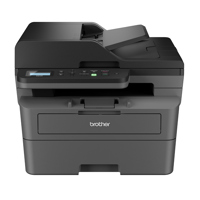
Brother DCP-L2640DW Compact Wireless Duplex MF Monochrome Laser Printer
$209.99

$398.99

Save:$189.00 (47%)

Ships from Manufacturer

Usually ships within 2-5 Days. Delivery is subject to availability.

Brother HL-L2405W Compact Wireless Monochrome Laser Printer
$139.99

$249.99

Save:$110.00 (44%)

Temporarily On Backorder

Although this item is temporarily on Backorder, you can order it now and it will ship as soon as it arrives. Your card will only be charged once item is shipped.

InterfaceAirPrint, Ethernet, USB, Wi-FiAirPrint, Ethernet, USB, Wi-FiAirPrint, USB, Wi-Fi
Resolution1200 x 1200 dpi1200 x 1200 dpi1200 x 1200 dpi
Operating SystemLinux, Mac & WindowsLinux, Mac & WindowsLinux, Mac & Windows
Power Requirements110-120V110-120V110-120V
Printer TypePrinter OnlyAll-in-OnePrinter Only
Cartridge ConfigurationSingleSingleSingle
DuplexAutomaticAutomaticNo
Input Sheets Capacity250250250

About Brother HL-L2460DW

FEATURED REVIEWS

Prints FAST!

By ThomasJ

Not sure why I didn't buy this sooner to replace my 14 year old Canon Pixma MX432 All-In-One printer that was slow and noisy. This has a bit smaller footprint so it takes up a bit less space and is much quieter. It also prints very FAST!

Joy to Use

By Satisfied P.

We love this printer. It is quiet and reliable. Setup was easy including Wifi connectivity.

Because efficiency and quality are paramount in any business or home office, the HL-L2460DW Compact Wireless Duplex Monochrome Laser Printer is the ideal solution for high-volume, high-quality printing needs. This compact and robust printer consistently delivers sharp, easy-to-read monochrome prints at a high speed of up to 36 pages per minute (ppm).

The printer's 250-sheet paper tray minimizes the need for frequent paper refills, while its automatic duplex printing feature not only saves time but also reduces paper waste, making it an eco-friendly choice. With flexible connectivity options such as dual-band wireless, Ethernet, and USB 2.0, you can print from virtually any device.

The HL-L2460DW printer also supports the Brother Mobile Connect App, allowing you to manage your printer remotely and print anytime, from almost anywhere. This feature, coupled with advanced security measures, ensures your information remains secure while maintaining seamless connections during printing.

Designed to deliver exceptional print quality consistently, the HL-L2460DW uses Brother Genuine black toner cartridges (TN830 Standard, TN830XL High Yield, TN830V Value High Yield, and TN830XL 2PK Twin-Pack) and a replacement Drum Unit DR830. These supplies ensure your documents are clear, crisp, and professional, making them stand out.

The printer's versatile paper handling capabilities allow for seamless, simple, and reliable everyday printing. You can use the 250-sheet capacity paper tray for regular printing or the manual feed slot for envelopes and specialty paper.

With a commitment to sustainability, the HL-L2460DW printer features eco-friendly options such as Toner Save Mode and automatic duplex printing. It is ENERGY STAR compliant and EPEAT Silver rated, reflecting its dedication to environmental responsibility. In summary, the HL-L2460DW Compact Wireless Duplex Monochrome Laser Printer is a compact, durable, and affordable solution for all your high-speed, high-quality monochrome printing needs.

Brother HL-L2460DW Features

  • Print up to 36ppm
  • Automatic duplex (2-sided) printing
  • Ethernet and dual band wireless networking
  • Mobile printing on iOS and Android devices

Warranty Information

This product has a limited warranty of 12 months.

Key Features

  • Experience efficient printing with speeds up to 36 ppm using this Brother laser printer.
  • Enjoy automatic duplex printing, saving paper and reducing costs for your home office needs.
  • Connect via wireless, Ethernet, or USB for versatile printing from various devices easily.
  • Rely on crisp, clear 1200 x 1200 dpi resolution for professional-quality documents every time.
  • This compact laser printer fits seamlessly into any workspace, perfect for small offices.
  • Print from your mobile devices using AirPrint, Brother Mobile Connect, and Mopria for convenience.

What's in the box:

  • Brother HL-L2460DW Compact Wireless Duplex Monochrome Laser Printer
  • Starter Black Toner Cartridge (700-Pages)
  • DR830 Drum Unit (15000-Pages)
  • AC Power Cord
  • Quick Setup Guide
  • Brother 1 Year Limited Warranty