2024-04-12T20:00:00
Rated 5 out of 5
Impressive
I chose this printer because I liked the product write up. I bought it directly from HP. When it arrived, it took a bit to familiarize myself with it's functions. It's small, but it folds out and does more than my last HP. I contacted HP support through the chat on HP homepage. Not only did they walk me through All of the functions, but updated my HP laptop and McAfee Security System and repaired the three viruses that they found while I watched the screen. Impressed!
A W.
Originally posted at

2024-03-22T20:00:00
Rated 3 out of 5
THE DESKJET 3755
THE DESKJET 3755 WORKS GREAT AFTER YOU GET USE TO IT. BUT IT HAS NO WARRANTY. LIKE SAID:IT'S A GOOK MECHINE, WITH NO WARRANTY, SO TAKE YOUR CHANCES....
CATTOOTH
Originally posted at
2024-02-05T19:00:00
Rated 1 out of 5
Still doesn't work
Still can't make it work - directions completely useless. Wireless still isn't working and can't find someone at HP to help. Terrible!
Disappointment2
Originally posted at
2023-12-30T19:00:00
Rated 5 out of 5
Small does big job
Love it. Size is great for little space apartments. I have purchased two of these printers.
Airhead
Originally posted at
2023-12-16T19:00:00
Rated 5 out of 5
replacement
my original printer started working so I haven't opened the new one yet
Carolyn n.
Originally posted at
2023-12-15T19:00:00
I am very disappointed with scan. My HP 5740 "all In One Printer" Item to scanned was put on Glass.
HPWiley
Originally posted at
2023-12-12T19:00:00
Rated 4 out of 5
Set up with a computer not phone
Had to use iPhone to set up it was a bit of a struggle once it finally took my password it's been fine
Fonia
Originally posted at
2023-12-12T19:00:00
Rated 5 out of 5
Small printer
So far, I'm very happy with my three-in-one printer. It fits on my 3' wide desk with my three-in-one desktop computer. It's lightweight, easy to use.
Humbird
Originally posted at
2023-12-08T19:00:00
Rated 2 out of 5
No happy...
Very disappointed with it. It is very slow, doesn't always print right. Will never buy a HP printer or other product on line.
MAPar
Originally posted at
2023-12-04T19:00:00
Rated 3 out of 5
Can anyone help me do a double sided doc?
For some reason there is no option available to create a double side document. It's hard to guide paper into the printer feed to manually create double sided documents.
Need h.
Originally posted at
2023-12-04T19:00:00
Rated 5 out of 5
Just what I needed!
Adequate printer that is easy to install.
Fiest
Originally posted at
2023-11-15T19:00:00
Rated 3 out of 5
Simple printer
Hp desk jet 3700 series
Student9
Originally posted at
2023-11-13T19:00:00
Rated 2 out of 5
A compact printer that wastes huge amounts of time
Was difficult to install; Tech help was useless and a huge waste of time; #10 botton keeps blinking and when I press it nothings happens
Nobodi
Originally posted at
2023-11-12T19:00:00
Rated 5 out of 5
Happy with purchase
Easy set up. OK quality. Good price. For personal use less than 50 pages per month. Would recommend.
CJ M.
Originally posted at
2023-11-10T19:00:00
Had the same one for 6 1/2 years (2017) so it was no question to order a new one.(2023)
Granma
Originally posted at
2023-10-10T20:00:00
Rated 5 out of 5
Looks Sharp
works like a charm,it's fast and the prints are sharp and colors right.
mickeysix
Originally posted at
2023-10-09T20:00:00
Rated 5 out of 5
Great bargain
Love the ease of this printer
Charley53
Originally posted at
2023-10-03T20:00:00
Rated 1 out of 5
Would not recommend this printer
When ink is low, not empty, has at least 25% left, it stops printing correctly. It will print some lines not all. Its a waste of ink and paper. Ink cartridges aren't cheap, so the printer wasting it when there's no reason to is unacceptable. You have to download an app just to be able to use it which is whatever. When I tell it to print on both sides, it won't. Recently it says theres no paper when there is. If you run out of paper during a print, and then reload it'll start printing the next page but then end with just a bar of black halfway through, again wasting ink. It does not finish the other pages after this. I would rather it just stop and not waste ink or paper and I just print out the pages that didn't print out. I got this because it was a decent size for a college dorm and printing is expensive at my university. But I think it might be more expensive to have this due to the way it wastes ink, paper, and my time.
Cston6482
Originally posted at
2023-09-24T20:00:00
Rated 4 out of 5
Printer Setup was confusing and somewhat frustrating
Once I figured out all the icons representing functions, paper trays were difficult to figure out, ink cartridges installed easily, and printer status and settings confirmed and working, I now can enjoy the printer. However, the setup was not as easy as previously using a HP install disk on my PC. Took me approximately 1 day for the install, and now, finally, the printer is printing correctly. Still exploring the settings.
Dianne C.
Originally posted at
2023-09-15T20:00:00
Rated 1 out of 5
Utter Waste of Time and Money
This is the worst product in the world. It never seems to work, and when I try to get help on the HP site, it doesn't recognize the product serial number. I've spent hours today trying to get one document to print and am literally in tears. I've had it for years and its maybe worked correctly 3 times. Seriously, don't waste your money. This product sucks and HP support sucks just as much.
KV*16
Originally posted at
2023-09-07T20:00:00
Rated 1 out of 5
Installation
I have not been able to install it yet. It is a very difficult and complicated process.
Butch K.
Originally posted at
2023-09-07T20:00:00
Rated 5 out of 5
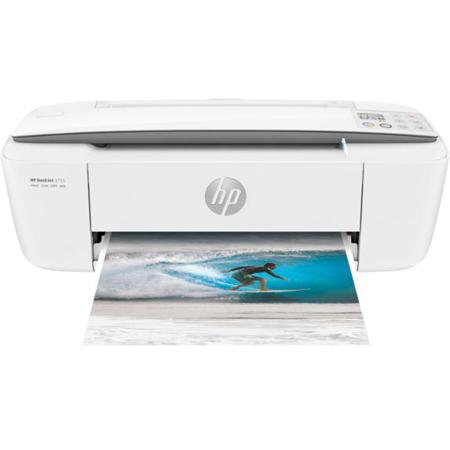
HP DeskJet 3755 All-in-One Printer
I absolutely LOVE my printer! It does everything I need it to do.
Saucycc
Originally posted at
2023-09-05T20:00:00
have to troubleshoot every time to get it to print. not so easy. makes me question buying another hp product.
tigly
Originally posted at
2023-08-10T20:00:00
Rated 3 out of 5
Alright for home
It's an ok printer for home, hard to connect to laptop and wifi
BSando
Originally posted at
2023-08-10T20:00:00
Rated 5 out of 5
Small but Mighty
Works perfectly smaller than I wanted but works awesome.
DKOMCP
Originally posted at
2023-08-07T20:00:00
Rated 1 out of 5
I have no other choice, but to go out and buy another printer
I spent the last few hours trying to get this to connect to my wireless. I have followed the instructions implicitly and the printer just does not show up. Unfortunately, I've been very ill and the printer has been in a box for months. Cant even remember where I got it. Ill just have to take the loss and trash it.
K2ri
Originally posted at
2023-08-04T20:00:00
Rated 1 out of 5
Poor Wi-Fi Connection - Unusable Most Days
Never stays connected to the Wi-Fi network at my house. Very hard to troubleshoot, most days I just give up. Would not recommend because every time I want to use it, it is unable to connect.
SusanLil
Originally posted at
2023-08-04T20:00:00
Rated 4 out of 5
Like the small desk size
Nice space saving printer. It works well for the printing that I do. I wish the instructions were a bit clearer on some things. t does a nice job on printing, is not the speediest buut adequate for my home printer.
Nance2
Originally posted at
2023-08-03T20:00:00
Rated 5 out of 5
Small, lightweight printer
Small, full function lightweight printer. Easy to carry with you to clients homes
JLWG
Originally posted at
2023-08-01T20:00:00
Rated 1 out of 5
I tried, but it didn't work
i am sending it back tomorrow. I have had it for two weeks and all that time, I have been trying to get it to print and it will not. I have tried everything and even had others to check it , but it just doesn't work. It has every thing on it that I need, but nothing works.
Pollywally
Originally posted at