
This item is no longer available.
Review Summary
2014-06-01T20:00:00
The HP Scanjet N6310 (L2700-10015) Windows Software disk was extremely difficult to get the basic drivers to load becasue it kept hanging up attempting to laod the Picture and General Scanning Software. My only guess is it must be related to Windows 8.1. Was finally able to get the basic driver / ISIS / TWAIN software to load. Thinking the Software disc was defective, I went to the HP site and download the "Full" software. Same issue took place with that software download. Picture and General Scanning Software would not load - - would just hang there forever and never complete the installation. With work arounds, and other scanner software that comes with Windows 8.1, and the HP driver / ISIS / TWAIN software that did load, the Scanner works as advertized. What should have been a simple 10 minute exercise to install the software recommended in the HP Scanjet N6310 Getting Started Guide ended up taking hours of fustration because the software load would hang and do nothing.
Ed64

2014-01-16T19:00:00
This scanner is ancient ... it seems as if it is at least a decade or more old. For the price I would expect at least a network port - wireless or Ethernet?? Sending back for sure.
maldonash
2014-01-11T19:00:00
Prior to the N6310, I have also owned two $600+ HP Multi Function machines. Both met with relatively early failures, in my opinion. Each only lasted roughly two years before their untimely deaths. This led me to purchase the N6310, a dedicated scanner, thus ending the printer functionality so that if one failed, I did not need to replace both. I also, at the same time, purchased an HP M400 series color laser printer. The printer, functions flawlessly and beautifully. However the scanner? LCD now displays gibberish and apparently can't be cured without taking it in for service. This happened, almost predictably, 13 months into ownership. It still scans fine, but I can't control the unit from the unit itself. This is the third time a scanner has failed me in five years. I've got nearly $2000 invested in the three. I can't say as I'm inclined to purchase another HP Scanner, but I still remain an avid HP fan in the printing world. I only wish that HP customer service would have at least talked to me to tell me they wouldn't do anything. I can't even get that much from them. I should have purchased a warranty. My expectations of HP were unfortunately, higher than this.
Mulder1949
2013-11-19T19:00:00
HP Scanner was NOT doubled-boxed. Scanner Feed Ramp came loose from packing tape and knocked around scanner feed area causing marring, scratching and nick damage. Despite this rough handling, unit seems to work well. Not a good impression on me.
Vincent
2013-10-16T20:00:00
Perfect solution for work tasks. HP! Please correct specifications in pdf file "HP Data Sheet". "Scan size maximum (ADF): 8.5 x 14 in (220 x 356 mm)" - specified size in mm is not true. The correct size should be 216 x 356 mm
Mike81
2013-09-04T20:00:00
This is my second flatbed hp scanner. So far its operates just as hp products are expected to to function. I love it for its character recognition ability as I use this function regularly.
shofar
2013-03-19T20:00:00
The scanner and software combine to provide a user-friendly 'minimal intrusion' operation. I have scanned book pages and stacks of sheets to my full satisfaction without any problems. The install was smooth on my HP Pavilion dv8 laptop with 64-bit Win 7 operating system.
ChartFreak
2012-12-21T19:00:00
I like this scanner. The only problem I have is that if it jams, I have to start all over. Maybe there's a way around this, but I haven't figured that out (clearing the jam and pushing ok doesn't work; it doesn't let me delete the page and continue). Also, once in a while it pulls more than 1 page at a time -- maybe the feeder is too sensitive, or it could be that the paper I'm scanning is old or too flimsy, or something like that. All in all I would recommend this scanner for a small business/personal use. The speed is great; what started out as a long scanning project is nearing completion.
JanH
2012-12-17T19:00:00
I selected the N6310 scanner for it's 75-sheet feeder as I have a few thousand pages to scan and archive. Feeder and scanner perform very well, with all scans automatically OCR's to scannable PDFs for disk storage. I have not found a limit to pages for a document, using up to 75 page documents. Installation CD software did not search and find new versions (even after I answered for it to do so.) Consequently required 3-4 reinstallations of newest version of software and discovering the the N6310 must have power cord removed to reboot internally. Once installed corrected -- a great scanner!
Samsam
2012-07-25T20:00:00
I've owned this scanner for more than a year and have used it to scan receipts, contracts, deeds, user manuals, product care instructions, photographs, utility bills, ... in short EVERYTHING --- from single sided documents to duplex scanning; both single page and multi-page; both auto-feed and manual scanning! I've been completely satisfied with the results of this product. It is a little slow getting started when you use the glass (rather than the auto feed) and the software provided with the product doesn't offer much in the way of cleaning up scanned documents or straightening a document that was slightly off when fed through the auto feed; and these are the only reasons I downgraded its performance; but it's still worth it. I did have a bit of trouble with the driver when I installed it and had to contact Customer Support for help. They were great and worked with me patiently step-by-step until I was satisfied with the scanner working properly. I would recommend this product to a family member, so it's a sure thing I would recommend it to a stranger.
NativeSC
2012-07-18T20:00:00
This scanner appears to have lots of featires which I would love to use. However after 8 hours of trying to install, I called Tech Support. They worked another 3 hours and finally decided it would not work with my System - Windows XP Pro on a HP XW8600 workstation. Tech said the USB ports did not have enough power to operate the scanner. Not sure this is the case as my old HP 5590 scanner worked fine. Also running a laser printer/fax on USB ports. HP Store did issue a paid return label.
1sharron
2012-07-17T20:00:00
Delighted to get the scanner. Had a little difficulty in getting drivers downloaded and had to use HP Support. They did a good job. The scanner is slow for warm up to start scanning but once you start, it is great. Delighted it is both color and B&W and will do two sided. Good bang for the buck!!!
Topeka1101
2012-02-18T19:00:00
The scanner is much faster than the scanner feature of the L7780. However, I was disappointed with the OCR feature of the included IRIS software in French. It seems that the software that comes with the L7780 is much more accurate in French even if it only scans into RTF.
parisboy42
2011-12-08T19:00:00
Recently upgraded computer to Windows 7 and old HP6300 was not capatible and I blew out the scanner after installing ScanVue to make it work. I am not very computer saavy but was able to install the scanner without any problem. Did have problems with PaperPort that was included with the software, but after uninstalling and installing three times I am up and running. I scan single black and white copies and many with fine print and have found that this scanner does really well using the 300dpi setting. It scans faster that my 6300, the quality is very good and the use of Paperport allows short cuts in scanning, such as stacking, scanning several documents at one time to save later. I did not have third party software with my old scanner and had to change settings each time so I am liking the additional software, although from what I read PaperPort manufacturer has issues of its own. Overall, I am very happy with the scanner, the fact that I was able to install it and get it running on my own was a bonus. I haven't figured out scanning pictures yet (for my own personal use) but one step at a time. The only downside of the scanner is the size, it's a bit big, but if it's size allows for a better copy, I'll take it.
Ellbelle
2011-10-12T20:00:00
I had a HP 7400 scanner wore it out after 10 years of use. Was told by HP Rep, that this unit replace that unit. Liked the software better on the 7400 and it had a scarper picture. This one will do but wish I could have gotten another 7400. Price was never the object. They talked me out of the 6350 saying it was over kill for what I wanted to do. 500.00 more. I appreciate always dealing with HP they have super products and would purchase HP again. Great experence as always. Things change.
blfrye
2011-08-16T20:00:00
i was hesitant to order this scanner after reading so many negative reviews. in the end i tried it as i need a flat bed scanner for artwork and presentation materials and also an automatic document feeder for between 15 - 25 pages at a time. it turns out this is a GREAT scanner. i LOVE it! i love that it scans different DPI either color or black and white to different files. all you need to do is set them up as you go and save them if you want them in your permanent memory. i can not recommend this product enough. i have not had any of the peoblems that others mention and i have Windows 7. i have a 2nd home in South Carolina and i have tried to resist spending another 400 dollars but find i really can't live without it. there really is no better recommendation than a repeat buyer!
derooster
2011-04-10T20:00:00
I think this is a good product but not great. GUI for scanning is a little clunky. One thing that really needs to be improved is the included software. The batch scanning with the attached paper feeder makes organizing paper easy. Many scanners come with file organizing software. HP should consider adding this or including coupons for discounts on this type of software.
mpc105
2011-04-07T20:00:00
This scanner should be discontinued by HP. The multifunction printer, OfficeJet 8500a I have scans a single sided page faster. Document feeding was sub-par; paper tray too small to accept a large job and walk away. Occasionally, it pulled multiple pages thru which meant you couldn't leave it unattended and rely upon it to accomplish the job. I basically purchased the printer to accomplish electronic filing...which this scanner apparently is not well suited for. Perhaps it was an acceptable performing scanner at one time; however, consumers should expect more speed, performance, functionality from dedicated scanners in order efficiently tackle the job demanded from it.
hpUser618
2010-07-08T20:00:00
I think the N6310 is great. Let me add, it's a bit slow, BUT, where other printers jam,if you follow the directions, this one goes and goes. When you leave stapes in or the pages are stuck together you have to expect it to complain. Because of its reliability, it'll beat another faster scanner. If you don't like the speed, go get a cuppa or do something else. Note that the support software is a little weak. One of the packages remembers every setting you make on the scanner and saves them. I haven't found how to stop it. The picture scanner does a fine job in detecting images. If you dont like them, you should know how to use enhancement and/or graphic software. Dont be lazy. It seems to be built rock solid. Nice machine.
CBR599
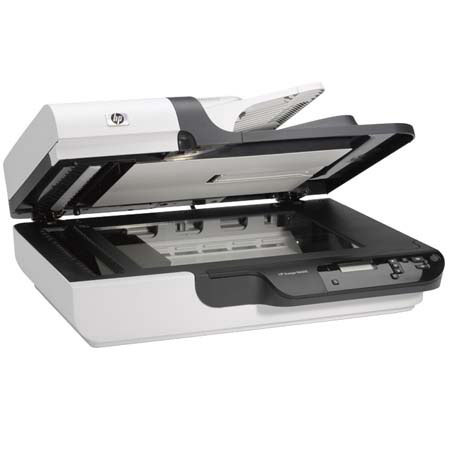
The HP ScanJet N6310 Document Flatbed Scanner is designed for busy office users who need to be able to capture and manage large numbers of documents - often different sizes - while also having the flexibility to scan photos, slides and negatives. Scan stacks of documents using the automatic document feeder and use the landscape flatbed to capture bound, stapled or irregular materials - you can even convert business cards into a digital database.
Get high-quality photo scans with 2400 dpi, 48-bit color and digitize 35 mm slides and negatives using the built-in transparent media adapter. Set shortcuts to common tasks such as scan-to-PDF or scan document to Microsoft Word, then access them at the touch of a button in future. Use HP scanning technology to automatically deskew, crop and rotate digitized files and choose color drop-out to improve OCR accuracy. Save scans in a choice of formats including PDF, TIFF and JPEG and send them directly to a folder, application or email.
Load up to 50-sheets into the automatic document feeder and leave them to scan at speeds of up to 15 pages per minute, or 6 images per minute for double-sided documents. Preview, edit and adjust scans using HP Scanning Software. Manage, organize and share images with ScanSoft PaperPort or Presto! PageManager. Integrate with existing document management systems using included ISIS, TWAIN and WIA drivers.