
This item is no longer available.
Review Summary
2014-01-17T19:00:00
I've used this equipment (maybe a little earlier version) for 7 years and it has been relatively low maintenance. Only a handful of problems over these years. Lately, it is jamming more, starting to chew up fed documents, or the feeder picks up more than one page at a time, but I think I'll replace it with the same model because it is pretty fast and easy to use. I figure 7 years of useful life with pretty much zero maintenance is a fair investment.
ltbA

2013-07-10T20:00:00
The product is finicky at best. The flatbed always work perfectly, but the feeder is shoddy. Sometimes the feeder works sometimes it jams for no apparent reason (even if I feed it flat blank paper it jams). There has to be something more reliable.
Admin1981
2012-12-15T19:00:00
A quality product at a low price. This is my second HP Scanner. Love HP.
Froggie2
2012-10-16T20:00:00
I have used this general type of HP scanner for many years with great results...it performs and is simple to use..it works great with acrobat for our pdf's ...would recommend it to anyone..
BEBarton
2012-04-25T20:00:00
Quality and functionality of scanner products need improvement. We must use HP scanners because of compatability/warranty issues with our software- the fact is that currently we would use another brand if we could due to those 2 issues. That being said, it works well overall and the images are very good...but you must be careful how you work with it. A "high maintenance" item that requires a bit of babysitting (draw any stereotypical analogy you want to from that...it fits!)
barkey
2012-04-18T20:00:00
The only problem was the installation disk. I had to load the setup program individually and not automatic. Other than that the scanner has created great pictures from old 35 MM slides.
Boater
2011-11-30T19:00:00
It is a very useful scanner. I send my scanned pages to emal or save them and also you can scan to any program you have. I greatly recommend it.
Ychapa
2010-12-18T19:00:00
This scanner can do most things to make your office free of paper and also save your document in the high quality for long time you need. I try and I like this scanner.
Talaat
2010-06-10T20:00:00
as a scanner, the unit is good; however, the "automatic" feeder gives more problems than it is worth. Everytime I try to use the feeder the paper jams and I have to start the scan all over again. So many times the jams occur that now I hand feed the scanner. For the price, there should not be any problems.
ms1018
2010-05-30T20:00:00
This scanner worked well on Vista but I can't make it work with Windows 7. I'm ready to throw it out! HP doesn't support it, I'm told, but they're still selling it. Has anyone used it successfully with Windows 7?
donvidon
2010-05-04T20:00:00
I purchased this machine to use at work. I had one heck of a time getting the software to work, as the wrong software CD was sent. I called HP and spent three days off and on the phone and finally the third tech got the right software download for me. Since then I haven't had any problems.
pattyd
2009-10-29T20:00:00
Don't Buy! I've had two of these now. One returned on the Warranty and now the new one is broken after the Warranty. Product constantly jams when using the feeder. No, options to clear jams or repair problems. Just when you think you've got it figured out, and you get your work flow going, some mysterious problem with the hardward sets your production back several days. As a flat bed it seems to work good. However if I needed a flatbed I would spend $50 and get the same image quality. Learn from my pain! Stay away from this product.
Cliff1
2009-09-23T20:00:00
I am facing a one problem in scanner 5590. (I am face hang problem, some time lump hang after 5 sheets and some time hang continuesly 2 and 4 time, so that i do)
khan
2009-09-11T20:00:00
I have scanned tens of thousands of pages with this scanner, and it has never failed me. Yes, I have had an occasional paper jam, but this was almost always my fault (forgot to remove a staple or loaded the ADF with an original in poor condition). And the price is excellent for such an high performing machine. I bought a second one (my project is huge and I have to live abroad at times) thinking that a low cost machine would fail or be damaged in transit. I have never used the second one. The first seems indestructilble.
grdewinter
2008-03-18T20:00:00
Our agency bought individual hp 5590 scanner for each employee's desk top about 3 months ago. The scanner is fine if you only use it for for occasional scanning. If you scan 3 page documents continuously for more than 20 minutes or less, the scanner jams up. It eats the document and will end up destroying some valuable documents you may not have an extra copy of. I would only recommend this scanner if it is to be used for occasional scanning. If not, please don't even think about buying it, because you will only end up frustrating yourself with the jams and chews of documents.
akobanks
2008-03-11T20:00:00
I have had my scanner for about three years now. I love it!!! All you have to remember is that when it "hick-ups" and no image appears, is to unplug the power....wait 5-10 seconds and plug it back in. This very seldom happens, but that's the remedy. The reason I found this "Write a Review" section is that I'm looking to purchase another one for another location. I have been putting my scanner in a suitcase and transporting it back and forth in my car to and from North Carolina and Florida for the past two years. And all I have to do is plug it in and it works!
CertifiedLegal
2008-01-07T19:00:00
We should have purchased a better scanner. This thing jams and is very slow. The image quality is fair. Text comes out as .tif and would be better in .pdf.
JSG99
2007-12-14T19:00:00
I bought the 5590 expecting it to scan (and copy) 8.5x14 (legal) documents just like the ad said it would. Does it? Not really. It will scan a legal sheet ONLY through the document feeder. The glass flatbed will only handle documents 8.5x12. Plus, it can't scan legal-size documents double-sided at all. Also, print quality is not very good for an advanced-generation maching.
JimO
2007-08-23T20:00:00
I have been using this scanner at my office for three years now and it is a great deal for the money. It performs consistently and reliably. The interface is very straight forward. The document feeder works great too and is a big time saver from having to hand feed multi-page or multi-sided documents. I recommend this scanner.
Flaxin
2007-08-02T20:00:00
Overall it is a great product, but was not designed for the office environment where a large number of documents (100+) are scanned daily. The feeder is where the wear and tear problem lies. We have had one for 3 months and have already replaced the whole top feeder unit and are looking to replace that again soon.
david
2007-04-24T20:00:00
I purchased this scanner because of the automatic document feeder. I have used it a lot since then, and find there are good and bad points about this scanner. I only use it for scanning documents into pdf files, and haven't tried any of the other features it has. Good points: It was easily the cheapest scanner with a document feeder. Bad points: The automatic document feeder is not reliable. It will usually work fine if you are scanning in 2 or 3 pages, but if you scan in more (say 5 to 10 pages), almost certainly one of the pages will not feed correctly. What happens is that the feeder grabs another page before the first page is finished scanning, and as a result, you do not get the full scan of some of the pages. I have found that the only way to reliably prevent this is to hold the papers not being fed with my fingers until it is time for the top one to be picked up, which provides enough tension so that the feeder does not pick it up and pull it into the scanner early. Of course, this means the document feeder is not automatic, but it is still faster than placing the pages one at a time on the glass. Another, more minor, problem is that occasionally the buttons on the scanner do not trigger the automatic software provided. I do not know if this is the scanner or the software, but this is not as problematic as the document feeder problems. Overall, if you need a scanner with an automatic document feeder, I would recommend you investigate other scanners.
bahboric
2007-04-19T20:00:00
I purchased this scanned about two years ago and it has overall been great. Easy to use, good work flow. Occasionally the unit will not function and needs to be unplugged and replugged in to clear the software error, but overall, it has been a terrific product to work with. Good software packages as well. We use it to scan in medical forms or explanations and insurance cards. It does this quite well and occasionally need it for other things. As with most auto feed products, you will occasionally get a paper jam. These are easily cleared. The duplex function works well too.
backfixer
2007-04-19T20:00:00
Hello, I purchased the scanjet 5590 scanner because it works with windows vista 64 bit edition. I have had other scanners before and thought nothing of it, other then it would work with my new operating system. But boy what a delightfull surprise I received once I got to know this machine. The way it scans is short of amazing. I just insert the paper into the paper feeder and it scans both sides without any problems. No more loading one sheet at a time and hoping everthing merges correctly. And when I want to scan a picture or magazine I just lift the lid and place it on the flatbed part of the scanner and its done. The resolution is good and it is a snap to use. If a time ever comes when this scanner must be replaced I will definetely be looking for what ever HP replaces this model with. I can't recommend this scanner enough. You just half to try it.
Todd
2007-04-18T20:00:00
I have been using this scanner for two years, and have yet to find a better price/performance value in the marketplace. It has the usual HP quality, both in design and construction. And, the operating features are beyond comparison with most of the competitive products that I've seen. The Automatic Document Feeder allows me to set up a multi-page document for transmission, via e-mail or Fax, with a set and forget attitude. I know that when I return, the document will have been sent off, without a hitch. Good Job HP.
mscott136
2007-04-18T20:00:00
This has been such an excellent scanner. The installation was a snap and it worked right off with no problems whatsoever. It works well with all of my programs to import scanned photos. It also is a great copier - with a push of a button on the front panel it sends a copy directly to my printer quickly and easily. The sheet feeder is very handy - and lo and behold, it actually does scan my negatives into pictures on my computer. Love this scanner! I have owned it for nearly a year, and have given it plenty of use to know how good it is.
Sherri
2007-04-18T20:00:00
This scanner is exceptionally easy to use, especially under Windows XP. My recent upgrade to Vista Home Premier caused a few problems, but they were easily fixed by using the update at HP Support. I have used this scanner for a little over 1-year and have scanned many items into PDF format. I found this to be very quick and easy to make digital copies of my many newsletters so that I can keep them for reference. I am hoping to start scanning my many slides as this will help me show them to my family and friends. The slide accessibility is fantastic.
Larry
2007-04-18T20:00:00
I like my printer. Only thing hard was installation. Once it is insatalled correctly it really does a good job. I have copyed pictures and documents. It works good with my hp printer and computer. It also has a big paper holder! A really good home office machine.
hoody
2007-04-18T20:00:00
Overall good product. Nice feature which allows automatic double sided scanning of large quantities of documents. This saves a huge amount of time. Feed seems pretty robust with only 1 jam after 500 various pages of use. I would recommend this scanner. For the price, it has superior features.
Justwhistle
2007-04-18T20:00:00
This is a good machine. It is light, quick, inexpensive, and produces good scans. The TWAIN interface works well - I've never used the packaged software - I can scan directly from the applications - Acrobat, WinFax, Office, ReadIris pro (and OCR program). The feeder workes well (especially the de-skew feature that most software support). My only complaint is general, since I have an 8200 Photojet and a 2550N LaserJet printer - THERE IS TOO LITTLE CONTROL ON WHAT GETS INSTALLED. It took longer to install the scanner ahd photojet software that any other program I've installed! Then there are way too many background tasks using up CPU cycles. Worse - once I figure out what I don't want to keep installed, there is very little choice in eliminating the unwanted software. A de-install / complete re-install doesn't help because there are few controlable install options. Where it gets installed should be controllable - which it is on some things but not others. Technical help was helpful, but they were as mistified by the laserjet printer status software package as I was - and it had conflicts with other processes that drug my machine to a crawl. These issues can all be addressed - which is why I'm taking the time to send this. The hardware works great!.
RickyD
2007-04-18T20:00:00
I had some trouble installing the scanner some of the instructions were not as clear as at least I need.......and it was confusing about the fact that if I had my printer/scan/copy machine installed the new scanner could not be activated....... Some of the features I have never been able to figure out as it crashes........luckily they are not things I need that much so it does not matter to me.......not sure if it is the instructions again or the Apple laptop,,,,,,,,by and large it does a great job with slides even making the images clearer when very old.......had a lot of trouble with the negatives though.........to me the instructions on the difference between doing negatives and slides was not very clear.......I am one who needs specific instructions.....the free class you had on line was a big help and I intend to eventually take another one........ It would be nice if when you are doing slides that once you set it up it did not have to be reset every time.......of course this could be the case on a more expensive model but it seems to me it should be a given on all machines..... SAM
samrem
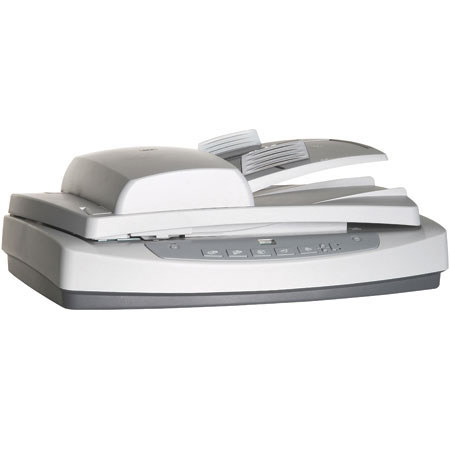
• High-quality scans at 2400-dpi optical resolution and 48-bit color - plus fast, easy operation from a duplexing automatic document feeder. Scans slides and negatives with included adapter. TWAIN drivers and document management software included.