2020-12-04T19:00:00
I sure hope this one lasts longer than the same unit I replaced. If not, I will be forced to go to another brand.
CheapBanker
Originally posted at

2020-11-26T19:00:00
Rated 1 out of 5
Serious Reliability Issues
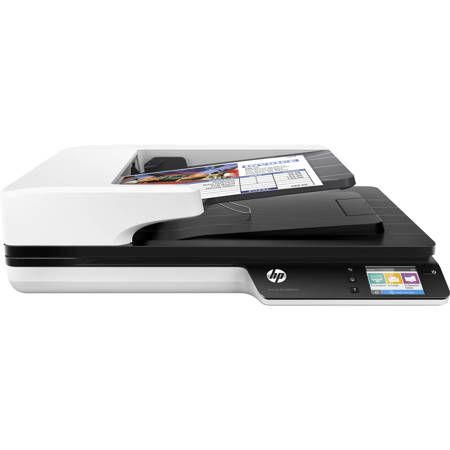
This is a follow-up to my review of about a year ago. As indicated in my earlier review, my HP ScanJet Pro 4500 fn1 network scanner malfunctioned after a year. Since this model is not repairable, I was forced to purchase a new scanner, and I purchased another one of this same model. The new scanner also malfunctioned after a year and cannot be repaired. However, since I purchased the next business day (NBD) replacement service, HP sent me a replacement scanner, which presumably will only last about a year of light use like the other two identical scanners. This is a great scanner if you want an expensive disposable scanner that needs to be replaced each year. I'm in the market for another network scanner for another location but will not be purchasing this model yet again -- it is simply too expensive of a proposition to have to replace the scanner on an annual basis.
AQZHP2
Originally posted at
2020-03-01T19:00:00
Rated 1 out of 5
Mediocre scanner ,price doesnt match valuye
The scanner cant do anything that the built in scanner in an officejet can do.
The pricetag is out of hands though and cant be justified.
All OCR features are software based, so you need a PC running the OCR software. Other PDF/Picture scans can be done directly from device.
It is fairly slow, but quality is good. It turns itself completely off after 8 hours, making off-site maintance a little annoying..
Nice try, but there are better options
Kennethsorensen
Originally posted at
2019-12-02T19:00:00
Rated 1 out of 5
An expensive mistake
I got fewer than 800 pages out of this before it failed. First, there was distortion on the flatbed scanner element. Then, it became a black vertical band.
HP support deemed it a mechanical issue and said replacement was the only option. As the scanner was lightly used (and therefore out of warranty), the cost would have been mine in full. No thanks.
I bought this business-level product with the expectation that it would serve me well for at least five years. This is probably the last HP product I will purchase.
Bruce88
Originally posted at
2019-10-11T20:00:00
Rated 4 out of 5
Great Scanner ... If It Does Not Break Early
I purchased this scanner as a replacement for the same scanner model that malfunctioned after about one and a half years of light duty service. The scanner provides great images, but obviously I am not too pleased that the same scanner model malfunctioned (and could not be repaired by HP) shortly after the warranty expired. Hopefully this replacement scanner lasts longer (though I hedged my bets by purchasing the 3-year NBD exchange service plan as a precaution this time). One other problem is that the scanning software provided by HP for local PCs on the network does not recognize the scanner on the network (although it recognized the previous scanner). HP technical support has been unable to solve the problem to this day, which is unfortunate because the scanner software provides some nice features and avoids the need to have to use the buttons on the scanner itself.
AQZHP
Originally posted at
2019-07-01T20:00:00
Rated 1 out of 5
THIS SCANNER IS A PEICE OF JUNK
GOT ONE ABOUT 2 YEARS AGO--IT WENT BAD IN LESS THAN A YEAR
HP REPLACED IT WITH ONE THAT LASTED LESS THAN A YEAR
HP WON'T REPLACE IT BECAUSE IT IS UNDER THE WARRANTY OF THE FIRST ONE THAT WENT BAD
ALAN12
Originally posted at
2019-06-13T20:00:00
Rated 1 out of 5
Terrible purchasing experience...so many ads.
I used to be able to buy through distribution because we are/were an HP partner. Now I can't buy this through disti without committing to a ridiculous sales minimum. Then I go to buy it direct here and the shopping experience is horrible. Tons of ads, far too many pages to click through. Miserable experience overall from HP.
Bcoz
Originally posted at
2017-10-22T20:00:00
Rated 2 out of 5
Excellent scanner, drastically lacking firmware
When scanning to a network share, the device always defaults to wifi even when wifi is entirely disabled and an ethernet cable is attached. Accordingly, clicking on "Scan to Folder" always presents a "you are not connected to wireless" type pop-up. Then users must jump in and out of numerous menus (and wait quite a long time at each screen change) before EVERY scan to get the fn1 to pickup the ethernet connection. Additionally, you cannot disable machine sleep, only extend the window to 8 hours, and the machine is very slow to power back on. Furthermore, I've been stuck at various different network wait screens for over 3 minutes at a time. Overall the scanning technology, speed, and quality is outstanding. The firmware just needs a complete overhaul. NOTE that HP has not yet released ANY firmware updates to this product to date.
WheresTheFirmware
Originally posted at