Share:
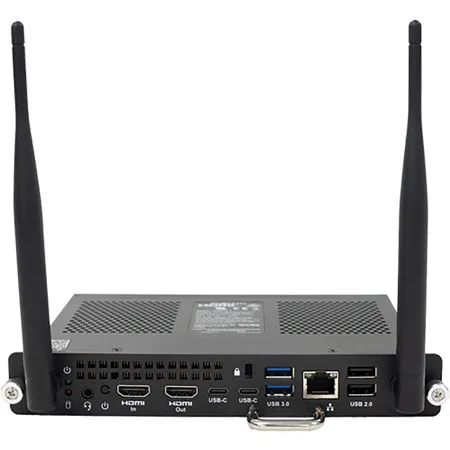
Smart Technologies PCM13 OPS PC Module, Intel Core i7-1365U vPro 1.8GHz, 16GB RAM, 256GB SSD
SKU: STPCM13I7V MFR: PCM13-I7V
Earn VIP Reward PointsKey Features
- Experience seamless integration with your interactive display, enhancing your presentation experience.
- Benefit from the robust Intel Core i7 processor, ensuring powerful and reliable performance for all your tasks.
- Enjoy quick boot times and ample storage with the 256GB NVMe SSD, perfect for demanding applications.
- Connect effortlessly with versatile input/output options, including HDMI and USB-C for ultimate compatibility.
- Utilize the pre-installed Windows 11 Pro for a familiar and secure operating system experience right out of the box.
- Enhance collaboration with integrated Wi-Fi 6e and Bluetooth 5.3, offering superior wireless connectivity.
Temporarily On Backorder?Expected Availability: 09/2026
Calculate Shipping
See Options
1
Add to ListGet Sale Alert

Add Adorama Protect:
Available to U.S. customers only.
Need help? Ask our experts.
Overview
Compare
Specs
Protection







About Smart Technologies PCM13
SMART Open Pluggable Specification (OPS) PC modules provide a hassle-free Windows 11 Pro installation based on 13th generation Intel Core processors and are designed specifically to work with SMART Board interactive displays. Available in three standard configurations, all OPS PC modules in the PCM13 series are WHQL (Windows Hardware Quality Labs) certified and fully licensed with Windows 11 Pro out of the box. Install the OPS PC module in a SMART Board interactive display's OPS slot to provide a complete 4K UHD Windows 11 installation at your fingertips, without the need for an external device or additional cables.
Install familiar Windows software applications, such as SMART Notebook collaborative learning software, SMART TeamWorks visual collaboration software, and SMART Meeting Pro software, and access the internet directly through your existing interactive display's network connection. Upgrades and service for the OPS PC module are easy to perform without removing the interactive display from its mounting.
Smart Technologies PCM13 Features
- Processor: 13th Gen Intel Core i7
- Operating System: Windows 11 Pro (licensed and pre-installed)
- Resolution: Supports up to 4K UHD output
- Certification: WHQL (Windows Hardware Quality Labs) certified
- Integration: Designed for SMART Board interactive displays with OPS slots
- Convenience: No external devices, cables, or adapters required
- Software Ready: Install and run familiar Windows applications directly