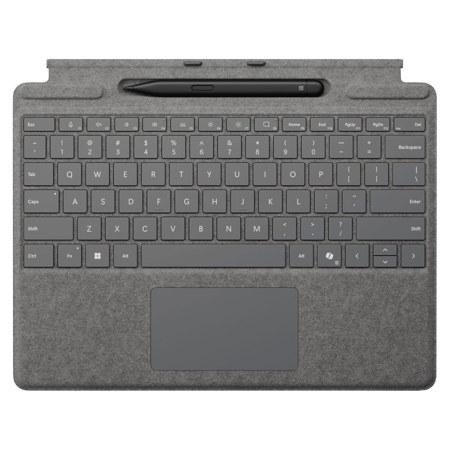

Microsoft Surface Pro Keyboard and Slim Pen 2 Platinum

SKU: MI8X600214 MFR: 8X6-00214
Earn VIP Reward Points

Key Features

  • Transform your Surface Pro into a versatile laptop with this keyboard, perfect for productivity on the go.
  • Experience superior typing comfort with mechanical keys and a full function row, enhancing your workflow.
  • Seamlessly store and charge your Surface Slim Pen 2, ensuring it's always ready for your creative ideas.
  • Enjoy dedicated keys for Copilot and media controls, streamlining your digital experience with ease.
  • The durable Alcantara material provides a premium feel and long-lasting protection for your tablet.
  • Lightweight and portable, this Surface Pro keyboard is ideal for students and professionals alike.
See More Product Details
Temporarily On Backorder?Expected Availability: 02/2026Request assistance or get notified
Free Shipping

See Options

1

Need help? Ask our experts.

Overview
Compare
Compatibility
Specs
Protection
Q&A

Questions & Answers

FAQ

What are the unique features of the Surface Pro Keyboard?

The Surface Pro Keyboard features a large glass touchpad, three innovative hot keys, and a built-in Surface Slim Pen 2 storage tray. It also has a full mechanical keyset, backlit keys, and an Alcantara material covering for added comfort.

How does the Surface Slim Pen 2 enhance the writing and drawing experience?

The Surface Slim Pen 2 features a sharper pen tip and an improved design for ultra-precise tilting, shading, and pressure sensitivity. It also has a haptic motor that simulates the feeling of writing on paper. You can control the level of feedback you feel when you select objects, hover, delete, and more.

How does the Surface Pro Keyboard and Slim Pen 2 facilitate productivity?

The Surface Pro Keyboard and Slim Pen 2 are designed for seamless integration with Microsoft Teams, Microsoft Whiteboard, and Microsoft Journal. They allow you to brainstorm and sketch with others, edit presentations on the spot, fill out and sign documents, or take personal handwritten notes, enhancing your productivity and creativity.

How does the Surface Slim Pen 2 charge?

The Surface Slim Pen 2 stores securely and recharges when stored in the Surface Pro Signature Keyboard or when magnetically attached to the Surface Laptop Studio.

What is the Copilot key on the Surface Pro Keyboard?

The Copilot key on the Surface Pro Keyboard is an innovative feature that brings AI power directly to your fingertips. It is designed to improve productivity and simplify daily tasks.

Reviews about this item

Review Summary

Microsoft Surface Pro Keyboard and Slim Pen 2 Specifications

Surface Pro Keyboard

Surface Pro Keyboard

Jump to...
  • Available Colors

    Black, Platinum

  • Compatibility

    Surface Pro 10 for Business
    Surface Pro 9 for Business
    Surface Pro 8 for Business
    Surface Pro X for Business

  • Accessibility

    Option to purchase with bold keyset edition

  • Keys

    Activation: Moving (mechanical) keys
    Layout: English, full row of function keys (F1 - F12)
    Dedicated keys for Copilot, microphone mute, snipping, Windows shortcuts, media controls, screen brightness
    Right click button

  • Pen integration

    Surface Slim Pen for Business storage and charging

  • Interface

    Magnetic

  • Sensors

    Accelerometer

  • Material

    Alcantara

  • Dimensions (L x W x H)

    11.38 x 8.90 x 0.19" (289.1 x 226.1 x 4.89mm)

  • Weight

    9.91 oz (281g)

Surface Slim Pen 2

Jump to...
  • Color

    Matte Black

  • Material

    Plastic Enclosure

  • Compatibility

    Surface Laptop Studio
    Surface Pro 3 - Pro 9
    Surface Pro X
    Surface Duo, Duo 2
    Surface Go, Go 2, Go 3
    Surface Hub 2S
    Surface Laptop 1-4
    Surface Studio 1,2
    Surface Book 1-3
    Surface Slim Pen 2 Tips
    Non-Surface devices that support Microsoft Pen Protocol (MPP)

  • Connection

    Bluetooth Wireless 5.0 technology

  • Buttons

    Side button, Top Button with eraser functionality

  • Tactile signals

    Haptic feedback functionality compatible only with Surface Pro 8 and Surface Laptop Studio with Windows 11

  • Pressure Sensitivity

    4,096 pressure levels
    Zero force inking

  • Battery

    Rechargeable Lithium Ion
    Up to 15 hours of typical usage

  • Battery Capacities

    Battery Capacity Nominal: 0.171 WH
    Battery Capacity Min: 0.164 WH

  • Storage and charging (Sold Separately)

    Slim Pen storage and charging in Surface Pro Signature Keyboard
    Surface Laptop Studio
    Surface Duo 2 Pen Cover
    Surface Slim Pen Charger
    Surface Slim Pen 1 USB-C Charging Base

  • Dimensions (L x W x H)

    5.38 x 0.44 x 0.25" (136.8 x 11.3 x 6.3mm)

  • Weight

    0.45 oz (13g)

  • UPC Code

    196388357512

Designed For Use With:

  • Microsoft Surface Pro 10
  • Microsoft Surface Pro 8
  • Microsoft Surface Pro 9
  • Microsoft Surface Pro X

Need Help?

For any questions about compatibility with this product, call us at 800-223-2500 or you can email us any time.

About Microsoft Surface Pro Keyboard and Slim Pen 2

- Surface Pro Keyboard -

Next-level versatility comes in the perfect, premium keyboard, featuring a large glass touchpad and three innovative hot keys, including the new Copilot key for AI power at your fingertips. A built-in Surface Slim Pen for Business storage tray provides secure and easy recharging.

Typing and writing in one

An exceptional typing experience
Sleek and compact, this keyboard performs like a traditional laptop keyboard, complete with full mechanical keyset, backlit keys, and large glass touchpad for precise control and navigation.

Adjusts instantly
Work your way anywhere. This keyboard clicks into place instantly and stays securely attached so you always have your keyboard and pen with you.

Comfortable and durable
This keyboard is covered with Alcantara material, adding a warm, comfortable touch to everyday tasks.

Natural inking at your fingertips
Sketch and write naturally on the screen and enjoy no-fuss pairing with Surface Slim Pen for Business, always ready and charged in the keyboard's storage tray.

Inclusive by design
Optional bold keyset has subtle accessibility features such as a larger, bold font, high contrast, and backlighting for easier typing.

Enhanced keyboard experiences

AI made easy
Press the Copilot key to improve productivity and simplify daily tasks with AI.

Seamless muting
Enhance calling with the press of a key to seamlessly unmute or mute your microphone.

Snip in a snap
Effortlessly grab a screenshot with a key that gives you quick access to the snipping tool.


- Surface Slim Pen 2 -

Write, sketch, navigate and recharge. Take handwritten notes and draw with the same feeling you get with pen on paper, with exceptional accuracy and a storable design.

The Surface Slim Pen 2 does not come with a charger. Surface Slim Pen 2 is compatible to charge with a wide variety of Surface devices. All are sold separately.

The best shading experience yet.
A sharper pen tip and an improved design let you approach the screen at a perfect angle for ultra-precise tilting, shading and an exceptional 4,096 points of pressure sensitivity.

Surface Slim Pen 2 stores securely and recharges when stored in Surface Pro Signature Keyboard and when magnetically attached to Surface Laptop Studio.

The haptic motor in Surface Slim Pen 2 brings the feeling of writing and drawing on paper to your PC's screen.

You control the level of feedback you feel when you successfully select objects, hover, delete, and more.

Create, store, charge, repeat
Write, sketch, navigate, and recharge. Take handwritten notes and draw with the same feeling you get with pen on paper, with exceptional accuracy and a new storable design. Surface Slim Pen 2 also delivers incredible shading and exceptional pressure sensitivity.

Fast, fluid, and perfect with your Surface
Our best performing pen yet, with real-time writing, pin-point accuracy, and incredible shading thanks to a sharper pen tip and improved design.

Note-taking, sketching, and navigating for everyone
Experience natural and intuitive note-taking, sketching, and navigating with the same feeling you get with pen on paper, thanks to feedback you control when paired with Surface Pro 8 or Surface Laptop Studio.

Surface Slim Pen 2 can help improve your productivity
You control the level of feedback you feel when you successfully select objects, hover, delete, and more.

Always charged and ready
Surface Slim Pen 2 is ready to use right out of the box for you to unleash your creativity. Better yet, you'll always know where it is with built-in, wireless charging and secure storage in Surface Pro Signature Keyboard or Surface Laptop Studio.

Capture ideas instantly
Brainstorm and sketch with others over Microsoft Teams or when using Microsoft Whiteboard. Plus, edit presentations on the spot, fill out and sign documents, or take personal handwritten notes in Microsoft Journal.

Microsoft Surface Pro Keyboard and Slim Pen 2 Features

  • Surface Pro Keyboard
  • A built-in Surface Slim Pen for Business storage tray provides secure and easy recharging
  • Sleek and compact, this keyboard performs like a traditional laptop keyboard
  • This keyboard is covered with Alcantara material
  • Sketch and write naturally on the screen and enjoy no-fuss pairing with Surface Slim Pen
  • Surface Slim Pen 2
  • Sleek and comfortable. Slim carpenter-inspired style is perfect for all hands and is easy to hold and control
  • Take notes naturally. The haptic motor in Surface Slim Pen 2 brings the feeling of writing and drawing on paper to your PC's screen
  • Surface Slim Pen 2 can help improve your productivity. You control the level of feedback you feel when you successfully select objects, hover, delete, and more
  • Create in real time with zero force inking. Ink flows fluidly out of the pen the instant it hits the screen
  • The best shading experience yet. A sharper pen tip and an improved design let you approach the screen at a perfect angle for ultra-precise tilting, shading and an exceptional 4,096 points of pressure sensitivity
  • Always works. Use Surface Slim Pen 2 to ink across the portfolio of ink-enabled Surface devices

Warranty Information

This product has a limited warranty of 12 months.

Compatibility

Designed for use with: Microsoft Surface Pro 10,Microsoft Surface Pro 8,Microsoft Surface Pro 9,Microsoft Surface Pro X

Key Features

  • Transform your Surface Pro into a versatile laptop with this keyboard, perfect for productivity on the go.
  • Experience superior typing comfort with mechanical keys and a full function row, enhancing your workflow.
  • Seamlessly store and charge your Surface Slim Pen 2, ensuring it's always ready for your creative ideas.
  • Enjoy dedicated keys for Copilot and media controls, streamlining your digital experience with ease.
  • The durable Alcantara material provides a premium feel and long-lasting protection for your tablet.
  • Lightweight and portable, this Surface Pro keyboard is ideal for students and professionals alike.

What's in the box:

  • Microsoft Surface Pro Keyboard
  • Slim Pen 2
  • User Manual
  • (Charger Not Included)
  • Microsoft 1 Year Limited Warranty