2026-05-13T20:00:00
Rated 4 out of 5
Works pretty well
Works pretty well, remote access doesn't work the best on the app though have to go through terminal. But it's far better than the stuff the internet company provides.
CDC
Originally posted at

2026-05-13T20:00:00
Rated 1 out of 5
Does not work
Used netgear will not allow me to sign-in with new pin and password. Does not sync to wifi or either net cable either. All verified by my internet service provider. Why did he help me?...because netgear customer service gave up on me and told me to call my internet service provider.
B A.
Originally posted at
2026-05-12T20:00:00
Rated 1 out of 5
Netgear router
Took 4 hours to get this up and running with wifi and now it does not work , you ripped me off 170.00 for 2 years of service. Thanks for nothing
Laura
Originally posted at
2026-05-07T20:00:00
Rated 5 out of 5
good router
Solid performer, handles several devices very easily. Many customization possibilities.
Steve H.
Originally posted at
2026-05-05T20:00:00
It is a good router. I bought it 5 years ago and just set it up. However I needed to talk to tech support because there was a problem hooking it up with the modem. Good support but it cost me 50 dollars for a 90 day support plan
Patricia k.
Originally posted at
2026-04-19T20:00:00
Rated 5 out of 5
Fast and reliable
Installation without problems. Fast and reliable router. Good price-quality ratio. Highly reccommended
Zoran Z.
Originally posted at
2026-04-14T20:00:00
Rated 5 out of 5
Very easy
Very easy to set up with the app and the router is fast as well
Dogs
Originally posted at
2026-04-11T20:00:00
Rated 5 out of 5
Love my netgear
I buy netgear
Product for my home and buisness i love it! Mostly for buiness when sharing wifi with cilent
Hang
Originally posted at
2026-03-28T20:00:00
Rated 5 out of 5
Quality Support!
Santoush, the phone tech support agent, was professional, courteous and patient while providing assistance in setting up the AC1900 wifi router when the existing modem neededbto complete a firmware update and then created an IP address conflict that I couldn't address. After a little input to identify the issues we completed the session and everyone was surfing the internet shortly thereafter. Thanks for the excellent support on a great product!
Ron
Originally posted at
2026-03-22T20:00:00
Rated 5 out of 5
Bestes router
Router works great. It's going on three years, and it still works. I would recommend it it. It has 2.4Ghz band for the older stuff.
Clarance
Originally posted at
2026-03-02T19:00:00
Rated 5 out of 5
Fantastic
I upgraded my router from 2013 to this newest model and went from 150 download to 975 download over wifi. incredible how close to my 1 gig ethernet speed it gets!
KS
Originally posted at
2026-03-01T19:00:00
Rated 5 out of 5
A reliable 5G Wifi router
We've owned this router for almost 4 years, it's operated perfectly since we bout it. Fast 5G performance.
David M.
Originally posted at
2026-02-23T19:00:00
Rated 5 out of 5
Does the job well.
My router works as it should. Setup is very easy and straight forward. I'm happy with my perches.
Charles
Originally posted at
2026-02-21T19:00:00
Rated 5 out of 5
Solid equipment
Excellent equipment and options, the VPN it's a killer option
Melvin
Originally posted at
2026-02-15T19:00:00
Rated 3 out of 5
New router
Easy to set up, doesn't seem to be as fast as my previous Netgear router because streaming lags. It would be easy to blame it on how many devices are attached but I live by myself.
Robin
Originally posted at
2026-02-10T19:00:00
Rated 5 out of 5
Best I ever had
As I walk in the house, my wifi is connected right away!
Tony B.
Originally posted at
2026-02-03T19:00:00
Rated 5 out of 5
Works great!
Needed it to hook up a sound board to an iPad, works marvelously.
JKILOM
Originally posted at
2026-01-23T19:00:00
Rated 5 out of 5
Nighthawk R7000 Router
This router was easy to install and fully setup and configure. There are simple built in tools in the software that make the process a breeze for setup. I was able to get everything ready in about ten minutes along with easily updating the firmware. I find that the added built in security features add extensive safeguards to protect all devices you connect to the network as it will instantly scan for malicious hardware attached.
The overall speed that this hardware is capable of was fantastic as I was getting near 700mbps download and upload speeds from my ISP. The overall coverage was extensive and able to reach the 2200 sqft. of our home. I would highly recommend this product for home and small business needs.
Ralph L.
Originally posted at
2026-01-23T19:00:00
Rated 5 out of 5
WORKS GREAT
I HAVE USED IT FOR SEVERAL YEARS AND HAD NO PROBLEMS ,IT COVERS MY WHOLE HOUSE AND MORE,THATS WHY I CHOSE NETGEAR FOR MY ROUTER,A NAME YOU CAN TRUST
PETER W.
Originally posted at
2026-01-10T19:00:00
Rated 5 out of 5
Good router very fast
It was easy to set up, no issues so far, and is blazingly fast with my internet
Abe
Originally posted at
2026-01-01T19:00:00
Rated 1 out of 5
BEWARE- NETGEAT HAS RIPPED ME OFF!
I bought this router years ago. It was running fine. I bought a NETGEAR Extender and had to download their app on my phone to install it. The app required me to call NETGEAR to complete the install. The number you call is a NETGEAR boiler room, you can hear them in the background trying to sell the callers software updates and new equipment. In my case they said I needed to pay $89 for a 1-year maintenance agreement which included a software update. Eventually the guy on the phone went from $89 to $49 for a 90 agreement in order to download what he said was the required. I was on the phone with him for four and a half hours after which I thought the extender and router were working OK. Later in the day my internet started to go in and out. Then it went out altogether. I called NETGEAR and after 2 hours on the phone with technical support desk I was told that my router (which had been working fine before the
Robert F.
Originally posted at
2025-12-31T19:00:00
Rated 5 out of 5
R7000 dream installation
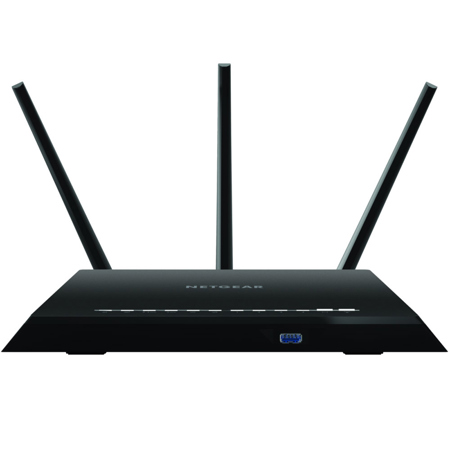
The Netgear R7000 was a dream to install using the Nighthawk phone app. This model has up to date firmware. There are many settings for overall configuration and control of the router making it very flexible for our needs. Three antennas give broad wi-fi coverage in a 3 story house basement.
Daniel
Originally posted at
2025-12-29T19:00:00
Rated 5 out of 5
Great router
I was able to easily set up the two WiFi points (2.4 and 5 ghz) inside my home. The security for this router is fantastic and adds a second layer of security.
David S.
Originally posted at
2025-12-29T19:00:00
Rated 1 out of 5
5G wifi not working
I wanted to like this router, but the 5GHz Wi-Fi is garbage. It constantly disconnects or disappears completely from my devices, forcing me to reboot the router multiple times a day. I've spent hours trying every fix online-changing channels, factory resets, firmware updates-but nothing works. It is completely unreliable.
Sean
Originally posted at
2025-12-28T19:00:00
Rated 1 out of 5
Not worth the money
I payed 178.00 and called customer service to find out why it slow and they told me I would have to pay another 199.00 to upgrade the fire wall. I will never buy a netgear product again
John
Originally posted at
2025-12-26T19:00:00
Rated 5 out of 5
Works well
The WiFi router worked as expected. Good range and signal.
Eric
Originally posted at
2025-12-22T19:00:00
Rated 5 out of 5
Powerful, easy set up
This product is exactly what we needed. Easy set up through the app. Great range in the building.
Standard
Originally posted at
2025-12-20T19:00:00
Rated 5 out of 5
Best connectivity and very reliable
I got this for working remotely and it has been working great!! Fast, secure VPN connection on the router and reliable with the speeds. 10/10 recommended!
Neel B.
Originally posted at
2025-12-13T19:00:00
Rated 3 out of 5
It doesn't seem strong enough
My router is upstairs, but 30 feet away it has a problem getting enough WiFi for my ring doorbell
shelly s.
Originally posted at
2025-12-01T19:00:00
Rated 5 out of 5
The one router to solve all problems
I have been having an issue with my cable companies internet. I spoke with a friend and found out it was the eero routers they gave me with my package. I found this router at a goodwill and hooked it up. It was easy after going to the website and finding the admin password and username. Very simple set up and zero issues with my internet afterwards. I definitely recommend this product if your cable providers internet drops a lot. It helps with lag issues and outages. I am using it as a bypass but it does the job perfectly.
David C.
Originally posted at