Softron Multicam Logger for Mac (Download)
SKU: SO3IB54
This item is no longer available.
Recommended Alternatives
Share:
Overview
Compare
Specs
Protection
About Softron 3IB54
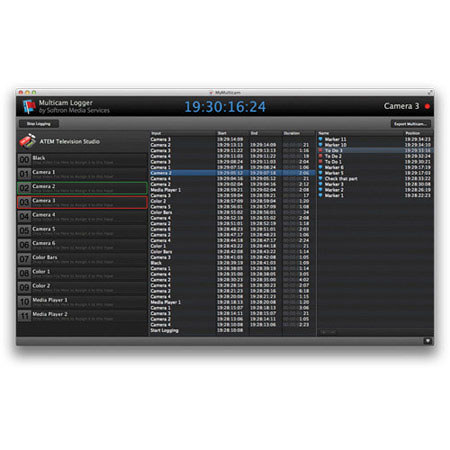
The Softron Multicam Logger is a new application that allows a user to log all of the different angles (or inputs) used in a live multi-camera production. It records which input the producer has selected on his vision mixer and when. Multicam Logger thus creates a multicam clip for Final Cut Pro X, Final Cut Pro 7 and Adobe Premiere Pro using the logs and the files recorded by any type of video recorder. The purpose is to use the resulting media to edit a final version of the production which could include necessary corrections.
Multicam Logger can integrate with ANY production switcher through GPI, but for easier operations, it has been designed to interface directly to the Blackmagic Design ATEM Production Switcher Line through Ethernet. The inputs on the ATEM Production Switcher appear immediately on the Multicam Logger screen and connect through a simple Network Connection, no need for complicated cabling and you can use any of the ATEM Production Switcher line.
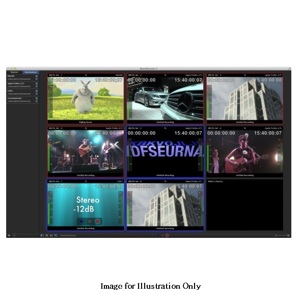
Selecting a device on the ATEM automatically selects it on Multicam Logger and vice versa, selecting it in the Multicam Logger application immediately selects the appropriate ATEM input on the switcher and retrieves the name of the different inputs from the ATEM. The clean and easy to use interface indicates which item is currently selected as Program and which is selected as Preview.
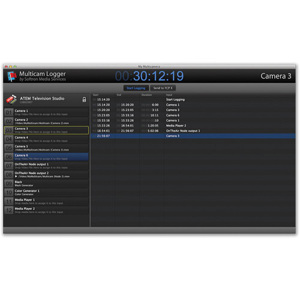
If you do not have an ATEM Switcher, you can also connect to your favorite Switcher using a standard GPI/tally interface. To connect to a Production Switcher using GPI, all the user needs to do is connect the device to Softron's GPICommander2 Logged information includes the Start, End, Duration and Input for each input into the ATEM Production Switcher.
By moving from camera to camera or from one device to another device, Multicam Logger notes the timecode for the start and the end of the selection. It also displays the duration and which input has been used.
Once the live session has ended, the user selects the file in the Finder that he wants to associate with the input and drops it onto the named input. Then simply click on send multicam to send the multicam to his favorite editing software (Adobe Premiere Pro CS6, Final Cut Pro X, Final Cut Pro 7). All of the changes will then appear in your editing solution and are ready to be modified. The user can then work as he would with any standard multicam clip to change which angle is chosen and when, as well as to modify the edit points, add effects, etc..
Multicam Logger does not record any video and is hardware agnostic. What Multicam Logger does is log the angles that the producer has selected on his vision mixer when producing a live show. To get to the multicam clips afterwards, it is necessary that you have the capability to record each of the cameras on set and ideally the program output as well. To record each camera feed, the user can select whatever solution is appropriate.
Of course, the bias is to use Softron's MovieRecorder for all recording. Other recording devices can include the AJA KiPro or Blackmagic Design Hyperdeck, even cameras with built-in memory can be used.
Softron 3IB54 Features
- Control your production switcher during your Live production from Multicam Logger
- Easy shortcuts
- Add markers to indicate which parts need to be corrected or add indications
- Sync angles with Timecode in file, file creation date/time, or simply concatenate and sync in edit software
- Send your multicam to your favorite editing software with the angle changes that you did to allow for a quick and easy correction before rebroadcast
- Controls: ATEM Production Switcher line connected through Ethernet
- Controls: All other production switchers supported but requires
- Controls: Support for X-Keys XK-24 and X-Keys XK-16. No configuration nor driver required!
- Controls: Support for Keyboard shortcuts
- Controls: Support for mouse controls
- Sync: Internal Mac Clock
- Sync: Remote Movierecorder Timecode
- Sync: Other TC sync to come
- Export Formats: Export to Adobe Premiere Pro CS6, Final Cut Pro X, Final Cut Pro 7
- Export Formats: Simply link your recorded camera ISOs files to each angle
- Export Formats: All video formats supported by your editing software
- Export Formats: Warning: multiple files in one angle is only supported when exporting to FCP X
- Recorders: Use any type of video recording device
- Recorders: Support for multiple codecs formats and resolutions in one multicam session