Orders placed during Passover Holiday (Wed 4/1 after 4PM ET – Thurs 4/9) will ship Fri 4/10. View our holiday shipping schedule.

Overview
Compare
Specs
Protection

Reviews about this item

Review Summary

Softron 3IB55 Specifications

  • Minimum System Requirements 1

    Encoding workstation: Mac OS:
    Lion version: Mac OS X 10.7 or later
    Mountain Lion version: Mac OS X 10.8 or later
    RAM:
    Lion version: 4 GB
    Supported Video Cards:
    Lion version: Only cards compatible with AV Foundation (see below)
    Requires Monitor Connected (Open GL Active):
    Lion version: Supported
    Mountain Lion version: No
    Set Resolution:
    Lion version: Supported
    Mountain Lion version: Supported

  • Minimum System Requirements 2

    Encoding workstation: H264 Profiles:
    Lion version: Only Baseline 3.0
    Mountain Lion version: Baseline 3.0, Baseline 3.1, Main 3.1
    Bitrate selection:
    Lion version: Only choose the Quality (Minimal, Low, Normal, High)
    Mountain Lion version: Supported - manually enter a desired bitrate value
    Frame Rate reduction:
    Lion version: Normal, 2x, 3x
    MacPro type:
    Lion version: Any
    iMac type:
    Lion version: Any

  • Minimum System Requirements 3

    MacBook Pro type:
    Lion version: Any
    MacBook Air type:
    Lion version: Any
    MacMini type:
    Lion version: Any
    Compatible Storage:
    Lion version: Any
    Hardware acceleration:
    Lion version: Not supported
    Mountain Lion version: Supported with 2011 "Sandy Bridge", Intel Processors and later

  • Browsers Compatibility 1

    Android Browser:
    HLS with HTML5 Video tag: Supported - Version 3.0 "Honeycomb" and 4.0 "Ice Cream Sandwich"
    HLS with JW Player Premium 6: Supported - Versions of Android that are flash compatible (prior to 4.1 "Jelly Bean")
    Chrome:
    HLS with HTML5 Video tag: Not Supported
    HLS with JW Player Premium 6: Supported
    Firefox:
    HLS with HTML5 Video tag: Not Supported
    HLS with JW Player Premium 6: Supported

  • Browsers Compatibility 2

    Internet Explorer:
    HLS with HTML5 Video tag: Not Supported
    HLS with JW Player Premium 6: Supported
    iOS Browser:
    HLS with HTML5 Video tag: Supported - iOS 3.2 and later
    HLS with JW Player Premium 6: Supported
    Opera:
    HLS with HTML5 Video tag: Not Supported
    HLS with JW Player Premium 6: Supported
    Safari on Mac OS:
    HLS with HTML5 Video tag: Supported - Version 5.1 and later
    HLS with JW Player Premium 6: Supported

  • Compatibility with HTTP Live Streaming

    Application / Device - Boxee Box (D-Link): HLS support - Supported
    Application / Device - FFMPEG: HLS support - Supported
    Application / Device - Quicktime: HLS support - Supported - Version 10 and later
    Application / Device - VLC media Player: HLS support - Supported - Version 2.0 and later
    Application / Device - Roku Digital Video Player: HLS support - Supported - Version 2.3 and later
    Application / Device - XBMC Media Center: HLS support - Supported - Version 12.0 and later

  • Compatibility with H.264 Profiles 1

    Device:
    Android:
    Baseline 3.0: Basic devices
    Baseline 3.1: High End devices
    Main 3.1: High End devices
    High 4.0: Not supported
    Device:
    Apple TV:
    Baseline 3.0: Supported
    Baseline 3.1: Supported
    Main 3.1: Supported
    High 4.0: Supported

  • Compatibility with H.264 Profiles 2

    Device:
    iPad:
    Baseline 3.0: Supported
    Baseline 3.1: Supported
    Main 3.1: Supported
    High 4.0: Supported - iPad 3 (New iPad) and later
    Device:
    iPhone:
    Baseline 3.0: Supported
    Baseline 3.1: Supported - iPhone 3G and later
    Main 3.1: Supported - iPhone 3G and later
    High 4.0: Supported - iPhone 4S and later

  • Compatibility with H.264 Profiles 3

    Device:
    iPod Touch:
    Baseline 3.0: Supported
    Baseline 3.1: Supported - iPod 4th generation 2011 and later
    Main 3.1: Supported - iPod 4th generation 2011 and later
    High 4.0: Not supported
    Device:
    Desktop browsers:
    Baseline 3.0: Supported
    Baseline 3.1: Supported
    Main 3.1: Supported
    High 4.0: Supported

  • Supported Video Cards 1

    AJA Video Systems:
    Io:
    Type: FireWire, Single Ingest: Not Supported, Multi Ingest: Not Supported
    Io Express:
    Type: ExpressCard, Single Ingest: Not Supported, Multi Ingest: Not Supported
    Io HD:
    Type: FireWire, Single Ingest: Not Supported, Multi Ingest: Not Supported
    Io LA/LD:
    Type: FireWire, Single Ingest: Not Supported, Multi Ingest: Not Supported
    Io XT:
    Type: Thunderbolt, Single Ingest: Not Supported, Multi Ingest: Not Supported

  • Supported Video Cards 2

    AJA Video Systems:
    Kona 3G:
    Type: PCI card, Single Ingest: Not Supported, Multi Ingest: Not Supported
    Kona LHE:
    Type: PCI card, Single Ingest: Not Supported, Multi Ingest: Not Supported
    Kona LHI:
    Type: PCI card, Single Ingest: Not Supported, Multi Ingest: Not Supported
    Kona LSE:
    Type: PCI card, Single Ingest: Not Supported, Multi Ingest: Not Supported

  • Supported Video Cards 3

    Blackmagic: Only with Drivers 9.7.5
    Decklink 4K Extreme:
    Type: PCI Card, Single Ingest: Supported, Multi Ingest: Not Supported
    Decklink Duo:
    Type: PCI Card, Single Ingest: Supported, Multi Ingest: Not Supported
    Decklink HD Extreme 3D:
    Type: PCI Card, Single Ingest: Supported, Multi Ingest: Not Supported
    Decklink Mini Recorder:
    Type: PCI, Single Ingest: Supported (HD only), Multi Ingest: Not Supported

  • Supported Video Cards 4

    Blackmagic: Only with Drivers 9.7.5
    Decklink Mini Monitor:
    Type: PCI, Single Ingest: Not Supported (has only 1 output), Multi Ingest: Not Supported (has only 1 output)
    Decklink Optical Fibre:
    Type: PCI Card, Single Ingest: Supported, Multi Ingest: Not Supported
    Decklink Quad:
    Type: PCI Card, Single Ingest: Supported, Multi Ingest: Not Supported
    Decklink SDI:
    Type: PCI Card, Single Ingest: Supported, Multi Ingest: Not Supported

  • Supported Video Cards 5

    Blackmagic: Only with Drivers 9.7.5
    Decklink Studio:
    Type: PCI Card, Single Ingest: Supported, Multi Ingest: Not Supported
    H.264 ProRecorder:
    Type: USB, Single Ingest: Not Supported, Multi Ingest: Not Supported
    Intensity Extreme:
    Type: Thunderbolt, Single Ingest: Supported, Multi Ingest: Not Supported
    Intensity Pro:
    Type: PCI Card, Single Ingest: Supported, Multi Ingest: Not Supported

  • Supported Video Cards 6

    Blackmagic: Only with Drivers 9.7.5
    Intensity Shuttle:
    Type: USB 3.0, Single Ingest: Supported, Multi Ingest: Not Supported
    Multibridge Eclipse:
    Type: PCI Breakout box, Single Ingest: Supported, Multi Ingest: Not Supported
    Multibridge Pro:
    Type: PCI Breakout box, Single Ingest: Supported, Multi Ingest: Not Supported
    UltraStudio 3D:
    Type: Thunderbolt, Single Ingest: Supported, Multi Ingest: Not Supported

  • Supported Video Cards 7

    Blackmagic: Only with Drivers 9.7.5
    UltraStudio 4K:
    Type: Thunderbolt, Single Ingest: Not Supported, Multi Ingest: Not Supported
    UltraStudio Mini Recorder:
    Type: Thunderbolt, Single Ingest: Supported (HD only), Multi Ingest: Not Supported
    UltraStudio Mini Monitor:
    Type: Thunderbolt, Single Ingest: Not Supported (has only 1 output), Multi Ingest: Not Supported (has only 1 output)

  • Supported Video Cards 8

    Blackmagic: Only with Drivers 9.7.5
    UltraStudio Pro:
    Type: USB 3.0, Single Ingest: Supported, Multi Ingest: Not Supported
    UltraStudio SDI:
    Type: USB 3.0, Single Ingest: Supported, Multi Ingest: Not Supported

  • Supported Video Cards 9

    Matrox Digital Video Solutions:
    Mojito MAX:
    Type: PCI Card, Single Ingest: Supported Only with drivers 3.2, Multi Ingest: Not Supported
    MXO:
    Type: DVI Card, Single Ingest: Not Supported, Multi Ingest: Not Supported
    MXO2:
    Type: Express Card, PCI Card or Thunderbolt, Single Ingest: Supported Only with drivers 3.2, Multi Ingest: Not Supported

  • Supported Video Cards 10

    Matrox Digital Video Solutions:
    MXO2 LE:
    Type: Express Card, PCI Card or Thunderbolt, Single Ingest: Supported Only with drivers 3.2, Multi Ingest: Not Supported
    MXO2 Mini:
    Type: Express Card, PCI Card or Thunderbolt, Single Ingest: Supported Only with drivers 3.2, Multi Ingest: Not Supported
    MXO2 Rack:
    Type: Express Card, PCI Card or Thunderbolt, Single Ingest: Supported Only with drivers 3.2, Multi Ingest: Not Supported

  • Supported Video Cards 11

    Matrox Digital Video Solutions:
    Multi:
    Type: PCI Card, Single Ingest: Not Supported, Multi Ingest: Not Supported
    VS4:
    Type: PCI Card, Single Ingest: Not Supported, Multi Ingest: Not Supported

  • Supported Video Cards 12

    MOTU:
    MOTU HD Express:
    Type: FireWire, Single Ingest: Not Supported, Multi Ingest: Not Supported
    MOTU HDX-SDI:
    Type: FireWire, Single Ingest: Not Supported, Multi Ingest: Not Supported
    MOTU V4HD:
    Type: FireWire, Single Ingest: Not Supported, Multi Ingest: Not Supported

  • Supported Video Cards 13

    FireWire Devices (Canopus, Camera):
    Type: FireWire, Single Ingest: Not Supported, Multi Ingest: Not Supported

About Softron 3IB55

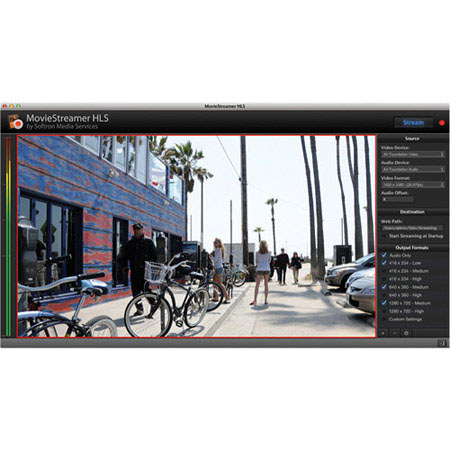
The Softron MovieStreamer HLS is an audio/video streaming application designed for Mac users looking to stream professional grade audio and video to the Net. MovieStreamer HLS accepts video from input devices that support Apple's AV Foundation and encodes the stream into HTTP Live Streaming at multiple bitrates to multiple destinations. MovieStreamer HLS is Live streaming made easy. Select your source (the video card you will use), the destinations (where you will record your stream to), the Output formats (the bitrate, resolutions that you want to use) and click on the record button. MovieStreamer HLS will create all that is required for the HLS format.

No need to be a streaming specialist to use MovieStreamer HLS as it comes with Recommended Presets that you can use very easily. Just start the application and tick which Preset you want to use. When you are ready, just start streaming. Recommended Presets cannot be modified so you can always use them as a reference. These settings are those recommended by Apple for the HTTP Live Streaming best practice.

Most users will be satisfied with the Recommended Presets but in case you want to fine tune your settings, you can just build your own in the Custom Presets. You will be able to set the Resolution, the bitrate, the H264 Profile and if decide whether you want to decrease the frame rate or not.

You can send your HLS streams to multiple destinations. You can record onto local storage, i.e. any mounted volume on your Mac, which can be either an SMB or an AFP volume. You can also automatically upload to an FTP server or to your Amazon S3 account. And can use multiple destinations so that you have a backup solution for your Live streams.

Integration with Amazon S3 is built right into MovieStreamer HLS. As Amazon itself defines it, "Amazon S3 provides a simple web services interface that can be used to store and retrieve any amount of data, at any time, from anywhere on the web. It gives any developer access to the same highly scalable, reliable, secure, fast, inexpensive infrastructure that Amazon uses to run its own global network of web sites. The service aims to maximize benefits of scale and to pass those benefits on to developers".

Softron 3IB55 Features

  • Stream an incoming video signal over the internet
  • Encode in multiple resolutions and frame rate simultaneously for adaptive bitrate (depending on your configuration
  • Record to multiple destinations (Local, FTP, Amazon S3 & Cloudfront)
  • Create streams that are HTTP Live Streaming compliant immediately
  • Easy integration with your CDN
  • Automatically start streaming when the application starts
  • Streaming: Use the built-in Apache Server of OS X or OS X Server (Websharing) for small scale and easy streaming
  • Streaming: Upload to a FTP server for larger scale with CDN integration
  • Streaming: Create the m3u8 playlist and html page for easy integration
  • Streaming: Integrate with JWPlayer 6 Premium to bring compatibility with Flash compatible browsers and devices
  • Encoding: Encode in H264
  • Encoding: Record a QuickTime file simultaneously
  • Encoding: Select the format
  • Encoding: Decrease frame rate up to 3 times
  • Encoding: Locked presets available for zero configuration requirements, just select the typical config you need
  • Encoding: Customizable presets

Key Features

  • Streaming
  • Encoding: Encode in H264
  • Encoding: Record a QuickTime file simultaneously
  • Encoding: Select the format
  • Encoding: Decrease frame rate up to 3 times
  • Encoding