2024-03-19T20:00:00
Rated 2 out of 5
Not as compatible as advertised
I thought it was compatible with my laptop, but it turns out it's not.
Andrew R.
Originally posted at

2024-03-18T20:00:00
Rated 2 out of 5
where is my refund?!?!?
This dockingvstation seemed to built well, however it was not compatible with the laptop i purchased. I returned it 3 weeks ago but havent heard from Dell about my refund.
Karin
Originally posted at
2024-03-17T20:00:00
Rated 2 out of 5
USB-C Docks - a work in progress
While convenient, Dell USB-C/TB docks still need a lot of work. We use many of these in our environment and experience regular issues. We work extensively to maintain latest firmware to try and improve reliability with the docks as much as we can. Hopefully they will be as reliable as previous generation dock devices.
Ryan
Originally posted at
2024-03-10T20:00:00
Rated 5 out of 5
Performed as Expected
Works great and is exactly what I needed for my office.
Meras
Originally posted at
2024-03-05T19:00:00
Rated 5 out of 5
Dell Performance Dock - WD19DCS
The docking station works perfectly. It allows me to connect all the necessary accessories, including 3 monitors, to my laptop.
Orion7NFO
Originally posted at
2024-03-03T19:00:00
Rated 5 out of 5
What was I doing before this
Very helpful get things done
SirLee
Originally posted at
2024-03-03T19:00:00
Rated 5 out of 5
Great docking station option
Sleek and stable docking station that offers higher power output for better support on large monitor setups.
Adam C.
Originally posted at
2024-03-02T19:00:00
Rated 3 out of 5
Overpriced and Spotty
I expected this to be a really nice companion to my Dell XPS 17. While it's great for basic peripherals like mouse and keyboard, it's spotty when it comes to my Wacom tablet and Yeti microphone.
Erik
Originally posted at
2024-02-29T19:00:00
Rated 4 out of 5
Nice dock for the newer Dell Laptops
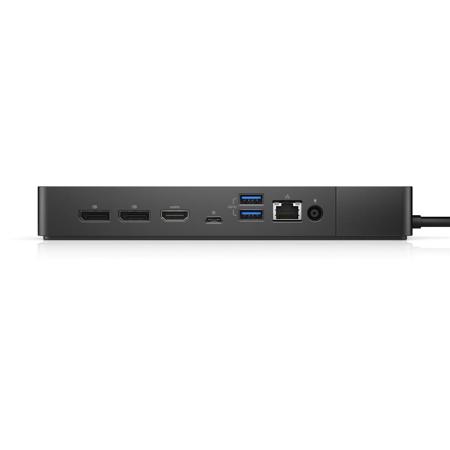
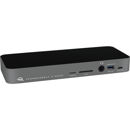
Docking station seems to work well, I use it with 2 displays and use the ethernet port on it along with various USB devices. That brings me to my 2 complaints, the first is the lack of USB A ports. It only has 2 on back and one on the front. IMO it should have at least 4 if not 6. The idea of a docking station to me is to mimic the ports found on a PC. The small amount of USB ports forces me to have a hub if I want to connect anything other than my keyboard and mouse. The other issue I have with it is that the cables to connect to your device come out of the left side of the dock. Both of the newer laptops I have the double USB C ports are on the left hand side of the unit. So unless I set the laptop underneath the dock or above the dock I have to route the cables funny. If they had made the cables come out of the right side of the dock I could have kept things in a nice neat line. It's mildly annoying, but certainly wouldn't keep me from buying the dock.
Joe E.
Originally posted at
2024-02-29T19:00:00
Rated 5 out of 5
Dell dock to save the day!
All plugged up and working like a charm!
Sarah
Originally posted at
2024-02-25T19:00:00
Rated 4 out of 5
Works well, make sure you run updates to get latest firmware
Worked as expected and no issues. A firmware update was required to prevent a concerning boot up message, "Your dock connection has limitations.. To continue operating normally, your system may draw power from your system battery..." I had to go to a Reddit post to find that a firmware update was required.
Scott
Originally posted at
2024-02-19T19:00:00
Rated 5 out of 5
Powerful Dock for powerful Laptops
Powerful Dock that works with perfectly with powerful Precision laptops. Makes my life so much easier because i have multiple monitors, mouse, keyboard and ethernet cable all connected to the dock. just connecting the main usbc port to my laptop in the morning and i'm good for the whole day.
Sandesh M.
Originally posted at
2024-02-18T19:00:00
Rated 5 out of 5
Dell dock to save the day!
All plugged up and working like a charm!
Sarah
Originally posted at
2024-02-18T19:00:00
Rated 4 out of 5
Dell Docking Station
The dock should have more ports.
Kim
Originally posted at
2024-02-06T19:00:00
Rated 1 out of 5
Avoid if possible.
These things fail with absurd frequency. Almost every restart I have to unplug at least one of my Display Port plugs to get a monitor to turn back on. If my company wasn't buying them I would have moved on to a superior product.
Tim
Originally posted at
2024-01-29T19:00:00
Rated 4 out of 5
Good overall, a couple small issues
This dock allows me to add all the peripherals I needed. The dual plug USB-C is a nice design touch. Two small issues I've had are that if you place the dual USB-C into your computer upside down, the computer complains it's not getting enough power and only one of the USB-C connectors lights up. When reversed, it works fine. The other problem is the power cord that connects to the dock (with the blue glowing ring), is not a tight fit and it slipped out slightly, causing my computer's battery to die overnight. Placement of the dock and its cables is important to keeping it working.
T D.
Originally posted at
2024-01-29T19:00:00
Rated 4 out of 5
Will not run three displays easily
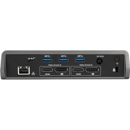
Got this newer docking station hoping to just plug in 3 monitors because the back has 3 connections. The back had 2 Display port connections and 1 HDMI connection for screens. With my current laptop, I have to plug two monitors into the dock and plug my 3rd screen into my laptop's HDMI port. Rather annoying that this dock has three screen outputs but only 2 seem to work correctly. If I plug in the third screen to the dock, then the default resolution is like a 1980's desktop screen.
RC
Originally posted at
2024-01-23T19:00:00
Rated 5 out of 5
Great docking station
Love this docking station. Makes work so much easier.
NBW
Originally posted at
2024-01-22T19:00:00
Rated 4 out of 5
Performed as expected
The dock has performed as expected. It has been able to power all my additional devices for a remote workstation in order to reduce the amount of cords required around the desk.
Scott
Originally posted at
2024-01-18T19:00:00
Rated 5 out of 5
Higher power than others needed for some laptops. Needed to plug in power in addition to docking station with other docks.
Works as expexted. Has the higher power output needed for some laptops
Cat
Originally posted at
2024-01-07T19:00:00
Great Dock especially with the Thunderbolt upgrade
dta116
Originally posted at
2024-01-05T19:00:00
It works great with all 3 monitors.
Bret
Originally posted at
2024-01-01T19:00:00
Rated 5 out of 5
Great Dock
Pleased with the Dock, shipped on time
Bwins
Originally posted at
2024-01-01T19:00:00
Rated 4 out of 5
Excellent pairing with my new XPS 15
Just wish it had 1 or 2 more USB slot/ports. Otherwise, it is rock solid for my new XPS 15 and my dual monitors.
Dave
Originally posted at
2023-12-31T19:00:00
Rated 5 out of 5
Excellent dock
Excellent dock with ability to run 2 external 4K HD Monitors at 60hz each
mpoole
Originally posted at
2023-12-26T19:00:00
Rated 5 out of 5
Works great!
Exactly what I needed and works great. No problem keeping connected or reconnecting monitors. Dock connection to a couple USB hubs works seamlessly.
The O.
Originally posted at
2023-12-18T19:00:00
Rated 4 out of 5
The docking station works excellent!
The docking station works excellent, it really is a great dock. My only issue on the dock would be the mixing of video outputs. It has been my experience that if have one output on HDMI and one output on Display the dock will loose the Display output after a short time. Changing both outputs over the the (2) Display outputs prevents this issue.
Nick B.
Originally posted at
2023-12-17T19:00:00
Rated 5 out of 5
Need for more expensive Precisions
Need for the more expensive Precisions...Precisions with better graphics needs this dock.
Zonieta
Originally posted at
2023-12-10T19:00:00
Rated 5 out of 5
The dock performs well.
The dock performs well. It has enough display ports to work with any dell monitor.
JM
Originally posted at
2023-12-10T19:00:00
Rated 5 out of 5
Solid Dell Docking station
Reliable and perfect for charging all necessary Dell laptops.
BC
Originally posted at