

Picture does not represent the actual item

Picture does not represent the actual item
Need help? Ask our experts.
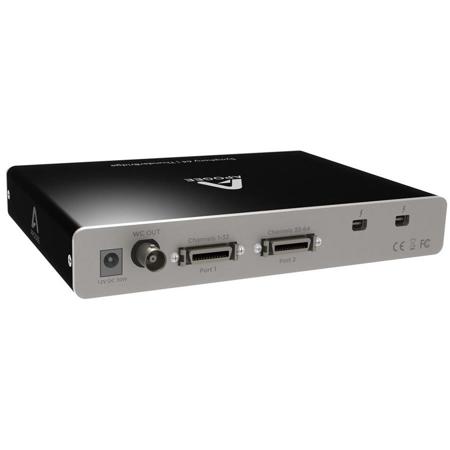
Apogee Symphony 64 ThunderBridge - 64 Channel Thunderbolt connection for Symphony I/O
Next-generation performance. Legendary sound quality
Apogee's Symphony 64, ThunderBridge enables Apogee's flagship audio interface, Symphony I/O, to connect to any Thunderbolt equipped Mac for true Thunderbolt compatibility and performance. Capable of up to 64 channels of input and output at sample rates up to 192kHz, Symphony 64, ThunderBridge delivers impressive channel counts at unprecedented speeds for a latency and hassle free recording experience that meets the requirements of the most demanding professional audio I/O applications.
The power of two Ports
Symphony 64, ThunderBridge offers two Thunderbolt ports to take advantage of the Thunderbolt protocol's daisy-chaining feature. Using the second port, additional Thunderbolt devices such as hard drives, DisplayPort monitors and other high bandwidth media devices may be connected in parallel from a single Thunderbolt port on the Mac.
Near zero latency
Built upon the PCIe protocol, Thunderbolt technology is as fast as any PCIe card such as the Apogee Symphony 64 PCIe. Measured at 1.8 ms at 96kHz/32 buffer, Symphony I/O and Symphony 64, ThunderBridge deliver near zero latency for a hassle free workflow.
Who is it for
Symphony 64, ThunderBridge is for the audio professional seeking the highest channel count, lowest latency and highest quality Thunderbolt audio solution for the Mac based studio.
Highlights
• Connects up to 64 channels of Apogee I/O to any
• Thunderbolt-equipped Mac
• Operates at sample rates from 44.1-192 kHz
• Compatible with Symphony I/O and x-Symphony-equipped Rosetta 800, 200, AD16x and DA16x.
• Latency = 1.8 ms at 96kHz/32 buffer
• 2 Thunderbolt ports for connecting additional peripherals
• 2 PC-32 ports for connection to Apogee interfaces
• DC Input - 12V DC 30W (power supply included)
• Status LEDs to verify proper system configuration at a glance
• Works with any Core Audio compatible application on Mac including: Logic, Pro Tools, Ableton Live
• Certified by Intel
• Made in the U.S.A.
• 64 channels of 24-bit 192kHz digital I/O
• 1.8 milliseconds of latency from analog source in to analog source out
• Two 32 channel, PC-32, bi-directional connectors
• Direct connectivity to Apogee's Symphony I/O or Rosetta 800, Rosetta 200, AD-16x and DA-16x converters equipped with an X-Symphony card
• Two Thunderbolt ports for connecting Thunderbolt devices
• Apogee's Maestro Software for advanced control & routing
• Build Quality: Steel and die cast aluminum
The fastest way to transfer data to and from a Mac
Thunderbolt consists of two mature and stable protocols, PCI Express and DisplayPort, creating a single highly-efficient protocol for both audio and video devices. Given that each technology has been well vetted in the computing industry you can be confident in its stability and performance.
Thunderbolt advantages
Thunderbolt offers a number of advantages for the audio and video professional, including the ability to connect up to six devices to single Thunderbolt port, as well as time synchronization uniquely suited for audio and video devices.
Certified by Intel
Symphony 64, ThunderBridge is certified by Intel, so you can be confident it will flawlessly integrate with other certified Thunderbolt devices.
