2026-03-24T20:00:00
Rated 1 out of 5
Untruthful ink cartridge claim on the website
The website states incorrect information in that the WF-7840 comes with 4 cartridges, but those 4 cartridges are meant for initialization only, but not for even 1 sheet of printing beyond initialization. Very disappointing to receive the printer, took almost 1 hour to setup and go through all the "machinations" of initilizing and then to find out I need to buy 4 cartridges to test the printing capability of the printer. 4 new cartridges range from $80 - $100 to purchase. I guarantee if I didn't like the printing of the printer, I'd be stuck with the cost of the new ink cartridges and unable to return them. Beware of the website that is completely unfactual and misleading to the purchaser! I was jazzed about the new printer, but very disappointed that the web page didn't divulge this caveat before buying! I returned the printer and now I'm still working with a semi-defunct printer that I was replacing. Corporate office had very little care that I was "up a creek w/out a paddle" after purchase and said they'd pass the information along, but they couldn't guarantee that the information on the web page would be corrected. Nor did they offer a set of 4 cartridges since their website was untruthful. BTW, this goes for the WF-7820, too! Buyer beware!!!
jbear
Originally posted at

2026-02-27T19:00:00
Rated 1 out of 5
Firmware turned my printer into a brick
You're recent firmware update has turned my printer into a brick. I do not appreciate being forced to purchase epson ink cartridges to make the printer function. I would rather throw it in the trash than succumb to your attempt to make more money off of me.
Hurricaner
Originally posted at
2026-02-24T19:00:00
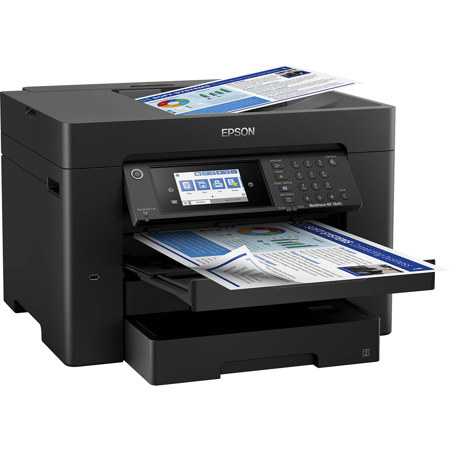
I wasn't prepared for the size of this thing, I didn't read the dimensions that closely. 54 lbs of printer. Good for small business kind of overkill for personal use. Had a WF 3840 this is that plus more, print quality is good as laser. My 3840 lasted 20 plus years so that's why I returned to Epson. Biggest complaint is WiFi drops (I knew that going in based on reviews. Hoped it was service provider issues but it happens a lot.
Bigass P.
Originally posted at
2025-12-11T19:00:00
Rated 5 out of 5
Affordable Printer to Print Reduced Size Plans
This printer is fantastic for printing reduced-size plans. We are able to print 13 x 19 plans at home. We have two Epson printers. They are affordable and do a great job printing, scanning, and copying. Super easy to use. The only thing I don't like about them is that when the colored ink runs out, they won't let you print in black and white. To avoid downtime and issues, I always have ink refills on hand. Much faster, cheaper, and way more convenient than having to go to a local printing store to have our plans printed out.
KristinithN
Originally posted at
2025-12-04T19:00:00
Rated 1 out of 5
Would NOT recommend, Customer service is terrible too!
I purchased this and it is the worst printer experience I have ever had! Returned it the next day, but giant waste of time.
1 - I was going to use this largely for color printing on cardstock for inserts on my business. However, there are streaks and gaps on all 7 of my various tests, none of them are consistent and are in different parts of each of the same photo/sample.
2 - even when using a normal 8.5x11 regular printer paper selected in the print properties on the computer as well as on the printer itself I got errrors saying they didn't match and i would have to override, extremely cumbersome and annoying.
3 - I was planning to use this for some non-standard sized paper and figured out how to add in that custom paper size, but it's annoying to me that this has to be done both on the print interface as well as on the printer itself, why can't what you select in the dropdowns when printing be sent to the printer, why does the printer also need you to manually select what kind of paper and what size? I've never seen another printer that does this.
4 - I emailed customer service asking for a refund because the print quality is so bad and I could tell that the print interface was annoying and didn't seem worth it to me. They told me to call sales, who told me that I needed to talk to customer service, but they took 10 minutes to figure out how to transfer me. Customer service wanted me to run all kinds of tests. I told them that I needed the printer to work yesterday and since it wasn't I now needed to return it, because I had already moved on to plan B, they could not help issue me a refund and so transferred me to another person who would email me the return instructions. I was very clear in my email that I wanted to return it because it wasn't able to print basic cardstock and it took an email and over 30 minutes on the phone to get a simple return label. This is one of the worst customer service experiences I have had in a LONG time. You could have just emailed me the return label from my initial email, but instead chose to give me the run around and waste my time.
I would not consider purchasing from Epson in the future as a result of this experience.
Mercedes1
Originally posted at
2025-09-29T20:00:00
Rated 2 out of 5
Avoid this one.
I hate this printer. It randomly disconnects from my wi-fi and won't reconnect. Sometimes for weeks. No matter what I do. Then, one day, it magically reconnects (without me doing anything). The print quality and the speed is excellent, but it does me no good when the stupid thing keeps disconnecting.
TLC911911
Originally posted at
2025-09-16T20:00:00
Rated 2 out of 5
Less than Acceptable Scanner
The software for the scanner is horrible. Confusing and unintuitive. Very little ability to adjust scanner settings to get desirable results. Output is inconsistent and not good. The inkjet printing capabilities and output are very good.
Sinbad
Originally posted at
2025-09-15T20:00:00
Rated 5 out of 5
Epson Workforce 7840 Printer
Thiis is the best printer I have purchased. A great printer for a low price, fast and easy to use...
Nathan S.
Originally posted at
2025-07-02T20:00:00
Rated 1 out of 5
Horrible printer
I bought this printer in oct 2024 by Jan 2025 it had a hardware issue so Epson replaced it now it is July and now the replacement has to be returned for same issue but this time they are sending me a refurbished one. This model is a lemon and you should not buy one
Kim8
Originally posted at
2025-05-04T20:00:00
Rated 2 out of 5
Frustration with ink cartridges
I bought this product a few months ago and it was fine until the firmware update. After the update, the machine doesn't recognize the ink cartridges. I spent time on the helpdesk line and they told me to try new cartridges. Try? These aren't cheap to just try with hope it fixes the problem.
Frustrated_Customer
Originally posted at
2025-04-01T20:00:00
Very difficult to link the printer to my MAC.
brentb28
Originally posted at
2025-03-19T20:00:00
Rated 1 out of 5
Work Force
Don't buy this unless you want a piece of junk!!! I just threw my as hard as I can out the door. To heck with your maintenance box and other multiple problems. It can only scan about 10 pages at a time without a jam. I'll never by Epson again?
Jimmy O.
Originally posted at
2025-03-04T19:00:00
Rated 3 out of 5
Great quality, but Ink Hog
I LOVE the print quality and scan ease and quality for letter and 11x17 sheets, BUT I am very angry about the rate of ink usage and the cost of cartridges. Although I've also had a brother printer that was an ink hog, so maybe all printers nowadays hog ink. I put a brand new black in cartridge in it after the one that came with the machine ran out. I got maybe 50-100 sheets TOPS through it and it's telling me my ink cartridge needs to be replaced again. Nothing I printed had excessive ink, it was mostly text reports and structural drawings that is just line-work. I never cleaned the heads so I wasn't wasting ink. Although it also says my waste box is almost full even though I've never cleaned the heads except whatever it does when its brand new and setting up.
brian354
Originally posted at
2025-03-01T19:00:00
Rated 1 out of 5
Don't buy from OFFICE-MAX!
There is a reason this is reduced in price. No Epson support, no phone number like eBay. Purchased at Office Max, grinding noises and inop after 3 weeks. Office Max won't take it back, should have purchased from Wal-Mart at least they have a return policy of value!
jgporsche
Originally posted at
2025-02-23T19:00:00
Rated 3 out of 5
TOO MUCH TIME AND INFO
THIS TAKES TOO MUCH TIME !!!!! AND WHY DO YOU NEED ALL OF THIS DATA. EVEN SENDING IN A COMMENT
BOBU
Originally posted at
2025-02-01T19:00:00
I received my printer in January 2025. When it is working it prints beautifully. So far though I have had to do multiple head cleaning/alignment tests too often. But the quality of prints for my artwork is what I was hoping for-excellent. Also uses quite a bit of ink.
WF i.
Originally posted at
2025-01-27T19:00:00
Rated 2 out of 5
Work great until it a firmware update bricked it
I was initially excited about this wireless all-in-one printer and the fact that it could print in larger formats. It was fast and met my needs until it I updated the firmware. Now it won't recognize my ink cartridges. I even bought a new set of cartridges from Best Buy and it still throwing the same error that my cartridges aren't recognized. I contacted support, they reached back out to me within 24 hours with questions and requested pictures. I sent it to them within hours, and it's now been two weeks and no response. It's less than 2 years old, and now a gigantic paperweight. Thanks for nothing Epson.
Tony B.
Originally posted at
2025-01-10T19:00:00
Rated 2 out of 5
Frequent paper jambs.
This is my second Epson all-in one. First one lasted several years with very few issues. This one is only 6 months old and having frequent problems with paper jams when scanning. It either grabs too many sheets or the paper gets severely wedged between the white plastic above the glass. Very difficult to remove. I tried contacting "support". First time they email back saying they received my email and would get back to me shortly, and never got back to me. Second time I filled in all the required fields, including serial number, and the request would not even go thru. Instead you get a message saying, "something when wrong".
Wasting t.
Originally posted at
2025-01-09T19:00:00
Rated 1 out of 5
Not Dot Buy!!!
I got this printer about 2 months ago. The print is slow, uses ink fast, the paper jams easily, and the way it updates is slow and cumbersome. I miss my old HP going back
Jorge1236
Originally posted at
2025-01-03T19:00:00
Rated 1 out of 5
wf-7840 is garbage
I hate the wf-7840 i can get it to print save pictures at 11x17 i try it so many ways and the only way that woks is to scan the picture first then change the print size.
Zzaul
Originally posted at
2024-11-03T19:00:00
Rated 1 out of 5
Avoid at all costs... ALL COSTS.
ZERO Stars. No Windows 11 driver. Cannot print booklets.
What a garbage company.
MrInkjet
Originally posted at
2024-10-30T20:00:00
Rated 2 out of 5
Not worth my money
I bought this printer in June 2024 after weeks upon weeks of research, trying to get the best value for my needs while staying within a certain price point. My purchase price was $350. The last time I had purchased a printer was ten years ago, and I had a little Canon that would get the job done, albeit fairly slow and had no other features (like scanning or ability to print large pages).
I thought this printer would be an upgrade to my old one, but it's been nothing but buyer's remorse. Every second or third printer job comes with lines through my prints and requires me to go into the settings to reset it. The upside is that I'm getting pretty quick at doing it.
I've read that i can convert this to a sublimation printer, which is something I've wanted, but I don't think that will fix the quality issues, and this thing is fairly large to use as a second printer. Also, it puts me right back at square one trying to find a reliable home printer.
I've never been able to get the scan to email function to work, despite trying multiple times in the last few months.
The speed of the print job in the specs is not as fast as real life, and doesn't print any faster than my old printer.
The ink is not as vibrant as my ten year old Canon, which is probably the most disappointing part of it all, because my research said Epson was supposed to be better and I use this to supplement print jobs for my business to save some money ordering prints online.
Overall not impressed, and I'm not sure what to do at this point.
Cstale007
Originally posted at
2024-10-15T20:00:00
Rated 1 out of 5
Replacement issues are the same as the replaced printer.
Replacement printer still has the same issues as one it replaced. Once turned on and configured, before even loading paper, I received a "paper jam" error. What? I checked the paper tray path to see if there was anything jammed from the factory but it was clear. I finally got it to copy, but not print. I'm going to have to give in and call tech support again and spend 20 minutes with them knowing they'll probably tell me it has a defective sensor (like the previous one) and to return it. I'm losing valuable time not being able to print business cards, flyers, and heat press designs. Ugh. Needless to say I won't order one again.
LarryJames
Originally posted at
2024-09-19T20:00:00
Rated 5 out of 5
After 1 year, no issues.
I am not a heavy user of the printer but so far after a year, it's done everything I've asked of it.
The scanning software is a little basic and clunky and it seems like it won't let you scan higher resolutions for larger images. But I'm sure I could use some third party software to get around that if I really needed it.
Apart from that, I'm very happy with it.
MrMcgoo
Originally posted at
2024-09-18T20:00:00
After 2 months, Error Code 000041. I can't see any paper jam anywhere in the unit. Now I can't print, fine. But I can't scan any documents either. This error makes the unit unusable. I have a huge brick on my desk. I opened a support ticket with Epson Support, no answer after 1 week.
Mathieu
Originally posted at
2024-09-15T20:00:00
Rated 1 out of 5
Do Not Spend Any Money Buying This Printer
This is one of the worst printers. Please do not spend any money buying this. It always has some kind of an issue. It gives you error messages and is very fussy with ink, etc. Now we have a "Close the Scanner" error, the scanner is close, tried the youtube help and it still doesn't work.
RS11
Originally posted at
2024-09-01T20:00:00
Rated 1 out of 5
HORRIBLE PRINTER
It's one thing for a company to be so stingy and force you to use their ink cartridges, but it's even worse when their own cartridges don't work.
Jason1
Originally posted at
2024-08-12T20:00:00
Rated 3 out of 5
Maintenance box went bad
We bought it not even 6 months ago once the ink ran out we bought new ink and didn't recognize any ink.
Nana p.
Originally posted at
2024-07-26T20:00:00
Rated 1 out of 5
Disappointed with Epson Printer - No Longer Prints Colors
I am extremely disappointed with my Epson printer. After only a few months of moderate use, it has stopped printing colors altogether. I have tried all the troubleshooting steps recommended by Epson, including cleaning the printhead and updating the firmware, but nothing has worked.
This issue has significantly impacted my productivity, as I rely on this printer for important color documents. The black and white printing still works, but that's not what I purchased this printer for. I expected better quality and longevity from a brand like Epson.
Additionally, the customer service experience has been frustrating. I had to wait on hold for a long time and was given generic solutions that didn't resolve the problem. For the price I paid, I expected a reliable product and responsive support.
I do not recommend this printer to anyone looking for a dependable color printing solution. Save your money and look for a more reliable brand.
phillybusiness
Originally posted at
2024-07-14T20:00:00
Rated 3 out of 5
Lots of ink
Great printer overall, but ink usage seems very high. Wish I had read more reviews, but this was the best offer on the market for 11x17 printers. Otherwise, loving everything about it. Great print quality.
relinc
Originally posted at