
This item is no longer available.
Review Summary
2018-07-29T20:10:06
I read the reviews before buying and agree with what's been said. I'm very satisfied with the hardware but the SilverFast software has crashed too many times. I no longer zoom in to see the image 1:1 because it stopped working many times while trying to use that feature. The SilverFast software is very complex if it wasn't for the fact I've used Photoshop for 20 years and understand many of the concepts it would be overwhelming. You also get very little in the way of a manual on running the software. The manual is about 8 pages long. There are Quick Time videos and pdf help files for every function, but I like a book to follow while I'm trying the features.
David H.
2018-06-01T12:44:50
I've had an Epson V750 for ten years and the best it would do is 2300 ppi. It will make a nice 12x18 in print from medium format but not from a 35mm. I bought the Plustek Opticfilm 120 when they went on closeout. It scans an honest 4000 ppi. Scanning times are reasonable. You do need to update the drivers and software though. Very pleased.
ALLAN D.
2018-03-16T11:58:21
Is great when it work, the resolution is close to a drum scanner, unfortunately, the software and hardware do not play well with each other and it keeps on crashing, or not scanning at all, I wish they would just fix this issue, the auto scanner, with auto dust and scratches is a hit and miss, sometimes it will clean all the images, sometimes it won't, even after dustin the negatives, it still did not catch all the dust, is quite fast compared to other scanners, but the constant crashing takes away from the fast scanning, is a great scanner if the software was fixed, I am using the latest software from the Plustek website, as the one that comes in the CD is quite old, but it still crashes on Sierra, and High Sierra on Mac, not sure on the PC side, I would recommend it for anyone is shooting on medium format, and posting to web, or doing prints for clients, but not so much for artwork as it is not as reliable for accurate artwork scans, and the density is not that of a drum scanner (although is close), unless you are willing to put the time, and patience for the constant crashing.
nathanael t.
2016-01-14T18:47:28
Things are working out nicely with my new equipment. My original scanner is 12 years old. This new one only cost more than the first one, and it is better constructed and comes with 7 trays vs. the three I had. It runs quieter, faster and has a smaller footprint. I had some apprehensions regarding the interface software (SilverFast) because that's what came with my old scanner and I never used it because it was lacking and a pain to use. Well that was version 5. The new unit came with version 8. It is very much improved and does more than I need. I won't be outgrowing this anytime soon. This is one of those pieces of hardware that is truly boner inspiring. The only advise I have is that people be ready for a gradual learning curve with the SilverFast application. If you are comfortable with other scanning software then you will have an easier time. The Plustek is very well built. It runs like a fine watch, except for the initial clunk that is heard at the beginning of a scan sequence. (Sounds like a little guy in there with a hammer.) Figuring out the resolution, and magnification settings will take some time, but once you find what you want just save the frame set. I have no issue with the fixed focus of this machine. There is no need to adjust it if your scans are from un-mounted film strips. I scan 120 film strips exclusively. All of my scans are sharp. I must confess that I'm a film guy. That means I do not expect my work to be over sharpened, over contrasted, or over saturated to the point of resembling a screen shot of some video game.
LEHMAN M.
2015-04-30T21:00:00
I purchased the Plustek 120 Opticfilm scanner in October 2013 and it has scanned over 3000 images, mostly 6 x 6 cm b/w. Overall, considering the ample cost, I am considerably disappointed, but there is not a better alternative yet. The good: 1) Image sensor and scanner optics seem quite good. The sensor/optics native resolution is 104 line pairs/mm, which exceeds most practical camera lens performance. My unit exceeds the sharpness of nearly all of my film images. 2) Film holders are robust and perform well, hold film flat, and are easy to load and do not scratch films. 3) Scan speed is adequate. Scanner produces images faster than I can label the envelopes and make preliminary adjustments to color/contrast. Dense images slow scan speed greatly. 4) Unit is reasonably quiet in operation. The bad: 1) The scanner firmware and bundled software do not play well together. Frequently, Silverfast (also Vuescan) cannot initialize scanner operation correctly..the scanner rejects the film holder without scanning. This seems to be a scanner glitch. The unit must then be powered off by removing the power plug on the back of the unit, and then restarting. Plustek has had more than two years to correct this problem, but so far, nothing has been done. Very Annoying. I may install a power switch on the front panel... 2) From time to time the scanner goes beserk, utters strange noises, and will not release the film holder. Fix is to remove the holder from the rear of the scanner. For this, 13 inches of clearance is required behind the scanner. (The film holder should never be forced to the front. ) 3) For strips of three 6 x 6 negatives, the film holder opening and spacing does not match my negatives, such that the third image had to be scanned by removing the film strip and then rescanning with the third frame in the first position. I cut the film holders apart, and remade them for my 56.4mm image size, and made them able to accomodate variable frame spaces, of which I have many. Holders are molded polycarbonate, and may be reworked using two-part methacrylate adhesive. I used the Versachem product. 4) Silverfast. Deserves its own review, but firstly is not yet well matched to this hardware. Batch scanning of 120 films requires an overview, and then individual frame prescans, and then individual film scans. I expected, based on experience with other scanners, that a single prescan would suffice to set framing and basic scan parameters. Big time waste. This is supposed to be a scanner for 120 film! Silverfast is overly expensive and complex. It attempts to be the swiss-army-knife of scanner controllers, but most of its corrections are much better applied only after the scan is completed and available for examination at high resolution. I have no use for sharpening and color/contrast/curve characterization/noise reduction until the full-sized scan is available. Most Silverfast features are "fluff" for careful work. I use Vuescan for most scans, much faster for my 3 frame 120 films. 5) Warranty for an item at this price level should be at least 3 years, not one. My scanner went totally unresponsive at 14 months. Repair from Plustek was to have been fixed price: $400. Since I was beyond warranty, and would have had to wait an unknown time for return to service, I opened the unit and found a limit switch had jumped out of position. Held by plastic tabs, not screws. Back in service same day. Several of the internal gears seemed undersized for long service life. Moderately difficult to work on, but doable if patient and careful. Recommendation: buy the extended all-perils warranty. 6) Scanner lacks internal baffles and blackening to reduce stray light. If I open the unit again, just for grins I will add light baffles on the led light source, and paint some internals flat black, which may extend performance in thinest negative image areas.
WILL G.
2014-05-26T21:00:00
Makes great scans, but it has a chronic glitch that others have complained about as well -- it often rejects the slide tray and scans anyway. Unplugging the device seems to reset it. Plustek has been unresponsive and obviously has allowed this problem to go uncorrected. It's more of an annoyance than a hindrance. Slide trays are well-designed and sturdy.
DAN H.
2014-01-27T19:00:00
There is a pretty big learning curve with this machine. I had to call their help line to address why the film tray was being rejected. Had trouble scanning at max resolution. I like the color rendition that this machine has. Very little color correction is needed. Fairly simple to operate once Plustek figured out what was going on with my unit. Image sharpness of the scans is acceptable but I was hoping for better. The machine needs to be re-booted too often and can slow production. Film trays are very well made and lock down the film well.
STEVE R.
2013-10-22T21:00:00
The scanner itself is great. When it works it produces great results with both b/w (I've used Ilford Delta 100 Pro) and color (Kodachrome and Velvia 100). Does'nt do a very good job on a dense slides - there is no way to increase the exposure and multiple exposure mode doesn't help much as the higher exposure image is not recorded (it is combined with normal exposure image). Sometimes the scanner's servo looses its position and scan is offset either slightly or completely - just power cyclyng corrects it. The shutoff time can't be modified and that makes batch work difficult - while the first image is processed the scanner may shut off and that's it. Lowering resolution or decreasing processing (like iSRD or ME) can help but that is not practical. Overall its a great product, just needs love, care and attention.
Serguei L.
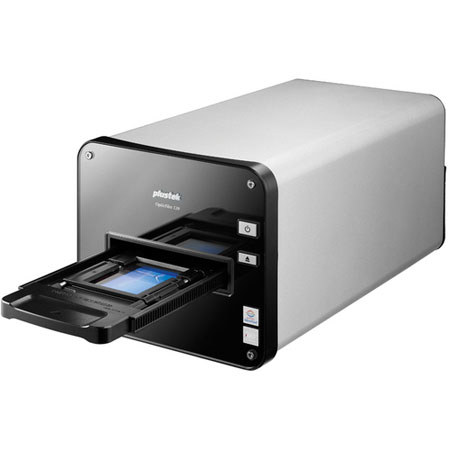
The Plustek OpticFilm 120 Film Scanner delivers the professional image quality results from 35 mm film strips, slides and 120/220 film from 6 x 4.5 cm up to 6 x 12 cm in sizes. It is designed for professional photographers, advanced amateur photographers, film photo enthusiasts, photography schools and clubs. The OpticFilm 120 satisfies the film scanning requirements of advanced amateurs or professionals that require the ultimate in image quality and an ICC profiled scanning system.