2026-01-03T19:00:00
Rated 2 out of 5
Great dock for single display output only
This product was great until I tried to connect multiple displays to it. They make claims that multiple displays are supported at 4K. This is false! While they might be able to say that 2 4K displays are supported on a Mac where the screen is mirrored not extended, nobody uses 2 4k screens in mirror mode!!
So get rid of your false advertisements!
TheRyan
Originally posted at

2025-09-09T20:00:00
Rated 1 out of 5
DisplayPort User's beware
Displayport 1.2 cannot do anything worth while and is over a decade old. You will run into many many incompatibility issues with this dongle. Bad. DisplayPort 1.4 is standard and from 2016. Current is 2.1.
Guy169420
Originally posted at
2025-06-20T20:00:00
Rated 5 out of 5
* Easy Install *
Great product! Plug and play. The ethernet connection has the device's name, so search for that name when you want to find it in your network. Very happy with this purchase!
Tim M.
Originally posted at
2025-05-28T20:00:00
Rated 1 out of 5
Highly disappointing
Even though it shows it's compatible with the 2022 M2 Apple Macbook Air, it doesn't support dual monitors. That's one of the main points people buy a dock! The chat agent had me download DisplayLink, review all of my settings, then confirmed it doesn't work. Waste of my time and money.
ewharz
Originally posted at
2025-02-27T19:00:00
Rated 3 out of 5
Underpowered USB ports
My Mac did not recognize the dock as an audio input/output device. Returned and replaced it. The replacement dock is recognized as an audio input/output device correctly. However some USB devices do not work; the Mac says the USB devices need power.
Question: if I connect my Mac's AC adapter to the USB-C PD connector, does that also provide power to the USB ports?
jerkington
Originally posted at
2025-02-11T19:00:00
Rated 2 out of 5
Okay but fiddly.
Does not always detect displays, especially in the DisplayPort.
justdennis
Originally posted at
2025-01-21T19:00:00
Rated 1 out of 5
Waste of Money
This was a waste of money. Apparently, it is not compatible with my LG Gram. While the USB ports work, the HDMI port does not. My monitor does not receive a signal from the dock.
It would be nice if Belkin listed on the packaging the devices that this dock is compatible with. I could have saved myself $100. Usually, I am happy with Belkin products, but not this useless device.
HRPuckinfutz
Originally posted at
2024-12-02T19:00:00
Rated 1 out of 5
Trash--Dock station, Cables etc. will not work
My Multiport dock worth $100+ is now a useless device as it is not compatible with my laptop. The fact that it is a docking station and should work with any laptop but the irritating thing is it does not and the customer service agent could not do anything other than give 10% discount on future purchase. This is absolutely ridiculous and it was an absolute waste of time and money investing in Belkin product with such a low level of customer support. Will never buy belkin product. Absolutely worst quality experienced for multiple products I have purchased.
Raj16
Originally posted at
2024-12-02T19:00:00
Rated 2 out of 5
usb ports don't work
Great for a day, then the USB ports stopped working. Apparently this is a common problem. I worked through all the online solutions, but none worked. I have a J5 that works flawlessly. I'm sending the Belkin back to get another J5.
Jim M.
Originally posted at
2024-07-10T20:00:00
Rated 3 out of 5
loosing Wi-Fi while using, and it gets hot a lot!
bought this product from a reseller here in my country, all it's products are original, i faced a big problem with my mac using the dock, Wi-Fi will disconnect and lose connection multiple times during using it, now im connecting it with an HDMI cable, previously i connected it with a display port but don't remember facing the same issue with connectivity.
another problem is the heat, i don't put my mac above the dock anymore, i noticed it generates quite a lot heat that effects my mac as well, in general a good dock,
momoly
Originally posted at
2024-05-06T20:00:00
Rated 1 out of 5
Disapointment
Looks great, but really disappointed that it not DisplayLink compatible, though the site says the new docking stations use it.
Nelah
Originally posted at
2023-12-30T19:00:00
Rated 4 out of 5
Needs One More USB Port
Great, but needs one more USB port (Mouse, Keyboard, Camera, Printer). Bought it to go with my new Dell XPS 15. The point is to hook up all the external devices, but there needs to be ONE MORE USB PORT. I had to disconnect the previously wired printer and make it a wireless printer now, but it made me wonder what the designers were thinking? The HDMI port goes to the large HD monitor, and the three USB ports go to keyboard, mouse, and camera. Even if it were a wireless mouse or wireless keyboard it would still need a USB port for the wireless connector. This was the only option at Best Buy, and it's a nice product, but someone didn't think this all the way through.
DavidSavannah
Originally posted at
2023-11-28T19:00:00
Rated 4 out of 5
Lot's of ports for peripherals
The dock was "plug and play", no driver's required. The only downside was that my external speakers did not connect through the dock.
D2Pc
Originally posted at
2023-11-04T20:00:00
Rated 5 out of 5
Great product
Great product. Like the way it works. Allows me to connect my iPad to monitor.
Zhac
Originally posted at
2023-08-19T20:00:00
Rated 3 out of 5
USB-C plug in cable on opposite side of laptop
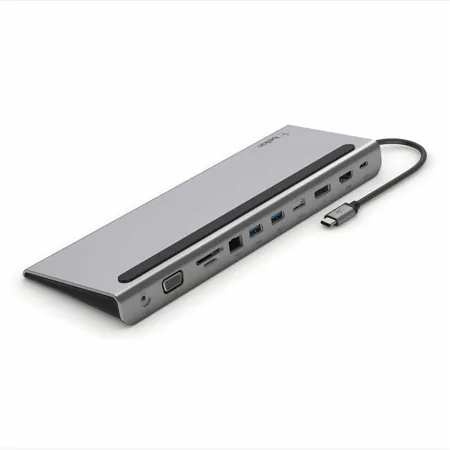
The short USB-C cable to connect to laptop is on the left side of docking station. I have an HP Spectre x360 13.3" laptop and the usb c ports are on the right side of the laptop. I have a small workspace and can't take advantage of resting my laptop on the docking station. If only Belkin made one with the plug in cable on the right side or long enough to reach the other side of the laptop without the use of extension cables. Otherwise, would've given it a better review.
dilemma808
Originally posted at
2023-08-07T20:00:00
Rated 1 out of 5
Feels like a bait and switch to me
the box should have clearly stated HDMI or DisplayPort. Who buys a $120 dock that only supports one HD monitor when it has 2 HD monitor ports.
CMR0230230
Originally posted at
2023-01-17T19:00:00
Rated 1 out of 5
Not great for windows machines
I have no idea why Lenovo is selling this dock. Had just purchased with the expectation that I would be able to charge my laptop and display an extra two 4k displays all from this dock but Belkin does not allow this on windows devices which is what Lenovo sells.
Chowder92
Originally posted at

2022-12-18T19:00:00
Rated 2 out of 5
Makes my SD card crash
Great for everything else but SD cards.
Lost 60G of footage and RAW pictures because it kept badly ejecting my SD card. Had to reformat the card multiple times because of it.
Nottobenamed
Originally posted at
2022-12-18T19:00:00
Rated 2 out of 5
Does not provide enough power.
It has the ports that I need on my MBP but will not provide the power.
Power cable directly plugged in will provide 20v at 4amps. With the the dock you only get 4v at .1 amps.
MBP keeps complaining that the USB is not providing enough power and then shuts if off.
Eventually you can trick it to run without power but when it resets it becomes a hassle.
MBP2019
Originally posted at
2022-09-21T20:00:00
Rated 5 out of 5
Computer Dock
Like a breeze passing by your face. The simplicity will feel like an old friend.
Alfred K.
Originally posted at
2022-08-12T20:00:00
Rated 2 out of 5
Did Not Work with My Laptop
This did not work on my new HP laptop, so I promptly returned it. The unit appears to be well made and has many ports for external devices. The 90-day return policy is excellent, but I had to pay the shipping costs :-(.
Jiminy C.
Originally posted at
2022-07-20T20:00:00
Rated 5 out of 5
Multiport dock is a great device for laptops
Great devices when you have multiple monitors, speakers, mouse and other devices connected to a laptop. Only draw-back is that the advertisement should specify that an external power source is necessary to power the unit. This really should be included with the purchase of the product or given the option to purchase an external power source.
DHSmith
Originally posted at
2022-07-18T20:00:00
Rated 3 out of 5
Gets the job done?sometimes
I originally purchased this dock from a BestBuy store when I realized my work laptop had no Ethernet port. I went on to use it for both a Mac and a Windows PC. A few months later, the device was no longer syncing with my wireless mouse and keyboard. I received a warranty replacement from Belkin and the new device "syncs when it wants to".
lionnheadd
Originally posted at
2022-07-06T20:00:00
Rated 4 out of 5
Working nicely -- now
I bought it last year for a laptop a company sent me. It worked ok, but there were some monitor issues. A stopped working with that client and the device has sat on the shelf for more than six months. I bought a new laptop. Well, two. The first was an Asus, and it wasn't recognizing the monitor connected through the station. Research showed that was a known problem with Asus. Returned that and got a Lenova. The docking station is now plugged in and an interface between the laptop and a kvm. The mouse/keyboard USB connection is into the docking station, as is a direct hdmi link to a second monitor, and I've used the station for sneaker netting software via USB drive. Everything seems to be working as expected.
ithinktfiam
Originally posted at
2022-04-23T20:00:00
Rated 5 out of 5
A little piece of mind to ease your USB-C needs
This product is amazing. It can support two monitors, SD, SD w/adaptors, USB uhubs, USB devises - at the same time. There is even VGA if you need it.
This is cheap at twice the price.
Chockbblock
Originally posted at
2022-03-27T20:00:00
Rated 5 out of 5
The best USB-C dock I can find
Works really well and probably the most useful and functional dock on the market. It feels well-made and is sturdy. And somehow much cheaper than almost anything else.
Anon6
Originally posted at
2022-03-19T20:00:00
Rated 3 out of 5
Nice Package but some issues
The good: Compact unit, fits neatly under laptop PC, has good assortment of inputs and outputs. The minor not so good: Short USB-C connection cord could be a half a foot longer. No screw sockets for VGA making easy for VGA cable to disconnect. When booting up with Mouse connected the its operation is erratic, connecting Mouse after booting up corrects issue. During video calls (Zoom, Microsoft Team, Google meet, etc.) Internet connection disconnects, this is the most serious issue as I have to de-dock from Belkin dock and reboot my PC to reconnect to the meeting without using the Belkin Multiport Dock.
Red40
Originally posted at
2022-03-08T19:00:00
Rated 4 out of 5
Good Product, Left vs Right...
Works great! Only issue is the power line connects to the right side of my computer and and not the left. Wish there was an option to buy left vs. right since I now have to use it upside down which slips around my desk.
Pepp
Originally posted at
2022-02-26T19:00:00
Rated 5 out of 5
Non tech savvy person here
Easy set up, worked as advertised! We use this dock station to use out home and work laptops. Both are Dells and it works well with either of our laptops
Jose L.
Originally posted at
2021-12-03T19:00:00
Rated 5 out of 5
Essential Accessory
This is a well-designed piece of hardware, both functionally and aesthetically. It adds essential connections (as laptops are unfortunately moving toward fewer ports), and acts as a convenient laptop stand and cable organizer. It's a must-have accessory when you're buying a new laptop.
Bryan M.
Originally posted at