You’ve been searching for how to fix your photography website, but you’ve probably missed the most important step: listening to what it’s actually saying to clients. The hidden message is costing your business. This article gives you a system to diagnose the real problem and fix it in one weekend. No redesign needed.
Ever wondered why people look at your portfolio but don’t book? Then keep reading.
First, In Case You’re New Here…
This article is part of a series, but you can read it on its own. Here’s what the other two cover:
- Article 1 – What Gear Actually Pays for Itself? Who your ideal customer is and what problem they need you to solve.
- Article 2 – The One-Sentence Test How you help in 10 memorable words (no more rambling).
This article shows you how to fix your photography website by decoding the five hidden messages that scare paying clients away, and fixing them in one weekend.
We’ll point you back to the earlier articles when needed, but you can start here.
Here’s What We’ll Cover
- What your website is really saying (and why clients leave)
- The 5 critical mistakes that cost you clients, and how to fix them
- A one-paragraph About-page formula
- A real-photographer case study
- A Saturday-Sunday weekend plan
Step 1: Before You Can Fix Your Photography Website, Hear What It’s Really Saying
Every part of your site sends a hidden message, often the opposite of what you intended. Let’s diagnose it with a quick decoder table.
What You Think You’re Saying | What Clients Actually Hear | Why It Hurts You |
“I’m a versatile photographer who shoots everything.” | “I have no focus.” | Clients want an expert, not a generalist. |
“I started at age 8…” | “This page is about me, not about solving your problem.” | They don’t care about your story. |
“Photography is my passion.” | “No real proof.” | Passion doesn’t equal competence. |
“I capture authentic moments.” | “I sound like every other photographer.” | Generic language = forgettable. |
Portfolio: weddings, products, street… | “What do you actually do?” | Lack of focus = lack of trust. |
“Contact me” at the bottom of the page | “I don’t know what happens next.” | No clear next step = no inquiry. |
These aren’t random misunderstandings, each is a fixable mistake. We’ll name them in Step 2, but first, try this:
Exercise 1: “What Clients Actually Hear” Audit
Pick three elements from your site (headline, About page, portfolio). For each, write what a client might actually think. (Download Worksheet 1)
Step 2: The 5 Critical Mistakes That Cost You Clients (And How to Fix Them)
These five mistakes are the reason you’re searching for how to fix your photography website. And here’s exactly how to fix each one this weekend.
Mistake | What It Looks Like | Hidden Message (from Step 1) | Quick Fix |
1. No clear headline | “Welcome” or “Photographer in [city]” | “I don’t know what I’m best at.” | Use your 10-word “how you help” line. |
2. “About Me” is a bio | “I started at age 8…” | “This page is about me, not you.” | Rewrite with Step 3 formula. |
3. Portfolio without a problem | Random mix (weddings, street, travel) | “What should I hire you for?” | Remove work you don’t want to be paid for. |
4. Testimonials that don’t sell | “Great to work with!” or “Very professional.” | “No real proof of results.” | Only keep quotes that mention a specific result. |
5. No clear call to action | Just “Contact” at the bottom | “What happens next?” | Change to “Tell me about your project” or “Book a free 15‑min call.” |
Exercise 2: The 5‑Minute Mistake Audit
Walk through your website right now. Which mistakes are present? Tick the boxes. (Download Worksheet 2)
Bonus: Get result-driven testimonials in 2 questions
Send this to a past client:
1. What was the main worry or problem you had before hiring me?
2. What specific result or feeling did you get from working with me?
Use these and your testimonials evolve from “Great photographer!” to real proof of results that help convert potential clients into paying customers.
Now that you know what’s broken, let’s fix it. On to Step 3.
Step 3: Fix Your About Me Page in One Go
Your About page is the second most-visited page on your site, it’s where clients decide if they trust you. Fix this one page, and you remove a major source of client uncertainty. Then apply the same formula to your Work With Me page, portfolio, and calls-to-action.
Right now, your About page doesn’t answer the only question clients have: “Can you help me?”
Here’s the formula (using your customer problem + your one-sentence help):
- Their problem: “You’re worried that [their fear].”
- Your help: “I help [audience] get [benefit] by [your one-sentence help line].”
- Proof: “Last month, [client] said: ‘[result quote].’”
- Social proof: “I’ve shot [X] [sessions], [X/5] stars from [Y] clients.”
- Personality: “When I’m not shooting, I’m [quirky detail].”
Example (Wedding Photographer):
“You’re worried your wedding day will fly by in a blur.
I help anxious brides feel present, without managing a thing.
Last month, Sarah said: “I didn’t even know you were there, but every photo made me cry.”
I’ve shot 47 weddings, 4.9 stars from 23 couples.
When I’m not shooting, I’m hiking with my rescue dog.”
Where to get your two key ingredients
To use the formula above, you need:
- Your customer’s specific problem
- Your 10-word “how you help” line
Exercise 3: About‑Page Rewrite Worksheet
(Download Worksheet 3) Fill in the blanks with their problem, your help, proof, and personality.
Now let me show you how this actually works courtesy a real photographer I work with as a Thinking Partner.
Step 4: Fixing a Photography Website – A Case Study
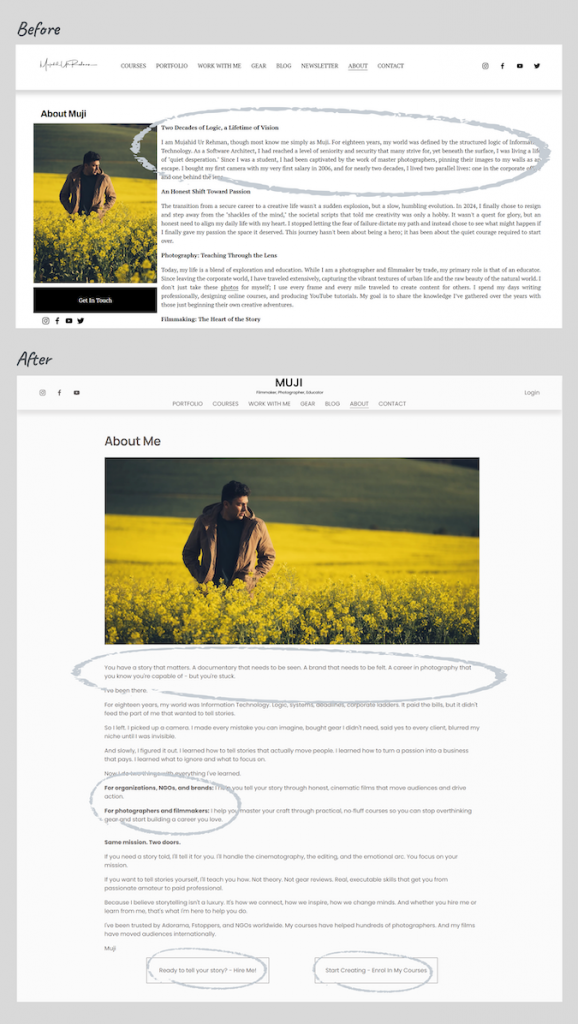
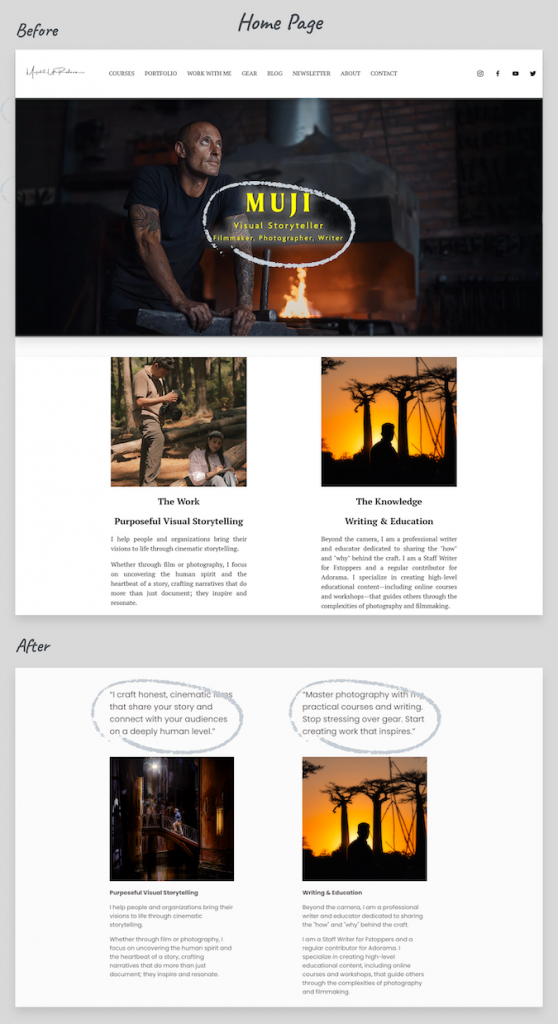
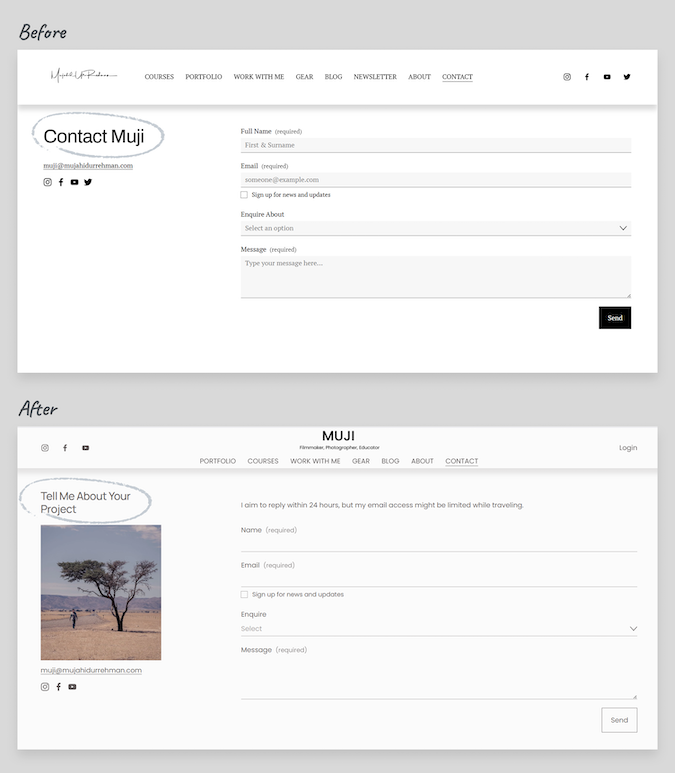
Meet Muji. He’s a talented photographer and educator, but his website wasn’t converting potential clients. We just sat down together, looked at what his site was really saying, and fixed the five mistakes.
Here’s what the process looked like.

Before: What his site was really saying
- Headline: “Visual storyteller” → Underlying message: “I’m vague and unfocused.”
- Long bio about his corporate past → Underlying message: “This page is about me, not you.”
- Mixed portfolio (street, travel, client work) → Underlying message: “I’ll shoot anything.”
- Weak testimonials (“Great guy!”) → Underlying message: “No real results to show.”
- “Contact” at the bottom of pages → Underlying message: “I don’t know what happens next.”
After: What his site says now
- Headline came from his One‑Sentence Test.
- About Me page rewritten using the formula from Step 3.
- Portfolio filtered down only to work he actually wanted to be hired for.
- Testimonials edited to show real results (“He understood our mission quickly and helped shape the story in a way that felt authentic and impactful.”).
- Clear calls to action on every page: “Tell me about your project” and “Enroll in the course.”
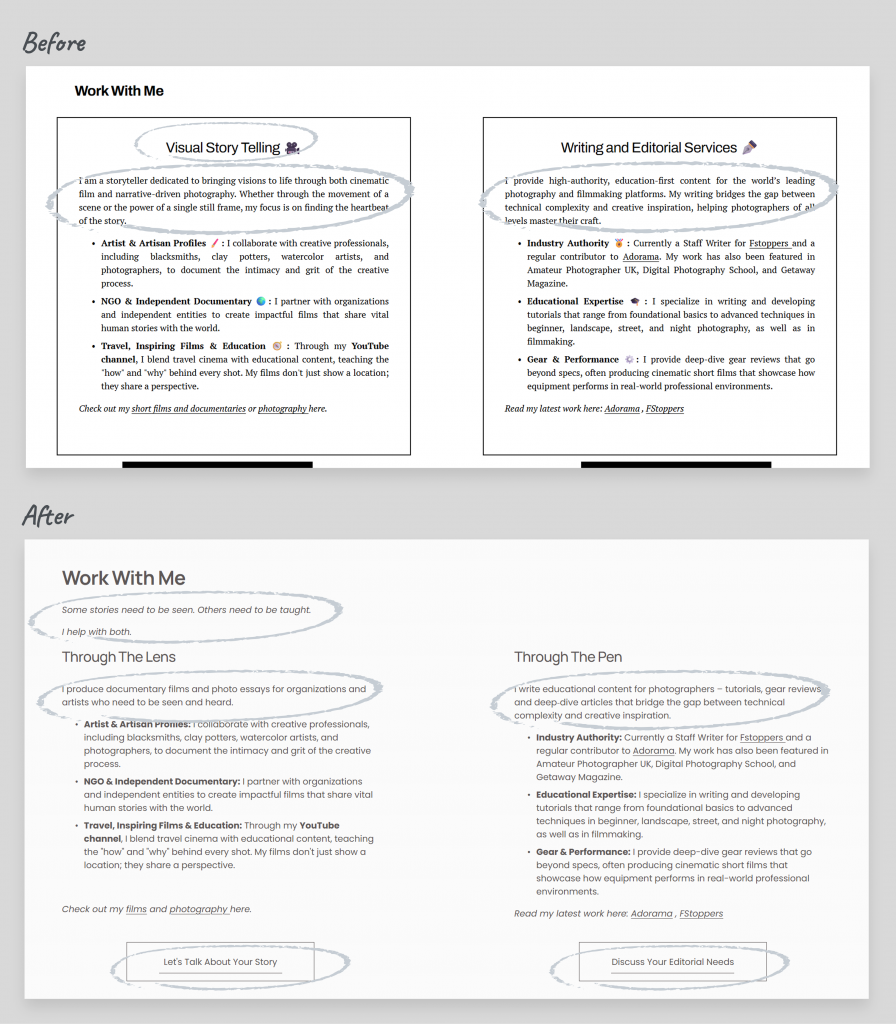
The underlying message now reads: “I understand your problem, and I know how to solve it.”
Step 5: Your One‑Weekend Plan (Saturday + Sunday)
You don’t need a month. Two focused days will fix your site.
Saturday morning – Purge
- Replace homepage headline with your One-Sentence.
- Delete any page or image that doesn’t match your niche.
- Run the “delete & replace” audit on your About page (Step 3 table).
Saturday afternoon – Rewrite
- Rewrite your About page using the Step 3 formula.
- Rewrite Work With Me pages as: Problem → Solution → Result.
- Add a clear call to action on every page (not just “Contact”).
Sunday – Polish & Publish
- Replace weak testimonials with result-focused ones.
- Test on mobile.
- Show it to a neighbor, ask “What do I do?” If they’re wrong, fix the headline.
- Publish changes and share on social: “I fixed my photography website. Here’s how I help now.”
Exercise 4: Weekend Action Tracker
(Download Worksheet 4) and tick off each task as you go.
One Last Reality Check: The 80/20 Rule
You won’t fix SEO, typography, or advanced galleries in one weekend. But these five mistakes cause 80% of client confusion. Fix those now, the rest can wait.
And revisit this audit every 3-6 months. Your business will evolve, and your website should evolve with it.
You didn’t need a redesign. You needed clarity. Now that your website has it, clients can finally see how you solve their problem.
This article gave you the weekend plan, the five mistake fixes, and the About-Me-page formula. Download the five worksheets for this article: