In this article, we give you six safe places to store your images on the road and for the long term. Whether you stay close to home or take your gear on the road, you know that between high-res stills, HD video, and 4K video shot with your DSLR, MILC, smartphone, or compact digital camera, even high-capacity memory cards fill up fast, and so does your computer hard drive.
Here are six safe ways to stow large quantities of image files both as you go and for the long run.
We’ve divided the world of portable storage into two kingdoms: Multimedia Storage Devices and Portable Drives.
A Multimedia Storage Device lets you plug many varieties of memory cards, as well as thumb drives and even tablets and smart phones, so you can load files directly onto it. You could then plug it directly into your computer and use it as an external drive. While the compatibility with a wide variety of memory cards that can be plugged in directly is good, these devices tend to hold under 1TB. They range in price from approximately $150 to $2,400.
A Portable Drive connects directly into your laptop or desktop (and in some cases, tablet or smart phone) and downloads only from there. You are more likely to use a Multimedia Storage Device when you are traveling and may not bring a laptop with you, while you are probably going to use a portable drive both on the road with a laptop and at home with your laptop or desktop computer.
For several years, you could buy a multimedia storage device that included a small monitor so you can preview images, but the market for such devices is not what it used to be, and so the choices are much more limited.
Note: Prices and availability are accurate as of May 28, 2015.
Multimedia Storage Devices
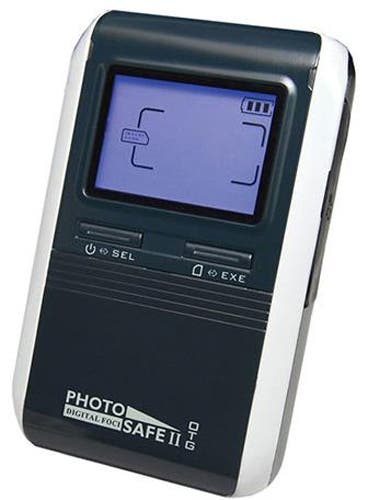
Digital Foci Photo Safe II (500GB)
Adorama price: $149
If you need a good amount of storage but are on a tight budget, the Digital Foci Photo Safe II offers 500GB of storage, freeing up your memory card without the need for a computer. Photo Safe II easily copies the entire content of your memory card with the convenient one-touch Auto Copy button with copy speeds of up to 5.0MB/sec, so a full 1 GB card can be copied in approximately 3.5 minutes. Photo Safe II CF Type I (including Extreme III, IV, UDMA), xD-Picture Card, MMC, SD/HC Card, miniSD, Memory Stick, MS PRO, MS Duo, and MS Pro Duo memory card formats. A unique folder name that indicates media card type and copy sequence is automatically created for each copy task to help you keep organized. When you get home, connect Photo Safe II to your computer to retrieve your saved pictures
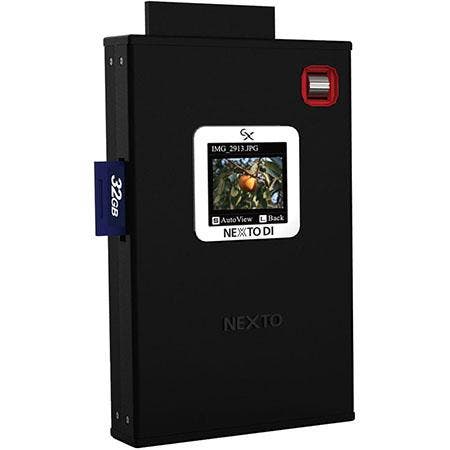
Nexto D1 ND2901 Digital Photo Storage (750GB)
Adorama price: $449.00
At the high end is Nexto, which is designed to streamline the process of backing up data from USB-compatible devices (such as direct from camera) and CF and all flavors of SD memory cards. A small 1.44-inch LCD monitor lets you see thumbnail photos. It is compatible with JPEG, Nikon ad Canon RAW formats as well as Olympus, Panasonic and Sony formatted cards. It is USB 3.1 powered and has a 90-minute battery life so you can transfer files while on the go. You can sync files to external USB hard drives at a rate of 40 MB/s, and the unit supports storage of single files that are larger than 4GB. Compatible with Mac, Windows and Linux operating systems. 5x3x0.9 inches, 8.11 oz.
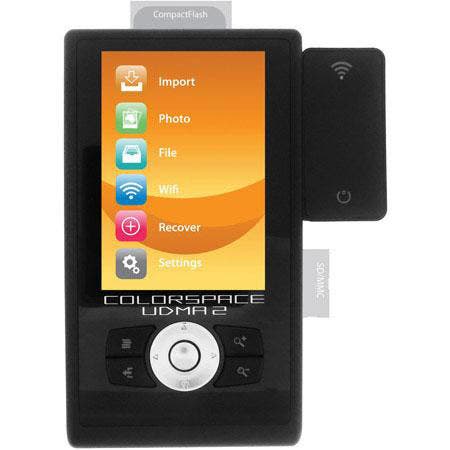
Sanho 1TB Colorspace UDMA Multimedia Player/Storage Device
Adorama price: $569.95
Sanho’s lineup of multimedia players and storage device combinations are available in capacities ranging from the mid-$200’s (casing without a drive) to this top-line model. It’s a stand-alone backup unit with a variety of data management and security cards, and can accommodate any 2.5-inch SATA hard drive, with no restrictions on storage capacity, so you can swap out the included drive for another one. You can view RAW and JPEG images or video on the generous-sized 3.5-inch LCD monitor. The unit has ports for CF, SD and MMC memory cards and boasts a 27MB/s data transfer rate. You can transfer photos via USB at 480 MB/s and wirelessly via an included WiFi transmitter, at 3MB/s. If you’re a stud at programming, you can create your own file navigation scripts and operations. Compatible with Windows, Mac and Linux operating systems. 5.4x3x1 inch, 10.2 oz.

Kingston Technology MobileLite WiFi USB Wireless Reader
Adorama price: $37.95
Built for smart phones and tablets, the Kingston Technology MobileLite WiFi USB Wireless Reader lets you transfer files between your smart device and either an SD card or USB storage device via Wi-Fi. It can serve as a link to thumb drives or even mass storage devices such as the ones listed below. It can be used by three devices simultaneously, and also doubles as a battery bank so you can recharge your phone or tablet on the go.
Portable Drives

LaCie 2TB Rugged Mini Portable External Hard Drive
Adorama price:
The LaCie Rugged Mini 2TB External Hard Drive is designed for outdoor and adventure photographers and videographers, featuring shock resistance, drop resistance and a rubber sleeve for added protection. It is rain-resistant and pressure-resistant (you can drive over it with a 1-ton car and it still works). It is small and light, and can easily be stowed in a larger pocket or a backpack. With the Rugged Mini, you’ve got the speed of USB 3.0 and full backward compatibility with USB 2.0, meaning that you can use it on almost any computer. You can transfer a 700MB video file in less than 7 seconds with USB 3.0, compared to 25 seconds with USB 2.0. It’s compatible with most Windows and Mac computers. The LaCie Rugged Mini is also available in other capacities from 500GB-2TB.
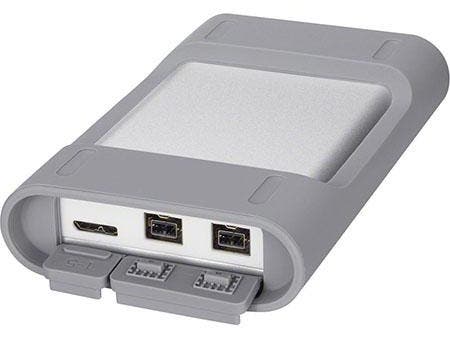
Sony Personal Content Station (2TB)
Adorama price:
Talk about bang for the buck! For under $225 you get 2 terabytes of durable portable storage via the 2TB version of the Sony Personal Content Station. Featuring zippy FireWire 800 connectivity and ports protected by ruggedized doors, this unit is designed for action and adventure travel and can be used in conjunction with Mac or Windows OS computers. Because it’s Firewire, file transfers are super-fast, allowing you to move massive files to and from your laptop quickly so you can edit images on the go and keep the storage space on your laptop’s hard drive available. While there is no memory card port, you can load files directly from your camera via USB cable. 3.5×1.1×5.9 inches, 11.3 oz.

Seagate Backup Plus Slim 1TB Portable Hard Drive
Adorama price:
Seagate’s portable backup drives offer great value, and Seagate Backup Plus Slim 1TB Portable Hard Drive is no exception. The slim metal design allows you to slide the drive into your pocket, purse or backpack and carry it with you. Via the Seagate Dashboard, use the Protect function to set up a one-click plan or schedule your automatic local backup. Keep multiple copies of your files in case disaster strikes. Install the free Seagate Mobile Backup app on an iOS or Android mobile device to back up all of the pictures and videos from the device to the drive or the cloud. Back up mobile devices via a Wi-Fi connection while at home, or use services like Dropbox or Google Drive while on the go.
Cloud Storage
An emerging area of storage is that of cloud storage. The term “cloud” is increasingly used for a variety of computer and storage topics. Pared down to its most basic form it simply means remote. A wide variety of companies offer cloud storage, ranging from Apple’s iCloud, Google Cloud Storage to Amazon’s Cloud Drive. They often include a set amount of free space, and then additional storage for a set price. Amazon’s starts at 5GB and then additional space is available starting at $10 a year. Business users often see cloud storage offered as Storage as a service (STaaS).
You are connected to the storage via a network connection, often Wi-Fi and the storage provider usually includes some level of security. You can store virtually anything that you can on your computer’s hard drive, images, video, contacts, calendars or financial records. The term has now evolved into covering devices that might be located in a home or business and allow remote storage. We are starting to see a few storage devices that have built-in Wi-Fi that enables them to send data to the cloud when they are full or at preset times.
But you don’t necessarily need a subscription fee…

WD MyCloud Personal 4TB Cloud Storage
Adorama price: $199.00
The WD My Cloud Personal features a large 4TB storage capacity capable of holding a variety of files from HD video to movies, music, photos, documents and more. The MyCloud Personal Cloud Storage device allows you to store all of your files in a central location and make those files accessible from nearly any web-enabled computer or mobile device, from any hotspot. The physical unit sits in your home or office, and you can automatically back up files from your PC and Mac, connect to Dropbox, set password access, and access your files from anywhere using your PC, Mac, tablet or smartphone using WD’s file management app. MyCloud is also available in 3TB, 2TB and multi-bay versions for pro users with capacities up to 16TB.