Overview
Compare
Specs
Protection

Reviews about this item

Review Summary

2023-01-12T19:00:00

Rated 3 out of 5

Fax?

Before I post a review perhaps you can explain why the top feed fax sounds like a tractor pulling in each page ai am faxing?

SWBrat

2023-01-10T19:00:00

Rated 5 out of 5

Printer performance

Easy to set up; works like a dream so far. Very fast and smooth operation. I like it.

Boomerbill

2022-09-13T20:00:00

Rated 5 out of 5

Good machine

Quality machine; easy to use.

Ray W.

2022-09-07T20:00:00

Rated 4 out of 5

Slow Software

I like the printer but the software when scanning is unnecessarily complicated and slow, very slow.

Peter N.

2022-09-02T20:00:00

Rated 5 out of 5

Excellent Choice

Fast high quality printing. Multiple scanning options.

HelpITBB2

2022-08-25T20:00:00

Rated 4 out of 5

USB port

The USB port is not as secure as in my previous hp printer

Michaelrxiv

2022-08-25T20:00:00

Rated 2 out of 5

Wireless printing gets message "printer offline"

Overall this device seems well built, but wireless printing is plagued with problems. Connecting with USB always works, but with wireless, much of the time we get the message that the printer is offline, even though both the printer and the laptop are connected to the same network. We know that it is connected because another laptop (we have two) may work fine with the printer. Never can tell which one will work and sometimes both won't - seemingly unpredictable.

Dan i.

2022-08-23T20:00:00

Rated 5 out of 5

Great Product

Excellent workhorse printer at an excellent value. I would highly recommend this to everybody.

R B.

2022-08-16T20:00:00

Rated 4 out of 5

User review

Didn?t have an automatic double-sided scanning, disappointed about this. It would be nice if HP can give me a rebate?

V S.

2022-08-16T20:00:00

Rated 4 out of 5

Small Screen Hinders Functionality / Good Printer

So far this printer has performed well with no problems. Set-up on our wi-fi network was easy using the built-in Windows 11 printer settings (we bypassed the included install disk). The biggest problem with the printer is that the LCD screen is extremely small, and only those with the smallest fingers will be able to easily use it - it's almost like they made the touch screen for child sized hands. We keep a pen pointy (like one you used to use on phones and tablets) to more easily use the screen. Otherwise, it's a great printer.

cfisher

2022-08-12T20:00:00

Rated 3 out of 5

Great, but....

It's great, but within a few weeks it printed a few pages that were all black, except for the letters (white) and a one-inch strip running down the length of the paper. Then it went back to normal but still had a one-inch strip that was blurred and mostly white. After printing a few hundred pages it is now mostly normal but still has blurred spots along the one-inch strip that first appeared.

Chon

2022-08-12T20:00:00

Rated 5 out of 5

Good printer easy to use and set up

The touch screen is small work well print in clear

Barry O.

2022-08-03T20:00:00

Rated 5 out of 5

Definite Upgrade

This replaced an older printer that had a lot of issues. I am so happy with this new printer - it is a breeze!

RBarnes

2022-07-31T20:00:00

Rated 2 out of 5

Printer experience, mixed experience.

Got it working ok but Slow to connect to computer when initiating print. Some initial issues connecting to wireless network. Cheap feel.

CTaylor

2022-07-31T20:00:00

Rated 1 out of 5

dont buy if u want to scan easily

cant scan without intrnet even with a direct hard wired connection that sucks

craig s.

2022-07-27T20:00:00

Rated 5 out of 5

Ideal for home office

I?m a legal document preparer. This machine checks all the boxes. Easy to install, fast printing great copies.

Mary A.

2022-07-26T20:00:00

Rated 5 out of 5

Good Price and fast shipping

Good Price and fast shipping. Placing order a little cumbersome.

Milesw1

2022-07-26T20:00:00

Rated 5 out of 5

Great all around printer.

Great all around small office printer, scanner, copier. Can?t go wrong with this one, since you get a lot of mileage on one ink cartridge, quiet and crisp print. Definitely would recommend and btw I bought two of them!

Capt B.

2022-07-19T20:00:00

Rated 5 out of 5

Great SOHO Printer/Scanner

Things that are great about this printer: 1. Very easy to setup. We have a hard wired ethernet network and I found it very easy to setup the printer. 2. Really like the big paper tray. 3. Was pleasantly surprised that it prints duplex as a default. 4. The auto power down feature is great. We can go days without using the printer and the power down feature saves electricity. 5. I like that we can replace the fuser assembly. The only thing we have found that we did not like is the HP software running on the PC to do the scanning. It's very slow and awkward.

B Z.

2022-07-18T20:00:00

Rated 5 out of 5

HP LaserJet Pro MFP M227fdw Printer Small Office

So far, this machine does everything I need! Has surpassed my expectations.

kraemer1419

2022-07-10T20:00:00

Rated 4 out of 5

Great multi-function printer for small home office

Great multi-function printer at a great price for small home office needs. Setup is a bit confusing, but I was able to figure it out on my own.

thelifeoftheparty

2022-05-24T20:00:00

Rated 2 out of 5

Disappointed

Disappointed: printer not able to handle lighter shades of grey when printing from a web page. Will buy a color printer next time. Also, still unable to link iPhone & iPad with wifi feature on printer. Very frustrating.

ColorPrinter

2022-04-26T20:00:00

Rated 5 out of 5

Excellent printer

Excellent printer. I am very satisfy. The printer is very fast with good quality

Luc

2022-04-24T20:00:00

Rated 5 out of 5

Must have home use unit

Excellent quality product home based small business

Righteousone

2022-03-08T19:00:00

Rated 1 out of 5

Crap

Had this for about 2 years. It has been a constant connectivity nightmare. I should be able to connect to Windows PC, but apparently that is too much to ask in the 2020s. HP should hire people who know something about networking to design their products. I have purchased several HP devices over the years, but this is my last HP. And this one is about to be dropped out the window.

irate2

2022-02-11T19:00:00

Rated 2 out of 5

Honor the warranty HP. The scanner does not work. Scanned documents come out tilted. HP wants to give me my money back if I return the product, but at a lower than what they have listed. What a pity.

tj56

2021-09-04T20:00:00

Rated 5 out of 5

Affordable quality laser peinter

Nice little affordable laser printer does the job and quickly.

Kolt C.

2021-08-14T20:00:00

Rated 5 out of 5

HP Laserjet pro MFP M227fdw

It's a good printer. Well made and fully functional.

BMaundy

2021-07-11T20:00:00

Rated 5 out of 5

Great wireless printer

Works great. Easy to set up. Prints from MacBook and iPhone

Windsor

2021-06-29T20:00:00

Rated 2 out of 5

Offline and intervention

Printer keeps reporting its offline. I have to keep jumping to control panel and intervening.

Binky

Select a plan in the Add Protection section above and purchase with this product by clicking “Add to Cart”.

image-protection

TRUSTED PROTECTION PLANS, EXCEPTIONAL SERVICE.

Invest in Pre-Owned Gear & Peace of Mind!

Extend coverage on pre-owned products after the retailer warranty ends and protect photo & video gear from accidental damage with Adorama Protect.

Repair or Replacement

Repair or Replacement

If we can’t fix it, we’ll replace it at no additional cost.

Accidental Damage

Extended Protection

Coverage for pre-owned gear begins after the retailer warranty ends, plus accidental damage protection for photo/video gear that starts on day one.

Peace of Mind

Peace of Mind

Enjoy your gear without fear. We have you covered!

Malfunction Protection

Malfunction Protection

When regular use of your product over time results in mechanical or electrical failure.

Zero Deductible

Zero Deductible

We will never charge you a deductible after the purchase of a plan.

Customer-Focused Support

Customer-Focused Support

Our claims process is simple & easy and our customer service team is happy to help.

Adorama Protect powered by Extend is available for purchase to customers in the United States. Not available for International and U.S. territories purchases. Plans on pre-owned items do not cover pre-existing damages.

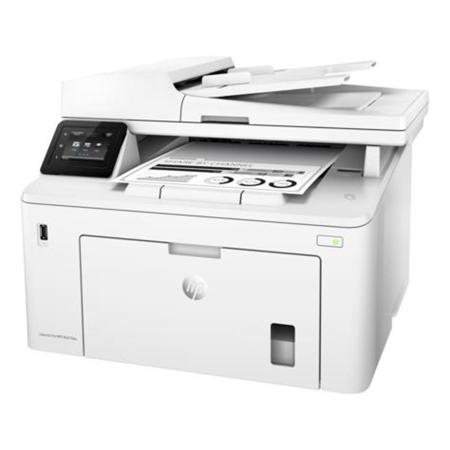
HP LaserJet Pro M227fdw Specifications

  • Functions

    Print, copy, scan, fax

  • Multitasking Supported

    Yes

  • Print Speed: Black

    Normal: Up to 28 ppm

  • First Page Out (Ready)

    Black: As fast as 6.8 sec

  • Duty Cycle (Monthly, A4)

    Up to 30,000 pages

  • Recommended Monthly Page Volume

    250 to 2500

  • Print Technology

    Laser

  • Print Quality Black (Best)

    Up to 1200x1200 dpi

  • Resolution Technology

    HP FastRes 1200, HP ProRes 1200

  • Print Languages

    PCL5c
    PCL6
    PS
    PCLmS
    PDF
    URF
    PWG

  • Display

    2.7" touch screen, LCD (color graphics)

  • Processor Speed

    800MHz

  • Automatic Paper Sensor

    No

  • Replacement Cartridges

    HP 30A Original Black LaserJet Toner Cartridge CF230A (Approx. 1600 pages), HP 30X Original Black LaserJet Toner Cartridge CF230X (Approx. 3500 pages), HP 32A Original LaserJet Imaging Drum CF232A (Approx. 23000 pages)

  • HP ePrint Capability

    Yes

  • Mobile Printing Capability

    HP ePrint; Wi-Fi Direct printing
    AirPrint 1.5 with media presence sensor
    Google Cloud Print 2.0
    NFC touch-to-print enabled

  • Wireless Capability

    Built-in Wi-Fi 802.11b/g/n

  • Connectivity, Standard

    1x Hi-Speed USB 2.0
    1x Hi-Speed USB 2.0 (host)
    1x Ethernet 10/100Base-TX
    1x Phone line (in)
    1x Phone line (out)
    Wireless, NFC

  • Network Ready

    Standard (built-in Ethernet, Wi-Fi 802.11b/g/n)

  • Minimum System Requirements

    Windows 10, 8.1, 8, 7: 32-bit or 64-bit, 2GB available hard disk space, CD-ROM/DVD drive or Internet connection, USB port, Internet Explorer. Windows Vista: (32-bit only), 2GB available hard disk space, CD-ROM/DVD drive or Internet connection, USB port, Internet Explorer 8. Windows XP SP3 or higher (32-bit only): Any Intel Pentium II, Celeron or 233MHz compatible processor, 850MB available hard disk space, CD-ROM/DVD drive or Internet connection, USB port, Internet Explorer 8

  • Minimum System Requirements (Cont.)

    Apple OS X Sierra (v10.12), OS X El Capitan (v10.11), OS X Yosemite (v10.10)
    1GB HD
    Internet required
    USB

  • Compatible Operating Systems

    Windows 10, 8.1, 8, 7: 32-bit or 64-bit, 2GB available hard disk space, CD-ROM/DVD drive or Internet connection, USB port, Internet Explorer. Windows Vista: (32-bit only), 2GB available hard disk space, CD-ROM/DVD drive or Internet connection, USB port, Internet Explorer 8. Windows XP SP3 or higher (32-bit only): Any Intel Pentium II, Celeron or 233MHz compatible processor, 850MB available hard disk space, CD-ROM/DVD drive or Internet connection, USB port, Internet Explorer 8

  • Compatible Operating Systems (Cont.)

    Apple OS X Sierra(v10.12), OS X El Capitan (v10.11), OS X Yosemite (v10.10)
    1GB HD
    Internet required
    USB. Linux

  • Memory, Standard

    256MB

  • Maximum Memory

    256MB

  • Paper Handling Input, Standard

    250-sheet input tray, 10-sheet priority tray

  • Paper Handling Output, Standard

    150-sheet output tray

  • Maximum Output Capacity (Sheets)

    Up to 150 sheets

  • Duplex Printing

    Automatic (Standard)

  • Media Sizes Supported

    A4
    A5
    B5 (JIS)
    A6

  • Media Sizes, Custom

    76 x 127 to 216 x 356 mm

  • Media Types

    Paper (laser, plain, photo, rough, vellum), envelopes, labels, cardstock, postcards)

  • Media Weight, Supported

    60 to 163 g/m2

  • Media Weights, Supported ADF

    70 to 90 g/m2

  • Scanner Type

    ADF, Flatbed

  • Scan File Format

    JPG, RAW (BMP), PNG, TIFF, PDF

  • Scan Resolution, Optical

    Up to 300 dpi (color and mono, ADF)
    Up to 600 dpi (color, flatbed)
    Up to 1200 dpi (mono, flatbed)

  • Scan Size, Maximum

    215.9 x 297mm

  • Scan Size (ADF), Maximum

    215.9 x 355.6mm

  • Scan Size ADF (minimum)

    148.5 x 210mm

  • Scan Speed (Normal, A4)

    Up to 15 ppm

  • Duplex ADF Scanning

    No

  • Automatic Document Feeder Capacity

    35 sheets

  • Digital Sending Standard Functions

    Scan to email
    Scan to network folder

  • File Formats, Supported

    PDF
    JPG

  • Scan Input Modes

    Front control panel, scanning via HP LaserJet Software Scan or TWAIN-compliant or WIA-compliant software

  • Copy Speed (Normal)

    Black: Up to 28 cpm

  • Copy Resolution (Black Text)

    600x600 dpi

  • Copy Reduce / Enlarge Settings

    25 to 400%

  • Copies, Maximum

    Up to 99 copies

  • Faxing

    Yes

  • Fax Memory

    Up to 1,000 pages

  • Fax Resolution

    Up to 300x300 dpi (halftone enabled)

  • Speed Dials, Maximum Number

    Up to 120 numbers (119 group dials)

  • Broadcast Locations

    119 locations

  • Power

    110V input voltage: 110-127VAC (+/- 10%), 60Hz/50Hz, 5.9A
    220V input voltage: 220-240 VAC (+/- 10%), 60Hz/50Hz, 3.3A

  • Power Consumption

    475W (active printing), 4.5W (ready), 1.0W (sleep), 0.1W (Auto Off/Wake on USB, enabled at shipment), 0.05W (Auto-off/Manual-on), 0.05W (Manual Off)

  • Energy Efficiency

    ENERGY STAR certified
    Blue Angel
    EPEAT Silver

  • Operating Temperature Range

    15 to 32.5 deg. C (59 to 90 deg. F)

  • Operating Humidity Range

    30 to 70% RH

  • Acoustic Power Emissions (Ready)

    2.8 B(A)

  • Acoustic Pressure Emissions Bystander

    52dB(A) (Active, Printing)

  • Cable Included

    Yes, 1x USB, 1x USB PC to Printer (All regions)

  • Software Included

    For Windows OS: HP Software Installer, HP Software Uninstaller (exclude Win8+), HP PCL6 Printer Driver, HP Device Experience (DXP), HP Connected, Device Setup & Software, HP Printer Assistant, HP Product Improvement Study, Online user manuals, HP Scan Driver, HP Scan Application, HP Fax Driver (4:1 bundle only), HP Fax Application (4:1 bundle only), For Mac OS: Welcome Screen, (Directs users to HP.com or OS App Source for LaserJet Software)

  • Dimensions (WxDxH)

    Minimum: 403 x 407.4 x 311.5mm (15.87 x 16.04 x 12.26")
    Maximum: 403 x 624.4 x 455.6mm (15.87 x 24.58 x 17.94")

  • Weight

    9.4kg (20.72 lbs)

About HP LaserJet Pro M227fdw Wireless Multifunction All-in-One Laser Printer, 28 ppm, 1200x1200 dpi, 260 Sheet Standard Input Tray, Automatic Duplex - Print, Copy, Scan, Fax

FEATURED REVIEWS

GREAT PRODUCT FOR THE MONEY!

By PETERKENT

WORKING WELL OTHER THAN THE SCAN FEATURE; ONLY 1 (THE MOST COMPLICATED ONE) IS USEABLE

Exceeded Expectations

By turbolink

I've searched for several years for a moderate cost, home use wireless mono-laser all-in-one that does jam-free duplex printing. A few were out there, but reviews ultimately gave caution to not jump on them, duplex features being problematic. This one came along, had enough of the right words in reviews, product summary, and specifications to give hope, so I bought one. It shipped immediately, had it in two days in Hawaii (at regular free shipping). I was concerned that there might be a ...

View full Review

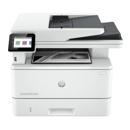
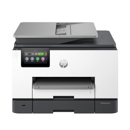
Get more pages, performance and protection from an HP LaserJet Pro MFP powered by JetIntelligence Toner cartridges. Set a faster pace for your business: Print two-sided documents, plus scan, copy, fax and manage to help maximize efficiency.

Fast speeds, low energy use
• Print, scan, copy and fax with a compact multifunction laser printer that fits into tight workspaces
• Print at the pace of business with fast two-sided printing - first pages are ready in as fast as 6.4 seconds
• Help save energy with HP Auto-On/Auto-Off Technology
• Tackle tasks and scan to email, USB and network folders from the 2.7" (6.9cm) color touchscreen

Mobile printing made simple
• Print from iPhone and iPad with AirPrint, which automatically scales jobs to the correct paper size
• Print from your mobile device with Wi-Fi Direct and NFC touch-to-print technology - no network needed
• Print with the ease of sending an email, right from a smartphone, tablet or notebook, using HP ePrint
• Send jobs from your smartphone, tablet or PC to any company printer, using Google Cloud Print 2.0

Manage company-wide printing with confidence
• Centralize control of your printing environment with HP Web Jetadmin - and help build business efficiency
• Identify new devices and gain insight into printing with HP Web Jetadmin remote discovery and monitoring
• Employ policy-based, fleet-wide protection features, using optional HP JetAdvantage Security Manager

HP quality - print after print
• Produce sharp text, bold blacks and crisp graphics with precision black toner
• Don t be fooled by alternatives that mimic Original HP. Innovative anti-fraud technology can help ensure you re getting the quality you paid for
• Print over 2x more pages than standard cartridges, using optional Original HP high-yield toner cartridges
• Get more pages than ever before with page maximizer technology and track remaining pages to help ensure you get what you paid for using print gauge technology